







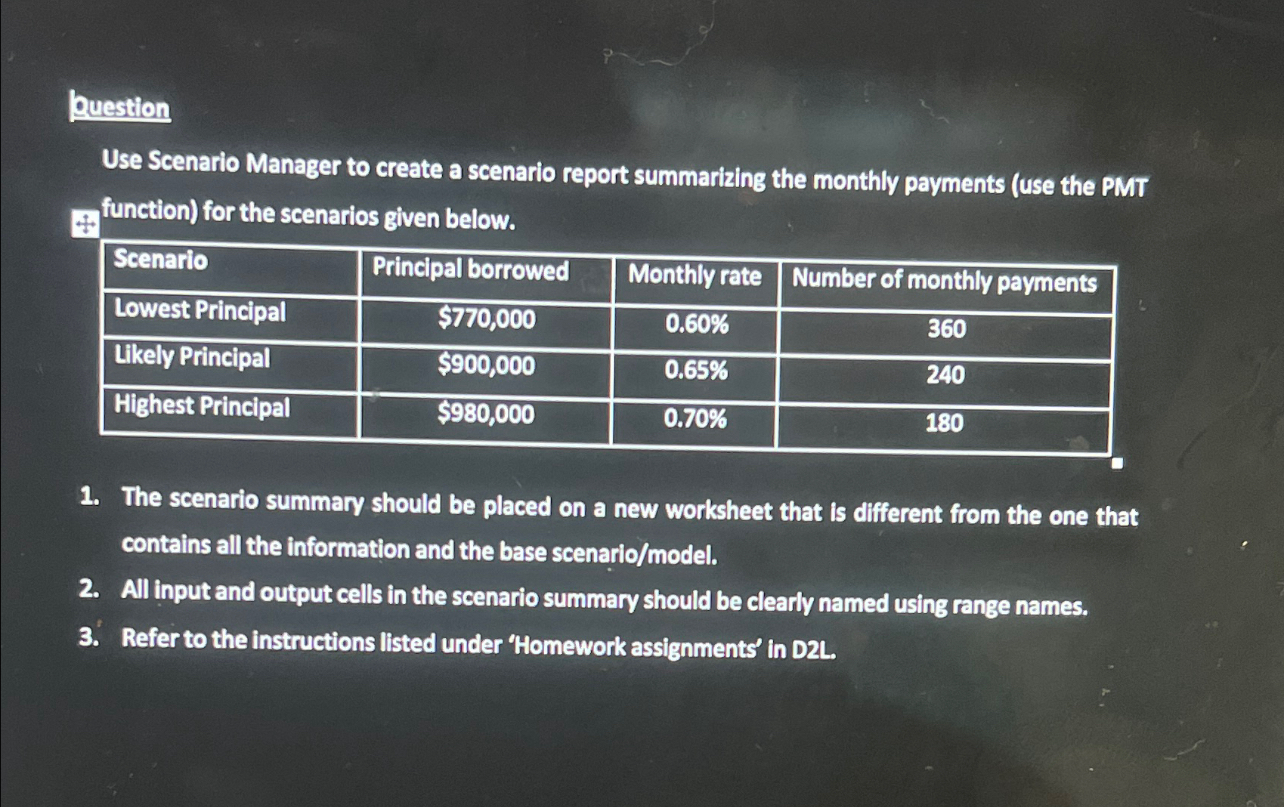
Question: Ruestion Use Scenario Manager to create a scenario report summarizing the monthly payments ( Use the PMT function ) for the scenarios given below.
Ruestion
Use Scenario Manager to create a scenario report summarizing the monthly payments Use the PMT function for the scenarios given below.
tableScenarioPrincipal borrowed,Monthly rate,Number of monthly paymentsLowest Principal,$Likely Principal,$Highest Principal,$
The scenario summary should be placed on a new worksheet that is different from the one that contains all the information and the base scenariomodel
All input and output cells in the scenario summary should be clearly named using range names.
Refer to the instructions listed under 'Homework assignments' in DL
Step by Step Solution
There are 3 Steps involved in it
1 Expert Approved Answer
Step: 1 Unlock

Question Has Been Solved by an Expert!
Get step-by-step solutions from verified subject matter experts
Step: 2 Unlock
Step: 3 Unlock
 Study Help