







Question: Run Packet Tracer file supplied and debug as needed 2. Your starting ipv6 network is 2001:caca:dada::/48. adequate subnets for the topology 3. Run OSPFV3 in
Run Packet Tracer file supplied and debug as needed 2. Your starting ipv6 network is 2001:caca:dada::/48. adequate subnets for the topology 3. Run OSPFV3 in all routers using the RIDs indicated 4. PCs and server should be able to ping each other 5. Capture the following screenshots for the ABRs - show ipv6 ro ospf - show ipv6 ospf nei - show ipv6 ospf virtual-link - show ipv6 ospf database - ping between each pair of PCs and server PKT file: https://drive.google.com/file/d/16A_VRyQsI9l9Q7FU9gC6jb1tRT7QbxTZ/view?usp=sharing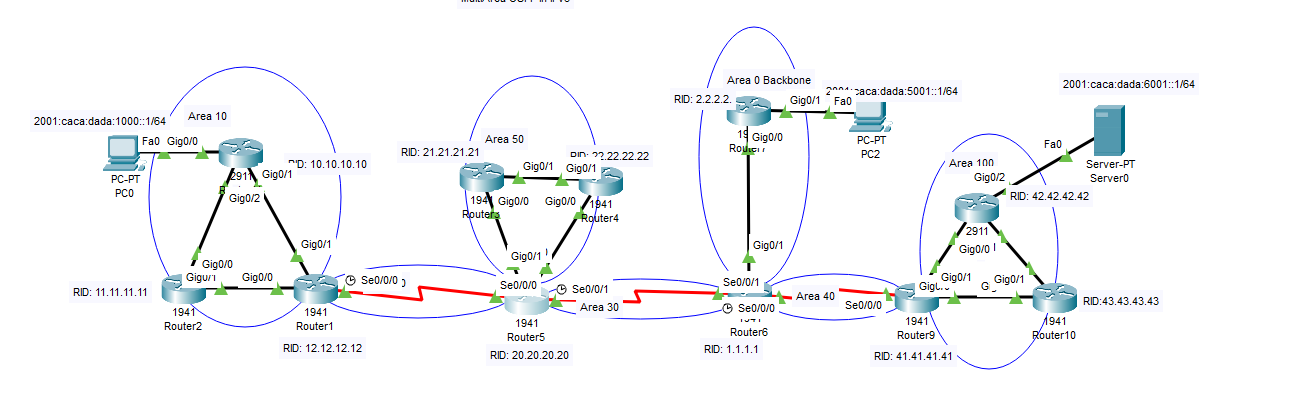
2001:caca:dada:1000::1/64 PC-PT PC0 Area 10 Fa0 Gig0/0 Gig0/2 'D: 10.10.10.10 RID: 21.21.21.21 Area 50 DIN 72.22.22.22 Gig0/1 Gig0/1 194 Gig0/0 Gig0/0/1941 Routers Router4 RID: 2.2.2.2. Area 0 Backbone 19 Gig0/0 20 caca:dada:5001::1/64 Gig0/1 Fa0 PC-PT PC2 Area 100 Gig0/2 Fa0 2001:caca:dada:6001::1/64 RID: 42.42.42.42 Server-PT Server0 AR LA Gig0/0 Gig0/0 Gig0/1 1941 Gigur'1 RID: 11.11.11.11 1941 Router2 RID: 12.12.12.12 Router1 Gig0/1 Gig0/1 Se0/0/0 Se0/0/0 Se0/0/1 Se0/0/1 Area 40 Area 30 Se0/0/0 Se0/0/0 1941 Router5 Router6 RID: 1.1.1.1 RID: 20.20.20.20 Gigl. 1941 Router9 2911 Gig0/01 Gig0/1 RID: 41.41.41.41 G Gig0/1 1941 Router10 RID:43.43.43.43
Step by Step Solution
There are 3 Steps involved in it

Get step-by-step solutions from verified subject matter experts
 Study Help