







Question: Run the following C programming code and explain in detail how the program works with the topic of I/O and UNIX I/O Programming . *
Run the following C programming code and explain in detail how the program works with the topic of I/O and UNIX I/O Programming.
*Include screenshots of program execution
#include
#include
#include
#include
#include
#include
#define FILE "76-os192-demo.txt"
void main(void) {
printf("See %s", FILE);
printf ("OUT=%d", STDOUT_FILENO);
close(STDOUT_FILENO);
int fd1 = open (FILE, O_RDWR |
O_CREAT | O_TRUNC, 0644);
int fd2 = dup2(fd1, 9);
printf( "A");
fprintf(stdout, "B");
dprintf(fd2, "fd1=%dfd2=%d",
fd1, fd2);
}
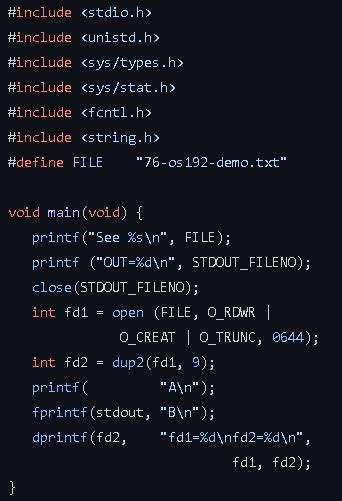
#include #include #include #include #include #include #define FILE "76-os 192-demo.txt" void main(void) { } printf ("See %s ", FILE); printf ("OUT=%d ", STDOUT_FILENO); close (STDOUT_FILENO); int fd1 = open (FILE, O_RDWR | int fd2 printf( = O_CREAT | O_TRUNC, 0644); dup2 (fd1, 9); fprintf(stdout, dprintf(fd2, "A "); "B "); "fd1-%d fd2=%d ", fd1, fd2);
Step by Step Solution
3.40 Rating (147 Votes )
There are 3 Steps involved in it
EXPLAINATION FD is for file descriptor define FILE 76os192demotxt File name is specified using it pr... View full answer

Get step-by-step solutions from verified subject matter experts
 Study Help