







Question: Run the Process Explorer utility in your Windows desktop (procexp64). Click on the System Information button (Ctrl+I) to see details of memory usage activity in
Run the Process Explorer utility in your Windows desktop (procexp64).
Click on the System Information button (Ctrl+I) to see details of memory usage activity in your system.
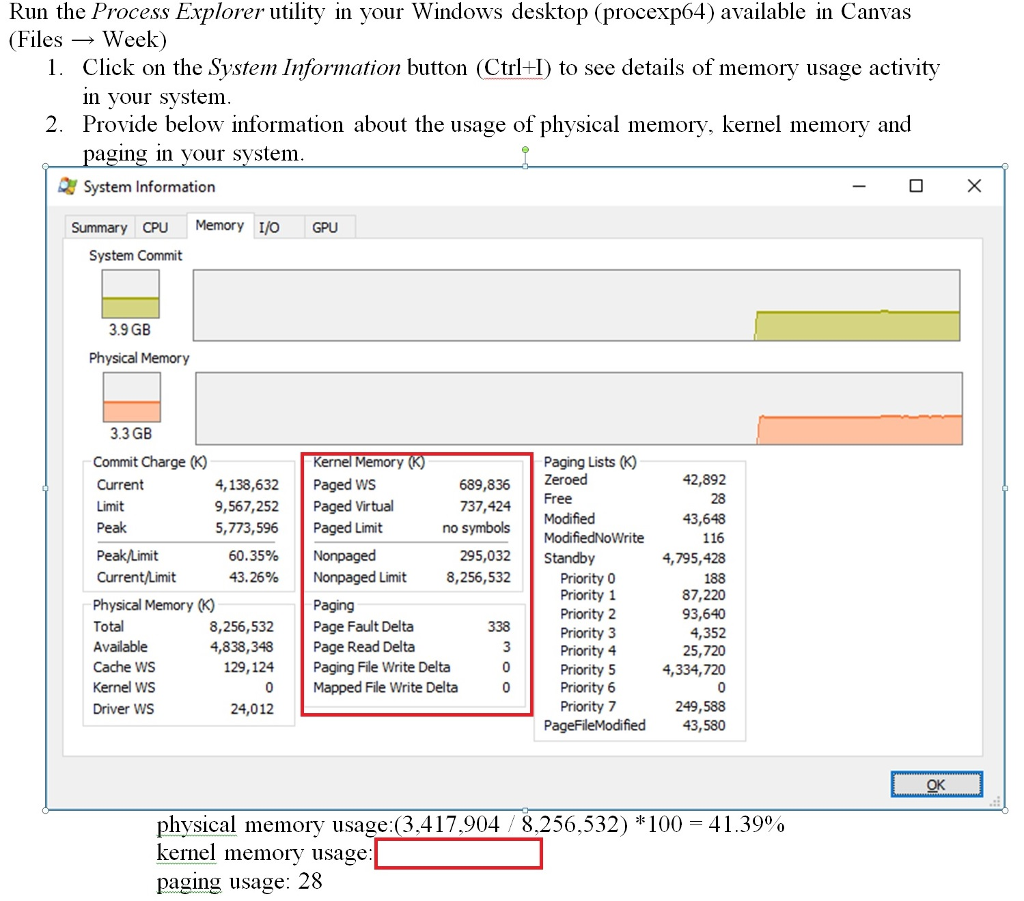
Provide below information about the usage of physical memory, kernel memory and paging in your system.
I see physical memory usage:(3,417,904 / 8,256,532) *100 = 41.39%
I can see paging usage: 28 .. the question I cannot seem to see is kernel memory usage:? see screen shot
Run the Process Explorer utility in your Windows desktop (procexp64) available in Canvas (Files Week) 1. Click on the System Information button (Ctrl+H) to see details of memory usage activity in your system. Provide below information about the usage of physical memory, kernel memory and paging in your system. Q System Information O X Summary CPU Memory I/OGPU System Commit 3.9 GB Physical Memory 3.3 GB Commit Charge (K) Current 4,138,632 Limit 9,567,252 Peak 5,773,596 Peak/Limit 60.35% Current/Limit 43.26% Physical Memory (K) Total 8,256,532 Available 4,838,348 Cache WS 129,124 Kernel ws Driver WS 24,012 Kernel Memory (K) Paged ws 689,836 Paged Virtual 737,424 Paged Limit no symbols Nonpaged 295,032 Nonpaged Limit 8,256,532 Paging Page Fault Delta 338 Page Read Delta Paging File Write Delta Mapped File Write Delta Paging Lists (K) Zeroed 42,892 Free 28 Modified 43,648 ModifiedNoWrite 116 Standby 4,795,428 Priority 0 188 Priority 1 87,220 Priority 2 93,640 Priority 3 4,352 Priority 4 25,720 Priority 5 4,334,720 Priority 6 Priority 7 249,588 PageFileModified 43,580 mo o OKO. physical memory usage:(3,417,904 / 8,256,532) * 100 = 41.390% kernel memory usage: paging usage: 28
Step by Step Solution
There are 3 Steps involved in it

Get step-by-step solutions from verified subject matter experts
 Study Help