







Question: Run the program as follows from your home directory: $./malloc.py -s2-S100-b 1000-n 1000-c The options say that the memory allocator has 100 bytes to allocate,
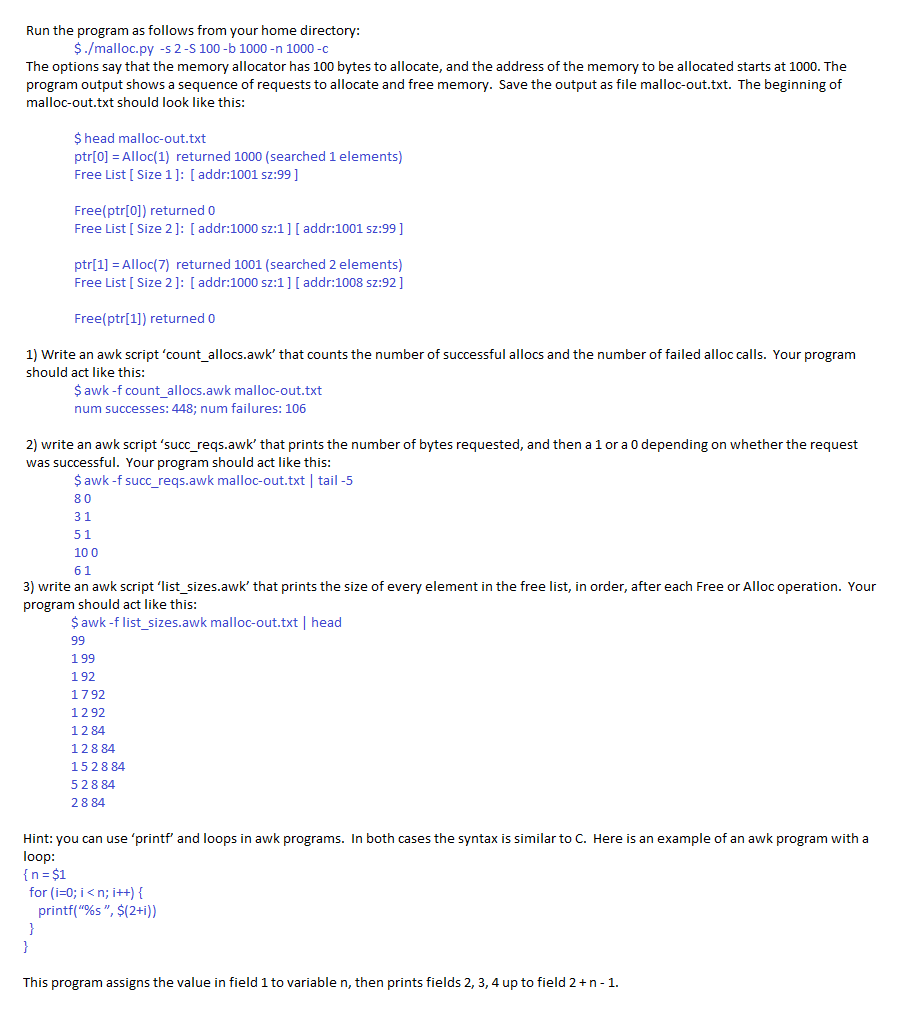
Run the program as follows from your home directory: $./malloc.py -s2-S100-b 1000-n 1000-c The options say that the memory allocator has 100 bytes to allocate, and the address of the memory to be allocated starts at 1000. The program output shows a sequence of requests to allocate and free memory. Save the output as file malloc-out.txt. The beginning of malloc-out.txt should look like this: $ head malloc-out.txt ptr[0] Alloc(1) returned 1000 (searched 1 elements) Free List [ Size 1]: [addr:1001 sz:99] Free(ptr[0]) returned 0 Free List [ Size 2]: [addr:1000 sz:1] [ addr:1001 sz:99 ] ptr[1]Alloc(7) returned 1001 (searched 2 elements) Free List [ Size 2]: [addr:1000 sz:1] [ addr:1008 sz:92] Free(ptr[1]) returned 0 1) Write an awk script 'count_allocs.awk' that counts the number of successful allocs and the number of failed alloc calls. Your program should act like this: $awk -f count allocs.awk malloc-out.txt num successes: 448: num failures: 106 2) write an awk script 'succ_reqs.awk' that prints the number of bytes requested, and then a 1 or a 0 depending on whether the request was successful. Your program should act like this: $awk -f succ_reqs.awk malloc-out.txt tail -5 8 0 3 1 5 1 100 3) write an awk script 'list_sizes.awk' that prints the size of every element in the free list, in order, after each Free or Alloc operation. Your program should act like this $ awk -f list_sizes.awk malloc-out.txt head 1 99 1 92 1792 1 2 92 1 2 84 12 8 84 15 28 84 5 2 8 84 2884 Hint: you can use 'printf and loops in awk programs. In both cases the syntax is similar to C. Here is an example of an awk program with a n= for (i=0; i
Step by Step Solution
There are 3 Steps involved in it

Get step-by-step solutions from verified subject matter experts
 Study Help