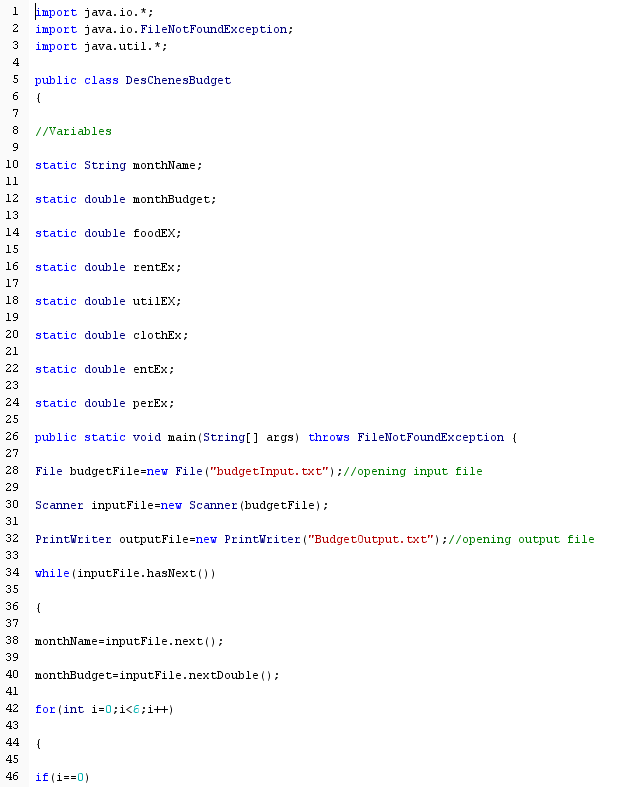
Question: RunBudget.java code No try statement, this. useage. All methods/classes public. Use of if, while, do-while loops, switch statements, arrays okay. Your Budget.java program currently collects
RunBudget.java code
No try statement, this. useage. All methods/classes public.
Use of if, while, do-while loops, switch statements, arrays okay.
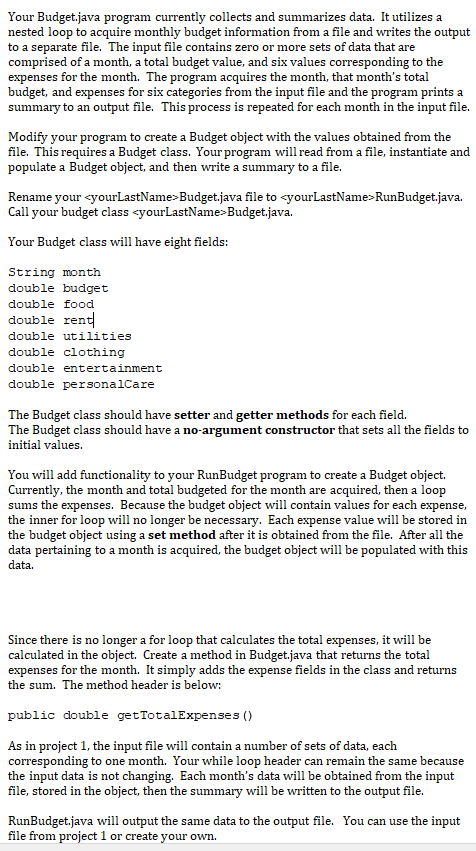
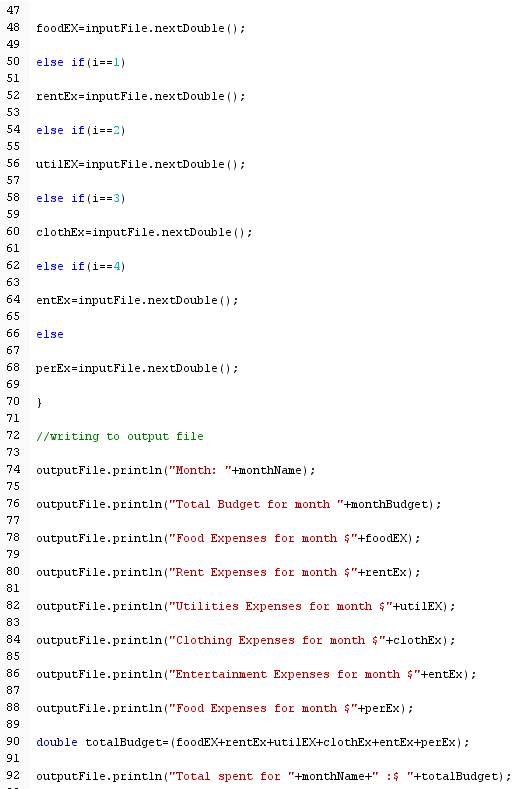
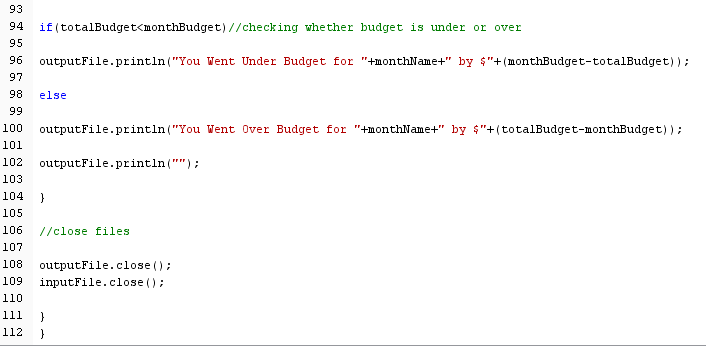
Your Budget.java program currently collects and summarizes data. It utilizes a nested loop to acquire monthly budget information from a file and writes the output to a separate file. The input file contains zero or more sets of data that are comprised of a month, a total budget value, and six values corresponding to the expenses for the month. The program acquires the month, that month's total budget, and expenses for six categories from the input file and the program prints a summary to an output file. This process is repeated for each month in the input file. Modify your program to create a Budget object with the values obtained from the file. This requires a Budget class. Yourprogram will read from a file, instantiate and populate a Budget object, and then write a summary to a file. Rename your cyourLastName-Budget.java file tcyourLastName>RunBudget.java. Call your budget class Budget.java. Your Budget class will have eight fields: String month double budget double food double ren double utilities double clothing double entertainment double personalCare The Budget class should have setter and getter methods for each field. The Budget class should have a no-argument constructor that sets all the fields to initial values. You will add functionality to your RunBudget program to create a Budget object. Currently, the month and total budgeted for the month are acquired, then a loop sums the expenses. Because the budget object will contain values for each expense, the inner for loop will no longer be necessary. Each expense value will be stored in the budget object using a set method after it is obtained from the file. After all the data pertaining to a month is acquired, the budget object will be populated with this data. Since there is no longer a for loop that calculates the total expenses, it will be calculated in the object. Create a method in Budget.java that returns the total expenses for the month. It simply adds the the sum. The method header is below: expense fields in the class and return:s public double getTotalExpenses () As in project 1, the input file will contain a number of sets of data, each corresponding to one month. Your while loop header can remain the same because the input data is not changing. Each month's data will be obtained from the input file, stored in the object, then the summary will be written to the output file. RunBudget.java will output the same data to the output file. You can use the input file from project 1 or create your own









 Study Help