







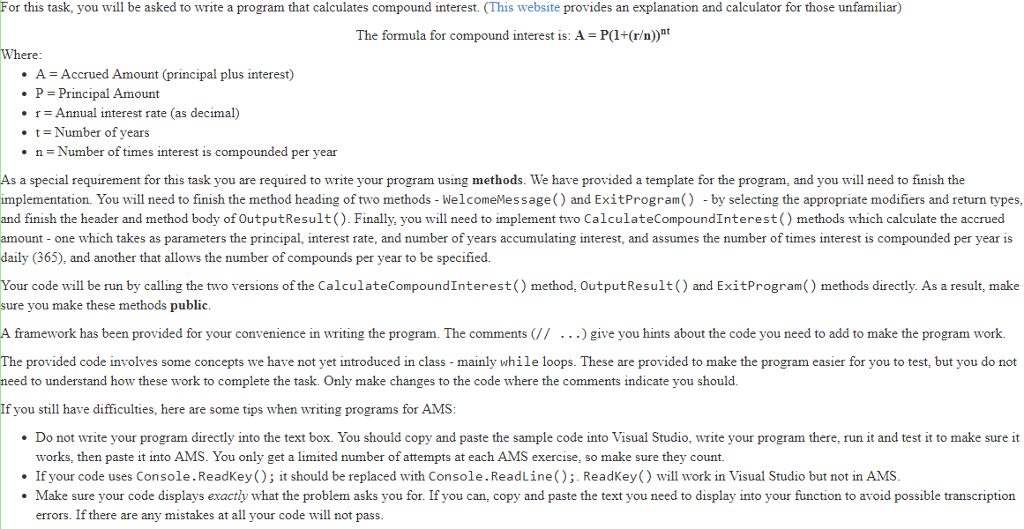
Question: Sample Code: using System; namespace CompoundInterestCalculator { public class CompoundCalculator { const int EXIT = 0; const int CALCULATE_DAILY = 1; const int CALCULATE_QUARTERLY =
Sample Code:
using System; namespace CompoundInterestCalculator { public class CompoundCalculator { const int EXIT = 0; const int CALCULATE_DAILY = 1; const int CALCULATE_QUARTERLY = 2; const int CALCULATE_VARIABLE = 3; const int NUM_OPTIONS = 3; public static void Main() { int menuOption; WelcomeMessage(); do { DisplayMenu(); menuOption = ReadOption(); if (menuOption != EXIT) { double finalAmount = CalculateInterest(menuOption); OutputResult(finalAmount); } } while (menuOption != EXIT); ExitProgram(); } // end Main // Fill in the appropriate modifier and return type (_ _) in the method declaration public _ _ WelcomeMessage() { Console.WriteLine(" \tCompound Interest Calculator "); } // end WelcomeMessage // Fill in the appropriate modifier and return type (_ _) in the method declaration public _ _ ExitProgram() { Console.Write(" Press enter to exit."); Console.ReadLine(); } // end ExitProgram static void DisplayMenu() { string menu = " 1) Calculate final amount after interest (compounded daily)" + " 2) Calculate final amount after interest (compounded quarterly)" + " 3) Calculate final amount after interest (define number of times compounded yearly)" + " Enter your option(1-3 or 0 to exit): "; Console.Write(menu); } // end DisplayMenu public static void OutputResult(double finalAmount) { // Display the message "The final amount of money plus interest is: $(amount)" // The amount should display as currency, with two decimal places, e.g. $10,000.00 } // end OutputResult static int ReadOption() { string choice; int option; bool okayChoice; do { choice = Console.ReadLine(); okayChoice = int.TryParse(choice, out option); if (!okayChoice || option NUM_OPTIONS) { okayChoice = false; Console.WriteLine("You did not enter a correct option. Please try again"); DisplayMenu(); } } while (!okayChoice); return option; } // end ReadOption public static double CalculateInterest(int menuOption) { // (For this exercise, we will assume the user is inputting correct input.) double principal; double interestRate; int numYears; double finalAmount; Console.Write("Enter the principal amount: "); principal = Double.Parse(Console.ReadLine()); Console.Write("Enter the interest rate: "); interestRate = Double.Parse(Console.ReadLine()); Console.Write("Enter the number of years that interest is accumulated for: "); numYears = Int32.Parse(Console.ReadLine()); if (menuOption == CALCULATE_DAILY || menuOption == CALCULATE_QUARTERLY) { if (menuOption == CALCULATE_DAILY) { // Call the appropriate CalculateCompoundInterest method } else { // Call the appropriate CalculateCompoundInterest method } } else { Console.Write("Enter the number of times the interest is compounded yearly: "); int numTimesCompounded = Int32.Parse(Console.ReadLine()); // Call the appropriate CalculateCompoundInterest method } Console.WriteLine(); // return the amount calculated by the compound interest method } // End CalculateInterest // Declare and implement the method CalculateCompoundInterest whose parameters are the principal, interest rate, and number of years (in that order)- make sure it is public! // For the declaration select an appropriate modifier, return type, and types for the parameters // This version assumes the interest is compounded daily (365 times a year) // For both methods, you should assume the interest rate is input already in decimal form (i.e. 0.02 rather than 2 for a 2% rate) // Declare and implement the method CalculateCompoundInterest whose parameters are the principal, interest rate, number of years, and number of times compounded yearly - make sure it is public! // For the declaration select an appropriate modifier, return type, and types for the parameters // This version allows the number of times compounded yearly to be specified. }//end class }//end namespace Step by Step Solution
There are 3 Steps involved in it
1 Expert Approved Answer
Step: 1 Unlock

Question Has Been Solved by an Expert!
Get step-by-step solutions from verified subject matter experts
Step: 2 Unlock
Step: 3 Unlock
 Study Help