





Question: Sample exercise (1 of 2) The following two sample exercises (over the next two pages) will help you familiarize yourself with the functionality of this
Sample exercise (1 of 2) The following two sample
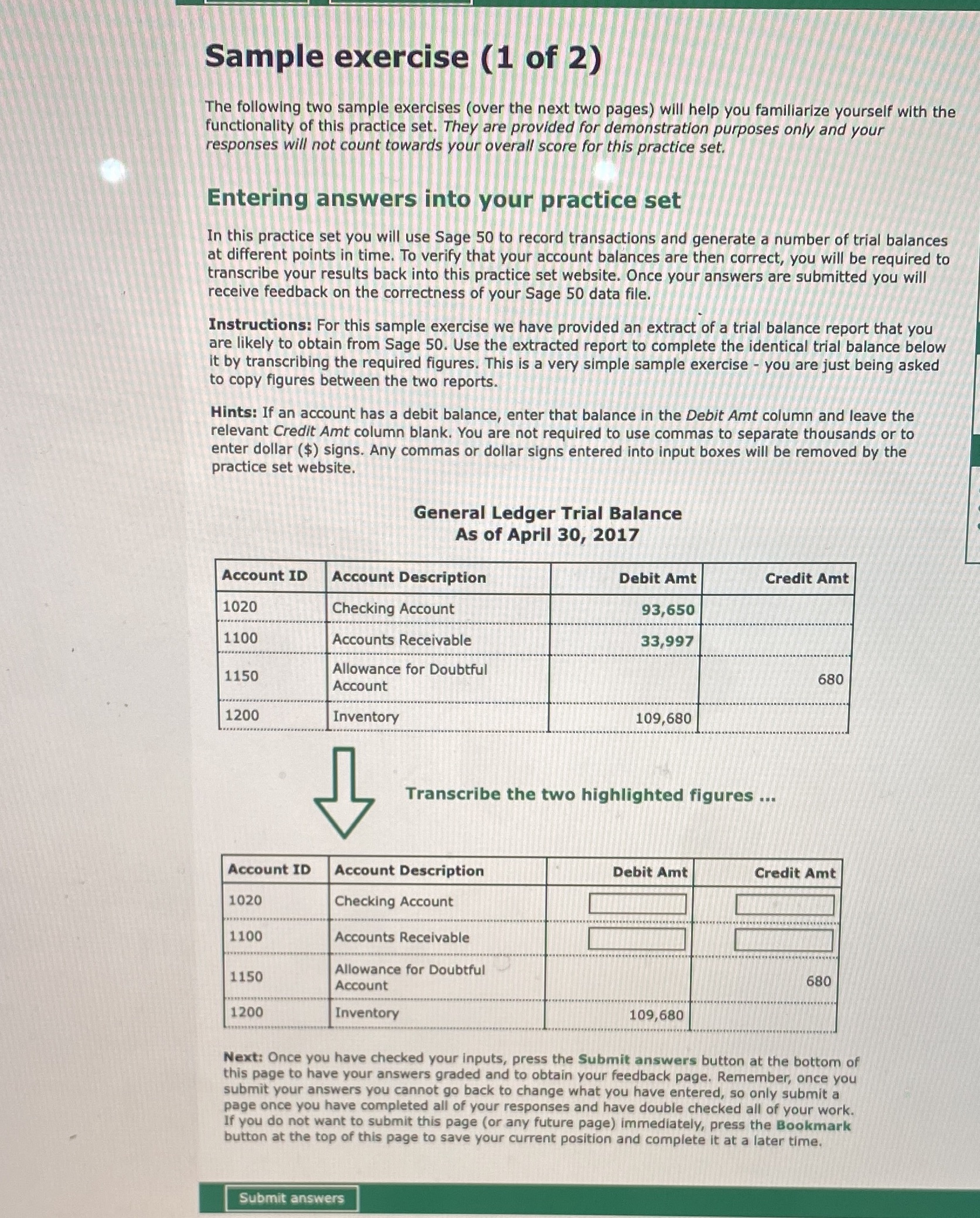
Sample exercise (1 of 2) The following two sample exercises (over the next two pages) will help you familiarize yourself with the functionality of this practice set. They are provided for demonstration purposes only and your responses will not count towards your overall score for this practice set. Entering answers into your practice set In this practice set you will use Sage 50 to record transactions and generate a number of trial balances at different points in time. To verify that your account balances are then correct, you will be required to transcribe your results back into this practice set website. Once your answers are submitted you will receive feedback on the correctness of your Sage 50 data file. Instructions: For this sample exercise we have provided an extract of a trial balance report that you are likely to obtain from Sage 50. Use the extracted report to complete the identical trial balance below It by transcribing the required figures. This is a very simple sample exercise - you are just being asked to copy figures between the two reports. Hints: If an account has a debit balance, enter that balance in the Debit Amt column and leave the relevant Credit Amt column blank. You are not required to use commas to separate thousands or to enter dollar ($) signs. Any commas or dollar signs entered into input boxes will be removed by the practice set website. General Ledger Trial Balance As of April 30, 2017 Account ID Account Description Debit Amt Credit Amt 1020 Checking Account 93,650 1100 Accounts Receivable 33,997 1150 Allowance for Doubtful 680 Account 1200 Inventory 109,680 Transcribe the two highlighted figures ... Account ID Account Description Debit Amt Credit Amt 1020 Checking Account 1100 Accounts Receivable Allowance for Doubtful 1150 Account 580 1200 Inventory 109,680 Next: Once you have checked your inputs, press the Submit answers button at the bottom of this page to have your answers graded and to obtain your feedback page. Remember, once you submit your answers you cannot go back to change what you have entered, so only submit a page once you have completed all of your responses and have double checked all of your work. If you do not want to submit this page (or any future page) immediately, press the Bookmark button at the top of this page to save your current position and complete it at a later time. Submit answers

Step by Step Solution

There are 3 Steps involved in it

1 Expert Approved Answer
Step: 1 Unlock blur-text-image

Question Has Been Solved by an Expert!

Get step-by-step solutions from verified subject matter experts

Step: 2 Unlock
Step: 3 Unlock

Students Have Also Explored These Related Accounting Questions!