







Question: Sample run: user input is in RED Enter the credit number: 43589795 Valid! Check another credit card(y)? y Enter the credit number: 4358979e Invalid, the
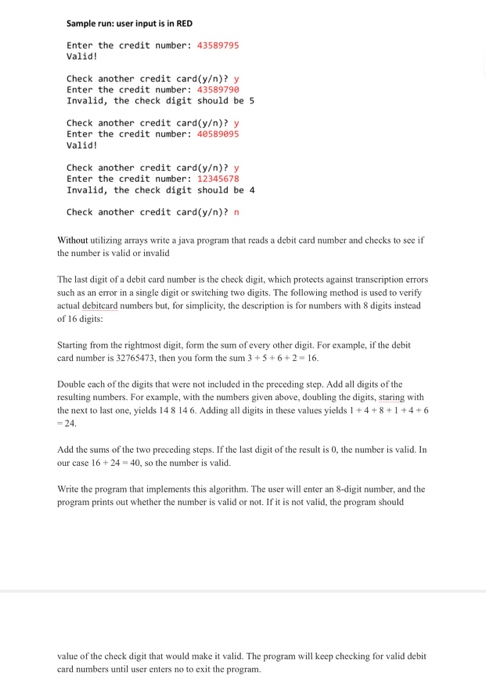
Sample run: user input is in RED Enter the credit number: 43589795 Valid! Check another credit card(y)? y Enter the credit number: 4358979e Invalid, the check digit should be 5 Check another credit card(y)? y Enter the credit number: 48589895 Valid! Check another credit card(y)? y Enter the credit number: 12345678 Invalid, the check digit should be4 Check another credit card(y)? n Without utilizing arrays write a java program that reads a debit card number and checks to see if the number is valid or invalicd The last digit of a debit card number is the check digit, which protects against transcription errors such as an error in a single digit or switching two digits. The following method is used to verify actual debitcard numbers but, for simplicity, the description is for numbers with 8 digits instead of 16 digits: Starting from the rightmost digit, form the sum of every other digit. For example, if the debit card number is 32765473, then you form the sum 3 +5 +6+2-16 Double each of the digits that were not included in the preceding step. Add all digits of the resulting numbers. For example, with the numbers given above, doubling the digits, staring with the next to last one, yields 148 14 6. Adding all digits in these values yields 1+4+8+1+4+6 Add the sums of the two preceding steps. If the last digit of the result is 0, the number is valid. In our case 16+24-40, so the number is valid Write the program that implements this algorithm. The user will enter an 8-digit number, and the program prints out whether the number is valid or not. If it is not valid, the program should value of the check digit that would make it valid. The program will keep checking for valid debit card numbers until user enters no to exit the program
Step by Step Solution
There are 3 Steps involved in it

Get step-by-step solutions from verified subject matter experts
 Study Help