







Question: Scenario Manager is an Excel tool that quantifies the impact of changing multiple inputs (a setting of these multiple inputs is called a scenario) on
Scenario Manager is an Excel tool that quantifies the impact of changing multiple inputs (a setting of these multiple inputs is called a scenario) on one or more outputs of interest.
Scenario Manager extends the data table concept to cases when you are interested in changing more than two inputs and want to quantify the changes these inputs have on one or more outputs of interest. Using Scenario Manager (Please open Excel file: Middletown.xlsx)
|
| Partly Cloudy | Rain | Sunny |
| Season-pass Holders | 3000 | 1200 | 8000 |
| Admissions | 1600 | 250 | 2400 |
| Average Expenditure Season-Pass Holders | $15 | $10 | $18 |
| Average Expenditure Admissions | $45 | $20 | $57 |
| Cost of Operations | $33,000 | $27,000 | $37,000 |
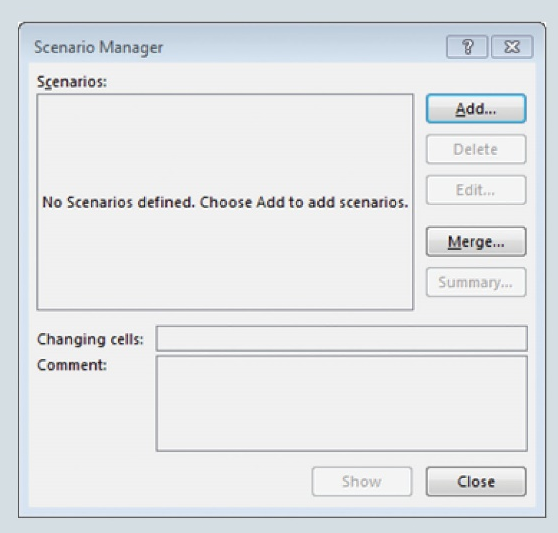
Step 1. Click the DATA tab in the Ribbon
Step 2. Click What-If Analysis in the Data Tools group, and select Scenario Manager
Step 3. When Scenario Manager dialogue box appears, click ADD button in Scenario Manager dialog box
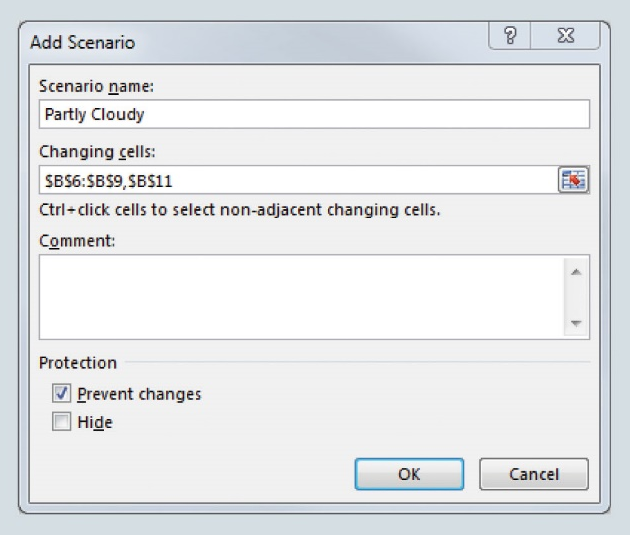
Step 4. When the Add Scenario dialog box appears,
type Partly Cloudy in the Scenario Name box, and,
type $B$6:$B$9,$B$11 in the Changing Cells box, then, click OK
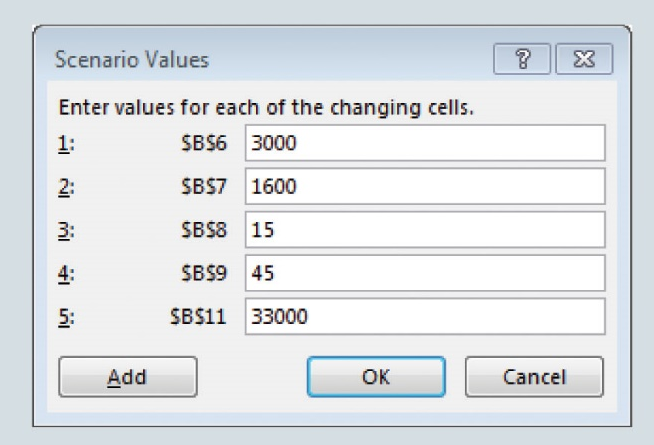
Step 5. When the Scenario Values dialogue box appears,
type 3000 in the $B$6 box, and,
type 1600 in the $B$7 box, and,
type 15 in the $B$8 box, and,
type 45 in the $B$9 box, and,
type 33000 in the $B$11 box, then,
click OK
Step 6. When the Scenario Manager dialogue box re-appears, repeat steps 3 to 5 for each scenario shown in above Table (Rain and Sunny)
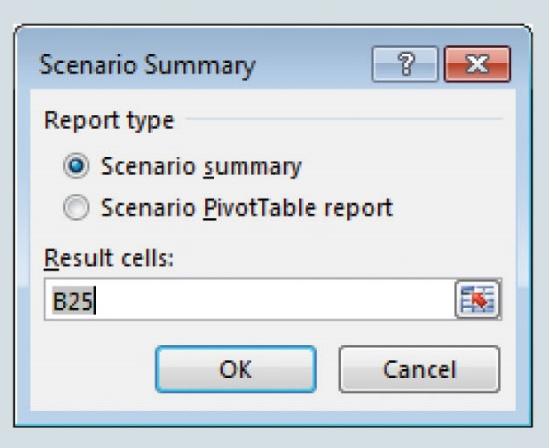
Step 7. When all scenarios have been entered and the Scenario Manager dialogue box re-appears, click Summary
Step 8. When the Scenario Summary dialogue box appears,
select Scenario Summary, and,
type B25 in the Results Cells box (B25 is the cell location for Profit formula in Spreadsheet), then,
click OK
NOTE: The Scenario Summary report appears on a separate worksheet
From your Excel file with the above steps completed, what is the Daily Profit for Middletown Amusement Park when the weather SUNNY?
(Enter your response here)
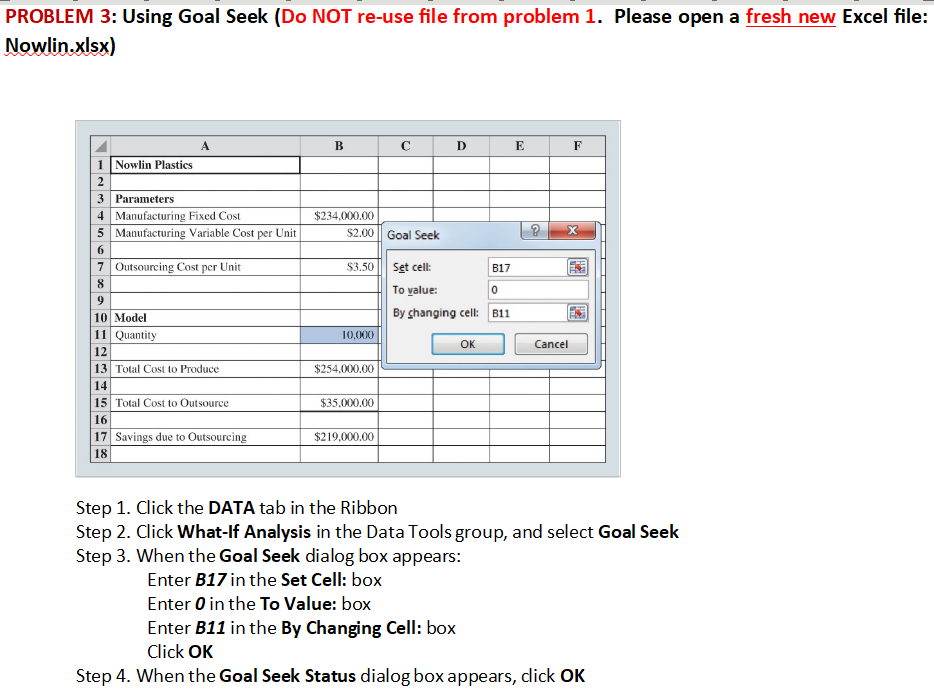
PROBLEM 3: Using Goal Seek (Do NOT re-use file from problem 1. Please open a fresh new Excel file: Nowlin.xlsx) Step 1. Click the DATA tab in the Ribbon Step 2. Click What-If Analysis in the Data Tools group, and select Goal Seek Step 3. When the Goal Seek dialog box appears: Enter B17 in the Set Cell: box Enter 0 in the To Value: box Enter B11 in the By Changing Cell: box Click OK Step 4. When the Goal Seek Status dialog box appears, click OK Scenario Manager Scenarios: Add... Delete No Scenarios defined. Choose Add to add scenarios. Merge... Summary Changing cells: Comment: Show Close Add Scenario Scenario name: Partly Cloudy Changing cells: SBS6:SBS9, SBS11 Ctrl+click cells to select non-adjacent changing cells. Comment: Protection 7 Prevent changes Hide Scenario Values Enter values for each of the changing cells. Scenario Summary Report type Scenario summary Scenario PivotTable report Result cells: PROBLEM 3: Using Goal Seek (Do NOT re-use file from problem 1. Please open a fresh new Excel file: Nowlin.xlsx) Step 1. Click the DATA tab in the Ribbon Step 2. Click What-If Analysis in the Data Tools group, and select Goal Seek Step 3. When the Goal Seek dialog box appears: Enter B17 in the Set Cell: box Enter 0 in the To Value: box Enter B11 in the By Changing Cell: box Click OK Step 4. When the Goal Seek Status dialog box appears, click OK Scenario Manager Scenarios: Add... Delete No Scenarios defined. Choose Add to add scenarios. Merge... Summary Changing cells: Comment: Show Close Add Scenario Scenario name: Partly Cloudy Changing cells: SBS6:SBS9, SBS11 Ctrl+click cells to select non-adjacent changing cells. Comment: Protection 7 Prevent changes Hide Scenario Values Enter values for each of the changing cells. Scenario Summary Report type Scenario summary Scenario PivotTable report Result cellsStep by Step Solution
There are 3 Steps involved in it

Get step-by-step solutions from verified subject matter experts
 Study Help