







Question: Scenario You are a network engineer, and it is your first day working with QCC and you have been given the job of creating a
Scenario
You are a network engineer, and it is your first day working with QCC and you have been given the job of creating a network for the CSET program. You are given the following three tasks to complete.
Configure IP addressing settings on network devices.
Perform basic device configuration tasks on a router.
Verify Layer connectivity via a routing protocol.
Setup some access control lists.
Note: If you need a value that is not given to you, you can use any value you want. However, you must use the correct values for the default gateways in order that the hosts can communicate.
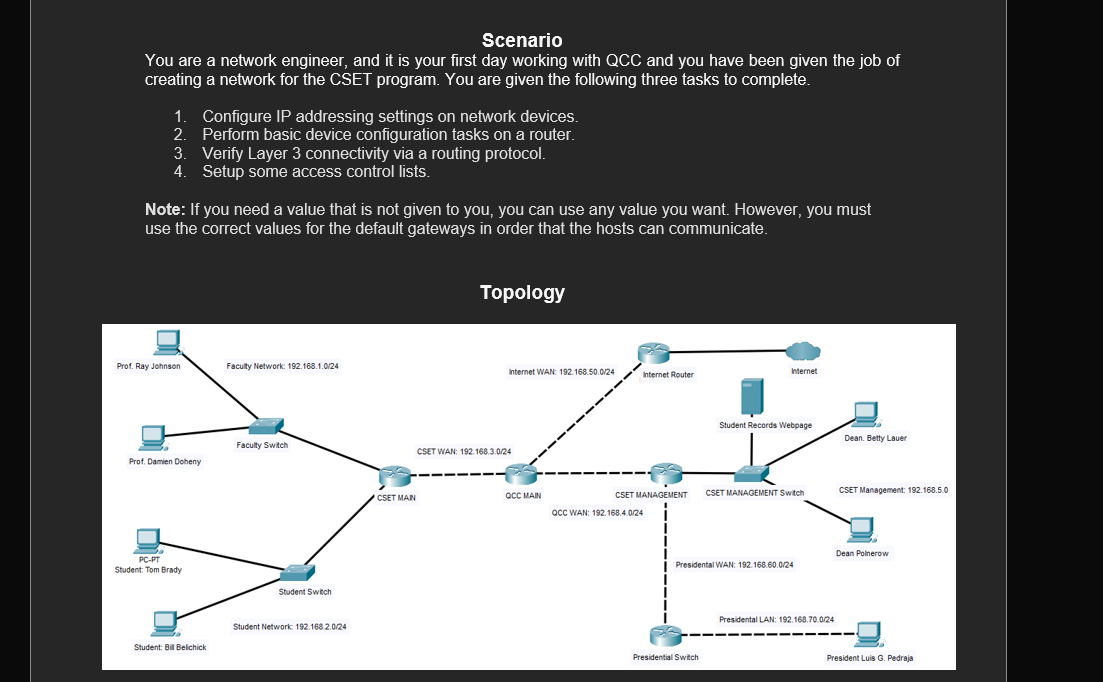
Topology
Part A: Device Address Table points
Complete the following table based on the details provided on the network topology
Device Name Interface IP Address Subnet Mask Default Gateway
CSET MAIN NA
CSET MAIN NA
CSET MAIN NA
QCC MAIN NA
QCC MAIN NA
CSET MANAGEMENT NA
CSET MANAGEMENT NA
CSET MANAGEMENT NA
Student: Tom Brady NIC
Prof. Damien Doheny NIC
Dean Betty Lauer NIC
Part B: Generic Router Configuration Points
List the primary command modes within a standard Cisco router and provide the syntax for each mode and how do you know you are in that mode? points
What is the command syntax to change the hostname of the QCC Main router to CSET Central Router assume you are in configuration mode points
On the CSET MAIN router, configure an IP address on one of its LAN interfaces and make sure to include a description for the interface assume you are in configuration mode points
What is the command syntax to configure the CSET MAIN router from unauthorized access with the encrypted privileged exec password. Enter the command here points
Provide the command syntax for the show command that will allow you to see the password is encrypted, that you configured in Question points
Secure one of outofband access lines into the CSET MAIN router assume you are in user mode Enter the commands here points
Configure the CSET MAIN router with Telnet access. Take a screenshot of your successful connection
Save the image as a jpg file, name it studentsnameconnection your name as the students name points
Backup the running configuration file of the CSET MAIN router to the TFTP server. Enter your command here points
You want to obtain some hardwaresoftware information about the CSET MAIN router. What command would use to get to get this information and list pieces of information from the command output points
Command:
Info :
Info :
Info :
Info :
Configure a MOTD Message of the day on the CSET MAIN router, Damien is the best professor at QCCassume you are in user mode points
What command would you use to see how many concurrent telnet sessions you can run on the CSET MAIN router and how many could can you have on that router
Enter the command here points
What command would enter to disable SSH on the CSET MAIN router. Enter the command here.
points
Remove the password that enabled earlier to access privileged mode. Enter the command here.
points
You are in global configuration mode and you want to check the current status of the CSET MAIN router currently in RAM What command would you use? Enter then command here points
Part C: Route Configuration Points
Note: You can choose to use either the RIP protocol or the OSPF protocol in the following section.
Enter in a command on the CSET Central router previously the QCC MAIN to enable a static default router to the Internet router assume you are in configuration mode Enter the command here points
Enable RIP or OSPF on all the routers in the topology. Take a screenshot of the commands you entered on the CSET MAIN router to configure the protocol.
Save the image as a jpg file, name it studentsnameprotocol your name as the students name points
Enter a static route on the CSET MANAGEMENT Router to point to the Presidential network assume you are in configuration mode Enter the command here points
Enter the command to show the current route table of both the CSET CENTRAL and CSET MANAGEMENT router. Take a screenshot of both route tables.
Save the images as a jpg file, name it studentsnameroutetablecsetcentral and studentsnameroutetablecsetmanagement your name as the students name points
Show the command that you use on CSET MAIN router to configure the LAN interface as passive.
Enter the command here points
Step by Step Solution
There are 3 Steps involved in it
1 Expert Approved Answer
Step: 1 Unlock

Question Has Been Solved by an Expert!
Get step-by-step solutions from verified subject matter experts
Step: 2 Unlock
Step: 3 Unlock
 Study Help