







Question: screenshots are required please. using MYSQL 1 - Triggers Exercise 1. Given the tables of the Travel Agency' schema, defined by the relational model below.
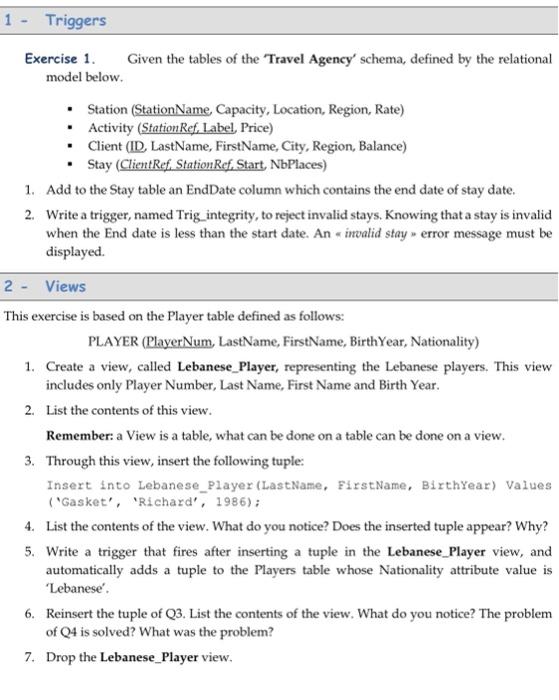
1 - Triggers Exercise 1. Given the tables of the Travel Agency' schema, defined by the relational model below. Station (Station Name Capacity, Location, Region, Rate) Activity (Station Ref. Label Price) Client (ID LastName, FirstName, City, Region, Balance) Stay (ClientRef. Station Ref. Start, NbPlaces) 1. Add to the Stay table an EndDate column which contains the end date of stay date. 2. Write a trigger, named Trig integrity, to reject invalid stays. Knowing that a stay is invalid when the End date is less than the start date. An invalid stay error message must be displayed 2 - Views This exercise is based on the Player table defined as follows: PLAYER (PlayerNum, LastName, FirstName, BirthYear, Nationality) 1. Create a view, called Lebanese_Player, representing the Lebanese players. This view includes only Player Number, Last Name, First Name and Birth Year. 2. List the contents of this view. Remember: a View is a table, what can be done on a table can be done on a view. 3. Through this view, insert the following tuple: Insert into Lebanese_Player (LastName, FirstName, BirthYear) Values ("Gasket', 'Richard', 1986); 4. List the contents of the view. What do you notice? Does the inserted tuple appear? Why? 5. Write a trigger that fires after inserting a tuple in the Lebanese_Player view, and automatically adds a tuple to the Players table whose Nationality attribute value is 'Lebanese'. 6. Reinsert the tuple of Q3. List the contents of the view. What do you notice? The problem of Q4 is solved? What was the problem? 7. Drop the Lebanese_Player view
Step by Step Solution
There are 3 Steps involved in it

Get step-by-step solutions from verified subject matter experts
 Study Help