





Question: SD By using Microsoft Access create database called DB_MIS and then create two tables Supplier and Product As the following requirements: ZIP State City Street
SD By using Microsoft Access create database
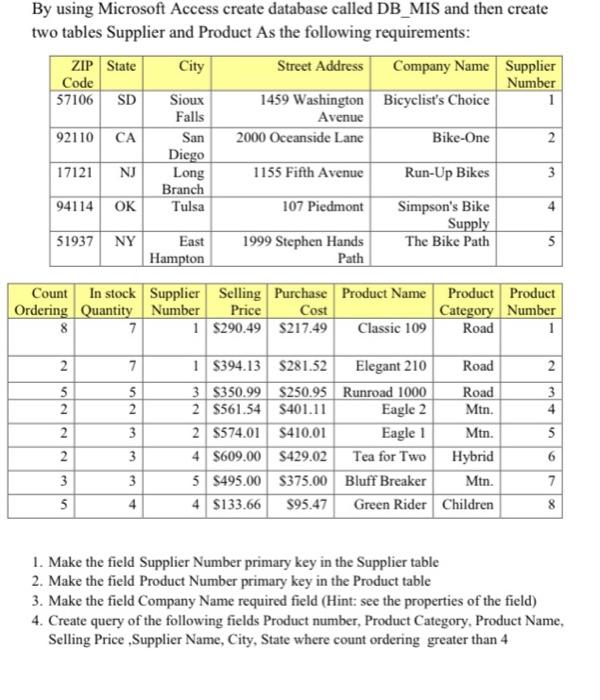
SD By using Microsoft Access create database called DB_MIS and then create two tables Supplier and Product As the following requirements: ZIP State City Street Address Company Name Supplier Code Number 57106 Sioux 1459 Washington Bicyclist's Choice 1 Falls Avenue 92110 CA San 2000 Oceanside Lane Bike-One 2 Diego 17121 NJ Long 1155 Fifth Avenue Run-Up Bikes 3 Branch 94114 OK Tulsa 107 Piedmont Simpson's Bike Supply 51937 NY East 1999 Stephen Hands The Bike Path Hampton Path 3 4 5 Count In stock Supplier Selling Purchase Product Name Product Product Ordering Quantity Number Price Cost Category Number 8 7 1 $290.49 $217.49 Classic 109 Road 1 2 7 2 5 2 2 2 5 2 3 3 4 1 $394.13 $281.52 Elegant 210 Road 3 $350.99 $250.95 Runroad 1000 Road 2 S561.54 $401.11 Eagle 2 Mtn. 2 5574.01 $410.01 Eagle 1 Mtn. 4 $609.00 S429.02 Tea for Two Hybrid 5 $495.00 $375.00 Bluff Breaker Mtn. 4 $133.66 $95.47 Green Rider Children 5 6 3 4 7 8 5 1. Make the field Supplier Number primary key in the Supplier table 2. Make the field Product Number primary key in the Product table 3. Make the field Company Name required field (Hint: see the properties of the field) 4. Create query of the following fields Product number, Product Category Product Name, Selling Price Supplier Name, City, State where count ordering greater than 4

Step by Step Solution

There are 3 Steps involved in it

1 Expert Approved Answer
Step: 1 Unlock blur-text-image

Question Has Been Solved by an Expert!

Get step-by-step solutions from verified subject matter experts

Step: 2 Unlock
Step: 3 Unlock

Students Have Also Explored These Related General Management Questions!