







Question: Search Design Layout References Mailings Review View Help Comments Editing Clare inserted the data in the range A 1 9 :C 2 6 as a
Search
Design Layout References Mailings Review View Help
Comments
Editing
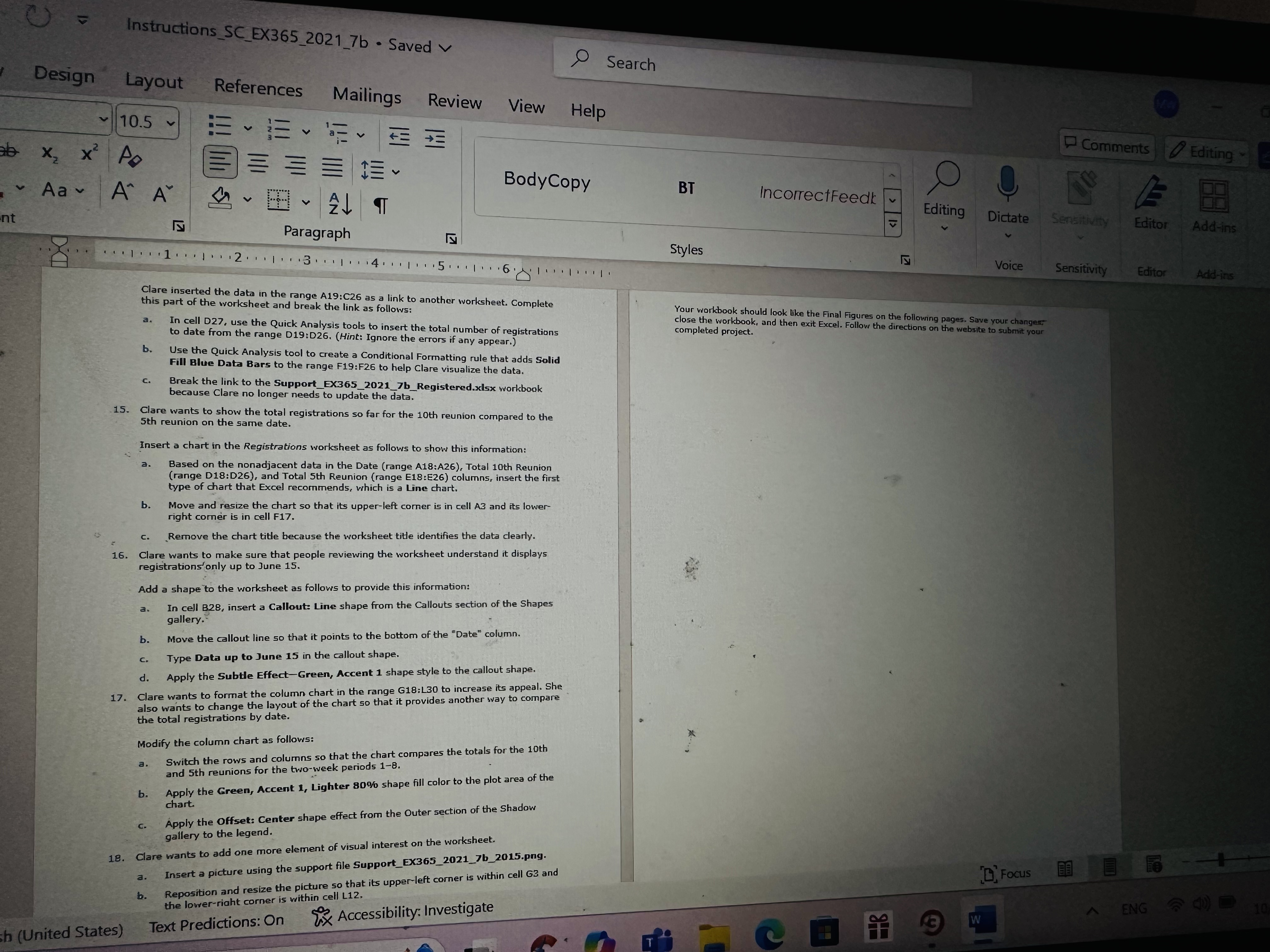
Clare inserted the data in the range A:C as a link to another worksheet. Complete
this part of the worksheet and break the link as follows:
a In cell D use the Quick Analysis tools to insert the total number of registrations to date from the range D:DHint: Ignore the errors if any appear.
b Use the Quick Analysis tool to create a Conditional Formatting rule that adds Solid Fill Blue Data Bars to the range F:F to help Clare visualize the data.
c Break the link to the SupportEXbRegistered.xdsx workbook because Clare no longer needs to update the data.
Clare wants to show the total registrations so far for the th reunion compared to the th reunion on the same date.
Insert a chart in the Registrations worksheet as follows to show this information:
a Based on the nonadjacent data in the Date range A:A Total th Reunion range D:D and Total th Reunion range E:E columns, insert the first type of chart that Excel recommends, which is a Line chart.
b Move and resize the chart so that its upperleft comer is in cell A and its lower right comer is in cell F
c Remove the chart title because the worksheet title identifies the data clearly.
Clare wants to make sure that people reviewing the worksheet understand it displays registrations' only up to June
Add a shape to the worksheet as follows to provide this information:
a In cell B insert a Callout: Line shape from the Callouts section of the Shapes gallery.
b Move the callout line so that it points to the bottom of the "Date" column.
c Type Data up to June in the callout shape.
d Apply the Subtle EffectGreen, Accent shape style to the callout shape.
Clare wants to format the column chart in the range G:L to increase its appeal. She also wants to change the layout of the chart so that it provides another sway to compare the total registrations by date.
Modify the column chart as follows:
a Switch the rows and columns so that the chart compares the totals for the th and th reunions for the twoweek periods
b Apply the Green, Accent Lighter shape fill color to the plot area of the chart.
c Apply the Offset: Center shape effect from the Outer section of the Shadow gallery to the legend.
Clare wants to add one more element of visual interest on the worksheet.
a Insert a picture using the support file SupportEXbpng
Your workbook should look like the Final Figures on the following pages. Save your changers close the workbook, and then exit Excel. Follow, the directions on the website to submit your completed project.
Search
Design Layout References Mailings Review View Help
Comments
Editing
Clare inserted the data in the range A:C as a link to another worksheet. Complete
this part of the worksheet and break the link as follows:
a In cell D use the Quick Analysis tools to insert the total number of registrations to date from the range D:DHint: Ignore the errors if any appear.
b Use the Quick Analysis tool to create a Conditional Formatting rule that adds Solid Fill Blue Data Bars to the range F:F to help Clare visualize the data.
c Break the link to the SupportEXbRegistered.xdsx workbook because Clare no longer needs to update the data.
Clare wants to show the total registrations so far for the th reunion compared to the th reunion on the same date.
Insert a chart in the Registrations worksheet as follows to show this information:
a Based on the nonadjacent data in the Date range A:A Total th Reunion range D:D and Total th Reunion range E:E columns, insert the first type of chart that Excel recommends, which is a Line chart.
b Move and resize the chart so that its upperleft comer is in cell A and its lower right comer is in cell F
c Remove the chart title because the worksheet title identifies the data clearly.
Clare wants to make sure that people reviewing the worksheet understand it displays registrations' only up to June
Add a shape to the worksheet as follows to provide this information:
a In cell B insert a Callout: Line shape from the Callouts section of the Shapes gallery.
b Move the callout line so that it points to the bottom of the "Date" column.
c Type Data up to June in the callout shape.
d Apply the Subtle EffectGreen, Accent shape style to the callout shape.
Clare wants to format the column chart in the range G:L to increase its appeal. She also wants to change the layout of the chart so that it provides another sway to compare the total registrations by date.
Modify the column chart as follows:
a Switch the rows and columns so that the chart compares the totals for the th and th reunions for the twoweek periods
b Apply the Green, Accent Lighter shape fil
Step by Step Solution
There are 3 Steps involved in it
1 Expert Approved Answer
Step: 1 Unlock

Question Has Been Solved by an Expert!
Get step-by-step solutions from verified subject matter experts
Step: 2 Unlock
Step: 3 Unlock
 Study Help