







Question: Seat.java /* * To change this license header, choose License Headers in Project Properties. * To change this template file, choose Tools | Templates *
Seat.java
/* * To change this license header, choose License Headers in Project Properties. * To change this template file, choose Tools | Templates * and open the template in the editor. */ package eventmanager;
public class Seat { private boolean sold; // sold = true means the seat is sold and sold = false means is not sold private int seatNumber; // an id of the seat private String registeredCustomerLastName; //last name of the customer if the seat was sold. private int cost; //price of the seat /* Complete the parameterized constructor for the Seat class Inputs: sld = market status (sold or unsold) stnum = seatNumber regcustlastname = registered customer's last name (if sold) cst = cost of the seat You are supposed to assign all the above inputs to their respective global variables */ public Seat(boolean sld, int stnum, String regcustlastname, int cst) { sold = sld; seatNumber = stnum; registeredCustomerLastName = regcustlastname; cost = cst; } /* This method returns the market status of the seat or in simple words the value of variable "sold" Delete 'return false;' statement and replace it with your own code. */ public boolean getMarketStatus() { return sold; } /* Returns the value of the variable seatNumber Delete 'return 0;' statement and replace it with your own code. */ public int getSeatNumber() { return seatNumber; } /* Returns the value of the variable registeredCustomerLastName Delete 'return "";' statement and replace it with your own code */ public String getCustomersLastName() { return registeredCustomerLastName; } /* Returns the value of the variable cost Delete 'return 0;' statement and replace it with your own code. */ public int getCost() { return cost; } /* Updates the global variable "sold" with the new "status" */ protected void setMarketStatust(boolean status) { sold = status; } /* Updates the global variable "registeredCustomerLastName" with the new "lastname" */ protected void setCustomersLastName(String lastname) { registeredCustomerLastName = lastname; } }
----------------------------------------------------------------------------------------------------------------------------------------------------------------------------
Event.java
package eventmanager;
import java.util.ArrayList;
public class Event {
// we could have used the Date class to represent this but we use string for // simplicity private String date; private String venue; // The area in Las Cruces where the event is being // held. private ArrayList seatList; // An arraylist of seats
/* * Complete the parameterized constructor for the Event class Inputs: dte = * Date of the event venu = venue of the event You are supposed to assign * all the above inputs to their respective global variables */ public Event(String dte, String venu) { date = dte; venue = venu; seatList = new ArrayList(); }
/* * Returns the value of the variable Date Delete 'return "";' statement and * replace it with your own code */ public String getDate() { // return date; }
/* * Returns the value of the variable venue Delete 'return "";' statement and * replace it with your own code */ public String getVenue() { // return venue; }
/* * In this method you would simply add a "Seat" instance (object) to the * "seatlist" */ public void addSeat(Seat object) { seatList.add(object); }
/* * In this method, you will go over the "seatlist" using a for loop and then * count all the 'sold' seats. You can use "getMarketStatus()" method of the * Seat class to know which seats should be accounted for (Hint: Refer to a * similar function in "CarAccountant" class provided for week 3) Delete * 'return 0;' statement and replace it with your own code. * * ATTENTION CS 452 STUDENTS: It's compulsory for you to check for empty * "seatlist" and change the return value if that's the case. */ public int getNumberOfSoldSeats() { int count = 0; for(int i = 0; i
/* * In this method, you could either go over the "seatlist" using a for loop * and then count all the 'unsold' seats by using the "getMarketStatus()" * method of the Seat class or you could simply subtract the sold seats * (obtained from getNumberOfSoldSeats()) from the total number of seats * (size of "seatlist") (Hint: Refer to a similar function in * "CarAccountant" class provided for week 3) Delete 'return 0;' statement * and replace it with your own code. * * ATTENTION CS 452 STUDENTS: It's compulsory for you to check for empty * "seatlist" and change the return value if that's the case. */ public int getNumberOfUnsoldSeats() { // return seatList.size() - getNumberOfSoldSeats(); }
/* * In this method, you would simply return the size of the "seatlist" Delete * 'return 0;' statement and replace it with your own code. */ public int getTotalSeats() { // return seatList.size(); }
/* * In this method you would go over the "seatlist" using a for loop and add * the last names on all "sold" Seats using "getCustomersLastName()". You * could use the method "getMarketStatus()" to see which all seats are sold * so that you only add the last names on the "sold" seats. An empty * "guestlist" variable has been created for you, you are supposed to fill * this list. (Hint: Refer to a similar function in "CarAccountant" class * provided for week 3) * * ATTENTION CS 452 STUDENTS: It's compulsory for you to check for empty * "seatlist" and change the return value if that's the case. */ public ArrayList getGuestsList() { ArrayList guestlist = new ArrayList(); for(int i = 0; i
/* * In this method you would go over the "seatlist" using a for loop and * gather the total sale by adding the "cost" of all "sold" seats. You can * use the method "getMarketStatus()" to see which all seats are sold and * then use "getCost()" method to get an access to their "cost". (Hint: * Refer to a similar function in "CarAccountant" class provided for week 3) * Delete 'return 0;' statement and replace it with your own code. * * ATTENTION CS 452 STUDENTS: It's compulsory for you to check for empty * "seatlist" and change the return value if that's the case. */
public int getTotalSale() { int totalCost = 0; for(int i = 0; i
}
----------------------------------------------------------------------------------------------------------------------------------------------------------------------------
EventManager.java
package eventmanager;
/** * * @author anest */ public class EventManager {
/** * @param args the command line arguments */ public static void main(String[] args) { Event event1=new Event("07/20/2018", "Downtown");
Event event2=new Event("07/12/2018", "University Ave");
Seat seat1ForEvent1 = new Seat(false,1,"",50);
Seat seat2ForEvent1 = new Seat(true,2,"Alyssa",50);
Seat seat3ForEvent1 = new Seat(true,3,"Erik",50);
Seat seat4ForEvent1 = new Seat(false,4,"",50);
Seat seat1ForEvent2 = new Seat(true,1,"Tony",100);
Seat seat2ForEvent2 = new Seat(false,2,"",100);
Seat seat3ForEvent2 = new Seat(false,3,"",100);
Seat seat4ForEvent2 = new Seat(true,4,"Jasmine",100);
Seat seat5ForEvent2 = new Seat(true,5,"Evelyn",100);
event1.addSeat(seat1ForEvent1);
event1.addSeat(seat2ForEvent1);
event1.addSeat(seat3ForEvent1);
event1.addSeat(seat4ForEvent1);
event2.addSeat(seat1ForEvent2);
event2.addSeat(seat2ForEvent2);
event2.addSeat(seat3ForEvent2);
event2.addSeat(seat4ForEvent2);
event2.addSeat(seat5ForEvent2);
System.out.println("Event 1: Info");
System.out.println("Date: "+event1.getDate());
System.out.println("Venue: "+event1.getVenue());
System.out.println("Total Number of Seats: "+event1.getTotalSeats());
System.out.println("Total Number of Sold Seats: "+event1.getNumberOfSoldSeats());
System.out.println("Total Number of Unsold Seats: "+event1.getNumberOfUnsoldSeats());
System.out.println("Total Sale: "+event1.getTotalSale());
System.out.println("Guest List: "+event1.getGuestsList());
System.out.println("Event 2: Info");
System.out.println("Date: "+event2.getDate());
System.out.println("Venue: "+event2.getVenue());
System.out.println("Total Number of Seats: "+event2.getTotalSeats());
System.out.println("Total Number of Sold Seats: "+event2.getNumberOfSoldSeats());
System.out.println("Total Number of Unsold Seats: "+event2.getNumberOfUnsoldSeats());
System.out.println("Total Sale: "+event2.getTotalSale());
System.out.println("Guest List: "+event2.getGuestsList()); } }
----------------------------------------------------------------------------------------------------------------------------------------------------------------------------
EventManagerUI.java
/* * To change this license header, choose License Headers in Project Properties. * To change this template file, choose Tools | Templates * and open the template in the editor. */ package eventmanager;
/** * * @author tieple */
/* List of text fields costfield : Textfield that accepts the cost of the seat customerlnfield : Textfield that accepts the last name of the person registered for the seat seatnumfield : Textfield that accepts the unique seat number of the seat soldfield : Textfield that accepts whether the seat is sold or not (true or false)
List of buttons event1button : Pressing this button would add the seat details entered to event 1 event2button : Pressing this button would add the seat details entered to event 2 clearbutton : clears all the text fields submitbutton : transfers the information stored in 'event1' and 'event2' objects to DisplayDetails class */ public class EventManagerUI extends javax.swing.JFrame {
/** * Creates new form EventManagerUI */ //we start off with two events Event event1; Event event2; //To be used by CS 452 students only public EventManagerUI() { initComponents(); //here we will give this events some default value, don't change these event1 = new Event("07/08/2017", "Downtown"); event2=new Event("06/05/2018", "University Ave"); //To be used by CS 452 students only }
/** * This method is called from within the constructor to initialize the form. * WARNING: Do NOT modify this code. The content of this method is always * regenerated by the Form Editor. */ @SuppressWarnings("unchecked") // //GEN-BEGIN:initComponents private void initComponents() {
jPanel1 = new javax.swing.JPanel(); jLabel1 = new javax.swing.JLabel(); jLabel2 = new javax.swing.JLabel(); jLabel3 = new javax.swing.JLabel(); jLabel4 = new javax.swing.JLabel(); event1button = new javax.swing.JButton(); event2button = new javax.swing.JButton(); clearbutton = new javax.swing.JButton(); soldfield = new javax.swing.JTextField(); seatnumfield = new javax.swing.JTextField(); customerlnfield = new javax.swing.JTextField(); costfield = new javax.swing.JTextField(); submitbutton = new javax.swing.JButton();
setDefaultCloseOperation(javax.swing.WindowConstants.EXIT_ON_CLOSE);
jPanel1.setBorder(javax.swing.BorderFactory.createTitledBorder("Event Manager"));
jLabel1.setText("Sold");
jLabel2.setText("Seat Number");
jLabel3.setText("Registered Customer Last Name");
jLabel4.setText("Cost");
event1button.setText("Add to Event 1"); event1button.addActionListener(new java.awt.event.ActionListener() { public void actionPerformed(java.awt.event.ActionEvent evt) { event1buttonActionPerformed(evt); } });
event2button.setText("Add to Event 2"); event2button.addActionListener(new java.awt.event.ActionListener() { public void actionPerformed(java.awt.event.ActionEvent evt) { event2buttonActionPerformed(evt); } });
clearbutton.setText("Clear"); clearbutton.addActionListener(new java.awt.event.ActionListener() { public void actionPerformed(java.awt.event.ActionEvent evt) { clearbuttonActionPerformed(evt); } });
javax.swing.GroupLayout jPanel1Layout = new javax.swing.GroupLayout(jPanel1); jPanel1.setLayout(jPanel1Layout); jPanel1Layout.setHorizontalGroup( jPanel1Layout.createParallelGroup(javax.swing.GroupLayout.Alignment.LEADING) .addGroup(jPanel1Layout.createSequentialGroup() .addContainerGap() .addGroup(jPanel1Layout.createParallelGroup(javax.swing.GroupLayout.Alignment.LEADING) .addGroup(jPanel1Layout.createSequentialGroup() .addComponent(event1button) .addGap(37, 37, 37) .addComponent(event2button) .addGap(54, 54, 54) .addComponent(clearbutton)) .addGroup(jPanel1Layout.createSequentialGroup() .addGroup(jPanel1Layout.createParallelGroup(javax.swing.GroupLayout.Alignment.LEADING) .addComponent(jLabel1) .addComponent(jLabel2) .addComponent(jLabel3) .addComponent(jLabel4)) .addGap(46, 46, 46) .addGroup(jPanel1Layout.createParallelGroup(javax.swing.GroupLayout.Alignment.LEADING, false) .addComponent(soldfield) .addComponent(seatnumfield) .addComponent(customerlnfield) .addComponent(costfield, javax.swing.GroupLayout.DEFAULT_SIZE, 199, Short.MAX_VALUE)))) .addContainerGap(223, Short.MAX_VALUE)) ); jPanel1Layout.setVerticalGroup( jPanel1Layout.createParallelGroup(javax.swing.GroupLayout.Alignment.LEADING) .addGroup(jPanel1Layout.createSequentialGroup() .addGap(17, 17, 17) .addGroup(jPanel1Layout.createParallelGroup(javax.swing.GroupLayout.Alignment.BASELINE) .addComponent(jLabel1) .addComponent(soldfield, javax.swing.GroupLayout.PREFERRED_SIZE, javax.swing.GroupLayout.DEFAULT_SIZE, javax.swing.GroupLayout.PREFERRED_SIZE)) .addGap(42, 42, 42) .addGroup(jPanel1Layout.createParallelGroup(javax.swing.GroupLayout.Alignment.BASELINE) .addComponent(jLabel2) .addComponent(seatnumfield, javax.swing.GroupLayout.PREFERRED_SIZE, javax.swing.GroupLayout.DEFAULT_SIZE, javax.swing.GroupLayout.PREFERRED_SIZE)) .addPreferredGap(javax.swing.LayoutStyle.ComponentPlacement.RELATED, 51, Short.MAX_VALUE) .addGroup(jPanel1Layout.createParallelGroup(javax.swing.GroupLayout.Alignment.BASELINE) .addComponent(jLabel3) .addComponent(customerlnfield, javax.swing.GroupLayout.PREFERRED_SIZE, javax.swing.GroupLayout.DEFAULT_SIZE, javax.swing.GroupLayout.PREFERRED_SIZE)) .addGap(43, 43, 43) .addGroup(jPanel1Layout.createParallelGroup(javax.swing.GroupLayout.Alignment.BASELINE) .addComponent(jLabel4) .addComponent(costfield, javax.swing.GroupLayout.PREFERRED_SIZE, javax.swing.GroupLayout.DEFAULT_SIZE, javax.swing.GroupLayout.PREFERRED_SIZE)) .addGap(50, 50, 50) .addGroup(jPanel1Layout.createParallelGroup(javax.swing.GroupLayout.Alignment.BASELINE) .addComponent(event1button) .addComponent(event2button) .addComponent(clearbutton)) .addGap(53, 53, 53)) );
submitbutton.setText("Submit"); submitbutton.addActionListener(new java.awt.event.ActionListener() { public void actionPerformed(java.awt.event.ActionEvent evt) { submitbuttonActionPerformed(evt); } });
javax.swing.GroupLayout layout = new javax.swing.GroupLayout(getContentPane()); getContentPane().setLayout(layout); layout.setHorizontalGroup( layout.createParallelGroup(javax.swing.GroupLayout.Alignment.LEADING) .addGroup(layout.createSequentialGroup() .addComponent(jPanel1, javax.swing.GroupLayout.DEFAULT_SIZE, javax.swing.GroupLayout.DEFAULT_SIZE, Short.MAX_VALUE) .addContainerGap()) .addGroup(javax.swing.GroupLayout.Alignment.TRAILING, layout.createSequentialGroup() .addGap(0, 0, Short.MAX_VALUE) .addComponent(submitbutton) .addGap(46, 46, 46)) ); layout.setVerticalGroup( layout.createParallelGroup(javax.swing.GroupLayout.Alignment.LEADING) .addGroup(layout.createSequentialGroup() .addComponent(jPanel1, javax.swing.GroupLayout.PREFERRED_SIZE, javax.swing.GroupLayout.DEFAULT_SIZE, javax.swing.GroupLayout.PREFERRED_SIZE) .addGap(18, 18, 18) .addComponent(submitbutton) .addGap(0, 16, Short.MAX_VALUE)) );
pack(); }// //GEN-END:initComponents
private void submitbuttonActionPerformed(java.awt.event.ActionEvent evt) {//GEN-FIRST:event_submitbuttonActionPerformed // TODO add your handling code here: //Already done for you //sets this window invisible setVisible(false); //sets the DisplayDetails window visible DisplayDetails disp=new DisplayDetails(); //pass on the two events to DisplayDetails disp.setupDisplay(event1, event2); }//GEN-LAST:event_submitbuttonActionPerformed
private void event1buttonActionPerformed(java.awt.event.ActionEvent evt) {//GEN-FIRST:event_event1buttonActionPerformed // TODO add your handling code here: /* ATTENTION: This is compulsory for both CS 152/452 students. This button would add the seat info to the 'seatlist' in event1. You would first use the getText() method for the respective field (e.g. costfield.getText()) to get all the seat info and then use all this information to create a 'Seat' object. This object can now simply be added to 'event1' using the addSeat(Seat object) method. After adding, simply clear all the textfields. (Hint: While there is no such button in CarDealer.CarDealer class, we do something similar with the "Add" button) */ }//GEN-LAST:event_event1buttonActionPerformed
private void event2buttonActionPerformed(java.awt.event.ActionEvent evt) {//GEN-FIRST:event_event2buttonActionPerformed // TODO add your handling code here: /* ATTENTION: This is compulsory for CS 452 students. CS 152 students are welcome to try This button would add the seat info to the 'seatlist' in event2. You would first use the getText() method for the respective field (e.g. costfield.getText()) to get all the seat info and then use all this information to create a 'Seat' object. This object can now simply be added to 'event2' using the addSeat(Seat object) method. After adding, simply clear all the textfields. (Hint: While there is no such button in CarDealer.CarDealer class, we do something similar with the "Add" button) */ }//GEN-LAST:event_event2buttonActionPerformed
private void clearbuttonActionPerformed(java.awt.event.ActionEvent evt) {//GEN-FIRST:event_clearbuttonActionPerformed // TODO add your handling code here: /* ATTENTION: This is compulsory for both CS 152/452 students. This button simply clears all the text fields. (Hint: Refer to the "Clear" button in CarDealer.CarDealer class) */ }//GEN-LAST:event_clearbuttonActionPerformed
/** * @param args the command line arguments */ public static void main(String args[]) { /* Set the Nimbus look and feel */ // /* If Nimbus (introduced in Java SE 6) is not available, stay with the default look and feel. * For details see http://download.oracle.com/javase/tutorial/uiswing/lookandfeel/plaf.html */ try { for (javax.swing.UIManager.LookAndFeelInfo info : javax.swing.UIManager.getInstalledLookAndFeels()) { if ("Nimbus".equals(info.getName())) { javax.swing.UIManager.setLookAndFeel(info.getClassName()); break; } } } catch (ClassNotFoundException ex) { java.util.logging.Logger.getLogger(EventManagerUI.class.getName()).log(java.util.logging.Level.SEVERE, null, ex); } catch (InstantiationException ex) { java.util.logging.Logger.getLogger(EventManagerUI.class.getName()).log(java.util.logging.Level.SEVERE, null, ex); } catch (IllegalAccessException ex) { java.util.logging.Logger.getLogger(EventManagerUI.class.getName()).log(java.util.logging.Level.SEVERE, null, ex); } catch (javax.swing.UnsupportedLookAndFeelException ex) { java.util.logging.Logger.getLogger(EventManagerUI.class.getName()).log(java.util.logging.Level.SEVERE, null, ex); } //
/* Create and display the form */ java.awt.EventQueue.invokeLater(new Runnable() { public void run() { new EventManagerUI().setVisible(true); } }); }
// Variables declaration - do not modify//GEN-BEGIN:variables private javax.swing.JButton clearbutton; private javax.swing.JTextField costfield; private javax.swing.JTextField customerlnfield; private javax.swing.JButton event1button; private javax.swing.JButton event2button; private javax.swing.JLabel jLabel1; private javax.swing.JLabel jLabel2; private javax.swing.JLabel jLabel3; private javax.swing.JLabel jLabel4; private javax.swing.JPanel jPanel1; private javax.swing.JTextField seatnumfield; private javax.swing.JTextField soldfield; private javax.swing.JButton submitbutton; // End of variables declaration//GEN-END:variables }
---------------------------------------------------------------------------------------------------------------------------------------------------------------------------------------------------------------------------------------------
DisplayDetail.java
/* * To change this license header, choose License Headers in Project Properties. * To change this template file, choose Tools | Templates * and open the template in the editor. */ package eventmanager;
/** * * @author tieple */ /* List of text fields totsfield : Textfield that would display the total number of seats totsalefield : Textfield that would display the total sale field totsosfield : Textfield that would display the total number of sold seats totunsfield : Textfield that would display the total number of unsold seats datefield : Textfield that would display the date venuefield : Textfield that would display the venue eventnumfielld : Textfield that would display the event number(1 or 2) guestlistfield : Text area that would display the name of all the guests for a certain event (1 or 2)
List of buttons event1button : Pressing this button should show all details for event 1 event2button : Pressing this button should show all details for event 2 exitbutton : Pressing this button should exit the application
*/
public class DisplayDetails extends javax.swing.JFrame {
/** * Creates new form DisplayDetails */ //Here again we will create two events but this time they will be initialized with //the information coming from the EventManagerUI class. So they are initialized in the //setupDisplay method. Event Event1; Event Event2; //To be used by CS 452 students only public DisplayDetails() { initComponents(); }
/** * This method is called from within the constructor to initialize the form. * WARNING: Do NOT modify this code. The content of this method is always * regenerated by the Form Editor. */ @SuppressWarnings("unchecked") // //GEN-BEGIN:initComponents private void initComponents() {
jPanel1 = new javax.swing.JPanel(); jLabel1 = new javax.swing.JLabel(); jLabel2 = new javax.swing.JLabel(); jLabel3 = new javax.swing.JLabel(); jLabel4 = new javax.swing.JLabel(); jLabel5 = new javax.swing.JLabel(); jLabel6 = new javax.swing.JLabel(); jLabel7 = new javax.swing.JLabel(); jLabel8 = new javax.swing.JLabel(); event1button = new javax.swing.JButton(); event2button = new javax.swing.JButton(); eventnumfielld = new javax.swing.JTextField(); datefield = new javax.swing.JTextField(); venuefield = new javax.swing.JTextField(); totsfield = new javax.swing.JTextField(); totsosfield = new javax.swing.JTextField(); jScrollPane1 = new javax.swing.JScrollPane(); guestlistfield = new javax.swing.JTextArea(); totunsfield = new javax.swing.JTextField(); totsalefield = new javax.swing.JTextField(); exitbutton = new javax.swing.JButton();
setDefaultCloseOperation(javax.swing.WindowConstants.EXIT_ON_CLOSE);
jPanel1.setBorder(javax.swing.BorderFactory.createTitledBorder("Event Details"));
jLabel1.setText("Event Number");
jLabel2.setText("Date of Event");
jLabel3.setText("Venue of Event");
jLabel4.setText("Total Number of Seats");
jLabel5.setText("Total Number of Sold Seats");
jLabel6.setText("Total Number of Unsold Seats");
jLabel7.setText("Total Sale");
jLabel8.setText("Guest List");
event1button.setText("Event1"); event1button.addActionListener(new java.awt.event.ActionListener() { public void actionPerformed(java.awt.event.ActionEvent evt) { event1buttonActionPerformed(evt); } });
event2button.setText("Event2"); event2button.addActionListener(new java.awt.event.ActionListener() { public void actionPerformed(java.awt.event.ActionEvent evt) { event2buttonActionPerformed(evt); } });
guestlistfield.setColumns(20); guestlistfield.setRows(5); jScrollPane1.setViewportView(guestlistfield);
exitbutton.setText("Exit"); exitbutton.addActionListener(new java.awt.event.ActionListener() { public void actionPerformed(java.awt.event.ActionEvent evt) { exitbuttonActionPerformed(evt); } });
javax.swing.GroupLayout jPanel1Layout = new javax.swing.GroupLayout(jPanel1); jPanel1.setLayout(jPanel1Layout); jPanel1Layout.setHorizontalGroup( jPanel1Layout.createParallelGroup(javax.swing.GroupLayout.Alignment.LEADING) .addGroup(jPanel1Layout.createSequentialGroup() .addGroup(jPanel1Layout.createParallelGroup(javax.swing.GroupLayout.Alignment.LEADING) .addGroup(jPanel1Layout.createSequentialGroup() .addContainerGap() .addGroup(jPanel1Layout.createParallelGroup(javax.swing.GroupLayout.Alignment.LEADING) .addGroup(jPanel1Layout.createSequentialGroup() .addComponent(jLabel8) .addGap(33, 33, 33) .addComponent(jScrollPane1, javax.swing.GroupLayout.PREFERRED_SIZE, 558, javax.swing.GroupLayout.PREFERRED_SIZE)) .addGroup(jPanel1Layout.createSequentialGroup() .addGroup(jPanel1Layout.createParallelGroup(javax.swing.GroupLayout.Alignment.LEADING) .addComponent(jLabel1) .addComponent(jLabel2) .addComponent(jLabel3) .addComponent(jLabel4) .addComponent(jLabel5) .addComponent(jLabel6) .addComponent(jLabel7)) .addGap(56, 56, 56) .addGroup(jPanel1Layout.createParallelGroup(javax.swing.GroupLayout.Alignment.LEADING, false) .addComponent(eventnumfielld) .addComponent(datefield) .addComponent(venuefield) .addComponent(totsfield) .addComponent(totsosfield) .addComponent(totunsfield) .addComponent(totsalefield, javax.swing.GroupLayout.DEFAULT_SIZE, 205, Short.MAX_VALUE))))) .addGroup(jPanel1Layout.createSequentialGroup() .addGap(234, 234, 234) .addComponent(event1button) .addGap(109, 109, 109) .addComponent(event2button))) .addContainerGap(24, Short.MAX_VALUE)) .addGroup(javax.swing.GroupLayout.Alignment.TRAILING, jPanel1Layout.createSequentialGroup() .addGap(0, 0, Short.MAX_VALUE) .addComponent(exitbutton) .addGap(38, 38, 38)) ); jPanel1Layout.setVerticalGroup( jPanel1Layout.createParallelGroup(javax.swing.GroupLayout.Alignment.LEADING) .addGroup(jPanel1Layout.createSequentialGroup() .addGroup(jPanel1Layout.createParallelGroup(javax.swing.GroupLayout.Alignment.TRAILING) .addGroup(jPanel1Layout.createSequentialGroup() .addGroup(jPanel1Layout.createParallelGroup(javax.swing.GroupLayout.Alignment.BASELINE) .addComponent(event1button) .addComponent(event2button)) .addGap(5, 5, 5) .addGroup(jPanel1Layout.createParallelGroup(javax.swing.GroupLayout.Alignment.BASELINE) .addComponent(jLabel1) .addComponent(eventnumfielld, javax.swing.GroupLayout.PREFERRED_SIZE, javax.swing.GroupLayout.DEFAULT_SIZE, javax.swing.GroupLayout.PREFERRED_SIZE)) .addGap(18, 18, 18) .addComponent(jLabel2)) .addComponent(datefield, javax.swing.GroupLayout.PREFERRED_SIZE, javax.swing.GroupLayout.DEFAULT_SIZE, javax.swing.GroupLayout.PREFERRED_SIZE)) .addGap(18, 18, 18) .addGroup(jPanel1Layout.createParallelGroup(javax.swing.GroupLayout.Alignment.BASELINE) .addComponent(jLabel3) .addComponent(venuefield, javax.swing.GroupLayout.PREFERRED_SIZE, javax.swing.GroupLayout.DEFAULT_SIZE, javax.swing.GroupLayout.PREFERRED_SIZE)) .addGap(18, 18, 18) .addGroup(jPanel1Layout.createParallelGroup(javax.swing.GroupLayout.Alignment.BASELINE) .addComponent(jLabel4) .addComponent(totsfield, javax.swing.GroupLayout.PREFERRED_SIZE, javax.swing.GroupLayout.DEFAULT_SIZE, javax.swing.GroupLayout.PREFERRED_SIZE)) .addGap(18, 18, 18) .addGroup(jPanel1Layout.createParallelGroup(javax.swing.GroupLayout.Alignment.BASELINE) .addComponent(jLabel5) .addComponent(totsosfield, javax.swing.GroupLayout.PREFERRED_SIZE, javax.swing.GroupLayout.DEFAULT_SIZE, javax.swing.GroupLayout.PREFERRED_SIZE)) .addGap(18, 18, 18) .addGroup(jPanel1Layout.createParallelGroup(javax.swing.GroupLayout.Alignment.BASELINE) .addComponent(jLabel6) .addComponent(totunsfield, javax.swing.GroupLayout.PREFERRED_SIZE, javax.swing.GroupLayout.DEFAULT_SIZE, javax.swing.GroupLayout.PREFERRED_SIZE)) .addGap(18, 18, 18) .addGroup(jPanel1Layout.createParallelGroup(javax.swing.GroupLayout.Alignment.BASELINE) .addComponent(jLabel7) .addComponent(totsalefield, javax.swing.GroupLayout.PREFERRED_SIZE, javax.swing.GroupLayout.DEFAULT_SIZE, javax.swing.GroupLayout.PREFERRED_SIZE)) .addGap(18, 18, 18) .addGroup(jPanel1Layout.createParallelGroup(javax.swing.GroupLayout.Alignment.LEADING) .addGroup(jPanel1Layout.createSequentialGroup() .addComponent(jLabel8) .addGap(0, 64, Short.MAX_VALUE)) .addComponent(jScrollPane1, javax.swing.GroupLayout.PREFERRED_SIZE, 0, Short.MAX_VALUE)) .addGap(18, 18, 18) .addComponent(exitbutton) .addContainerGap()) );
javax.swing.GroupLayout layout = new javax.swing.GroupLayout(getContentPane()); getContentPane().setLayout(layout); layout.setHorizontalGroup( layout.createParallelGroup(javax.swing.GroupLayout.Alignment.LEADING) .addComponent(jPanel1, javax.swing.GroupLayout.DEFAULT_SIZE, javax.swing.GroupLayout.DEFAULT_SIZE, Short.MAX_VALUE) ); layout.setVerticalGroup( layout.createParallelGroup(javax.swing.GroupLayout.Alignment.LEADING) .addGroup(layout.createSequentialGroup() .addComponent(jPanel1, javax.swing.GroupLayout.PREFERRED_SIZE, javax.swing.GroupLayout.DEFAULT_SIZE, javax.swing.GroupLayout.PREFERRED_SIZE) .addGap(0, 0, Short.MAX_VALUE)) );
pack(); }// //GEN-END:initComponents
private void event1buttonActionPerformed(java.awt.event.ActionEvent evt) {//GEN-FIRST:event_event1buttonActionPerformed // TODO add your handling code here: /* ATTENTION: This is compulsory for both CS 152/452 students. This button would display all the details for event 1 you can simply use the 'Event1' object here to access various methods already defined in the Event class, e.g. Event1.getDate(), Event1.getTotalSeats(), etc. You can then use the setText(String string) method for the respective text fields (e.g. datefield.setText(string), totsfield.setText(string), etc.) to set the "string" that you want to display on the respective text fields (Hint: While there is no such button in CarDealer.DisplayDetails class, we do something similar under the setupDisplay method) */ }//GEN-LAST:event_event1buttonActionPerformed
private void event2buttonActionPerformed(java.awt.event.ActionEvent evt) {//GEN-FIRST:event_event2buttonActionPerformed // TODO add your handling code here: /* ATTENTION: This is compulsory for CS 452 students. CS 152 students are welcome to try This button would display all the details for event 2 you can simply use the 'Event2' object here to access various methods already defined in the Event class, e.g. Event2.getDate(), Event2.getTotalSeats(), etc. You can then use the setText(String string) method for the respective text fields (e.g. datefield.setText(string), totsfield.setText(string), etc.) to set the "string" that you want to display on the respective text fields (Hint: While there is no such button in CarDealer.DisplayDetails class, we do something similar under the setupDisplay method) */ }//GEN-LAST:event_event2buttonActionPerformed
private void exitbuttonActionPerformed(java.awt.event.ActionEvent evt) {//GEN-FIRST:event_exitbuttonActionPerformed // TODO add your handling code here: /* ATTENTION: This is compulsory for both CS 152/452 students. This button would simply exit the application (Hint: We have a similar method in CarDealer.DisplayDetails class) */ }//GEN-LAST:event_exitbuttonActionPerformed
/** * @param args the command line arguments */ public void setupDisplay(Event event1, Event event2) { /* Set the Nimbus look and feel */ // /* If Nimbus (introduced in Java SE 6) is not available, stay with the default look and feel. * For details see http://download.oracle.com/javase/tutorial/uiswing/lookandfeel/plaf.html */ try { for (javax.swing.UIManager.LookAndFeelInfo info : javax.swing.UIManager.getInstalledLookAndFeels()) { if ("Nimbus".equals(info.getName())) { javax.swing.UIManager.setLookAndFeel(info.getClassName()); break; } } } catch (ClassNotFoundException ex) { java.util.logging.Logger.getLogger(DisplayDetails.class.getName()).log(java.util.logging.Level.SEVERE, null, ex); } catch (InstantiationException ex) { java.util.logging.Logger.getLogger(DisplayDetails.class.getName()).log(java.util.logging.Level.SEVERE, null, ex); } catch (IllegalAccessException ex) { java.util.logging.Logger.getLogger(DisplayDetails.class.getName()).log(java.util.logging.Level.SEVERE, null, ex); } catch (javax.swing.UnsupportedLookAndFeelException ex) { java.util.logging.Logger.getLogger(DisplayDetails.class.getName()).log(java.util.logging.Level.SEVERE, null, ex); } // //initialize Event1 and Event2 Event1 = event1; Event2 = event2; //We now have all the details about the seat and the events from EventManagerUI, these Events can //be used to display information /* Create and display the form */ java.awt.EventQueue.invokeLater(new Runnable() { public void run() { setVisible(true); } }); }
// Variables declaration - do not modify//GEN-BEGIN:variables private javax.swing.JTextField datefield; private javax.swing.JButton event1button; private javax.swing.JButton event2button; private javax.swing.JTextField eventnumfielld; private javax.swing.JButton exitbutton; private javax.swing.JTextArea guestlistfield; private javax.swing.JLabel jLabel1; private javax.swing.JLabel jLabel2; private javax.swing.JLabel jLabel3; private javax.swing.JLabel jLabel4; private javax.swing.JLabel jLabel5; private javax.swing.JLabel jLabel6; private javax.swing.JLabel jLabel7; private javax.swing.JLabel jLabel8; private javax.swing.JPanel jPanel1; private javax.swing.JScrollPane jScrollPane1; private javax.swing.JTextField totsalefield; private javax.swing.JTextField totsfield; private javax.swing.JTextField totsosfield; private javax.swing.JTextField totunsfield; private javax.swing.JTextField venuefield; // End of variables declaration//GEN-END:variables }
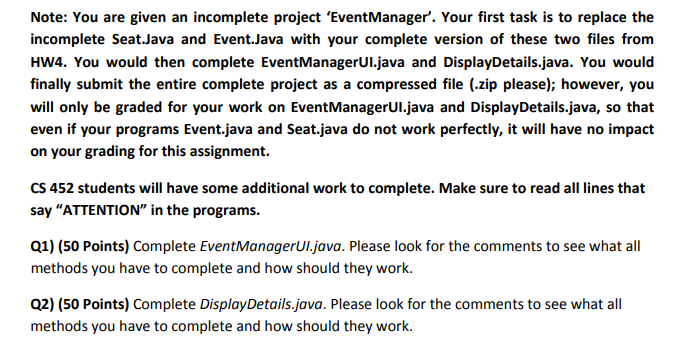
Note: You are given an incomplete project 'EventManager. Your first task is to replace the incomplete Seat.Java and Event.Java with your complete version of these two files from HW4. You would then complete EventManagerULjava finally submit the entire complete project as a compressed file (.zip please); however, you will only be graded for your work on EventManagerUI.java and DisplayDetails.java, so that even if your programs Event.java and Seat.java do not work perfectly, it will have no impact on your grading for this assignment. and DisplayDetails.java. You would CS 452 students will have some additional work to complete. Make sure to read all lines that say "ATTENTION" in the programs. Q1) (50 Points) Complete EventManagerUI.java. Please look for the comments to see what all methods you have to complete and how should they work. Q2) (50 Points) Complete DisplayDetails.java. Please look for the comments to see what all methods you have to complete and how should they work
Step by Step Solution
There are 3 Steps involved in it

Get step-by-step solutions from verified subject matter experts
 Study Help