







Question: Second part for question: Produce a time array that goes from 0 to 0.25 in steps of 1/8000 seconds. Then create variables for the notes
Second part for question: Produce a time array that goes from 0 to 0.25 in steps of 1/8000 seconds. Then create variables for the notes of a c major scale.
Regarding musical notes. Take the C note, E note and G note arrays and average them to produce a C major chord:

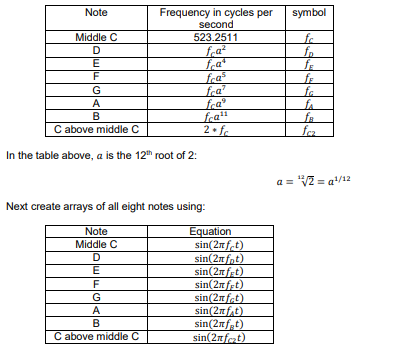
MATLAB code bellow:
% Define sample rate f_s
f_s = 8000;
% Create the time vector
time = 0 : 1/f_s : 0.25;
% Create a vector of the frequencies in the C Major scale
Frequencies = [523.2511 587.3295 659.2551 698.4565 783.9909 880.0000 987.7666 2*523.2511];
% Create a vector of the audio data
Tones = sin(2 * pi * time' * Frequencies);
% Create the scale by arranging each note in order, in a vector
Scale = Tones(:);
% Playing the sound at the sample rate f_s
sound(Scale, f_s);
Use the sound command to listen to the chord. In one figure plot the chord samples versus time in seconds both as a blue line and superimposed with red circles for each sample of the chord. Use the axis command to limit the time scale to 0 to 0.02 seconds. Include axis labels, a title, and grid lines, as shown below:
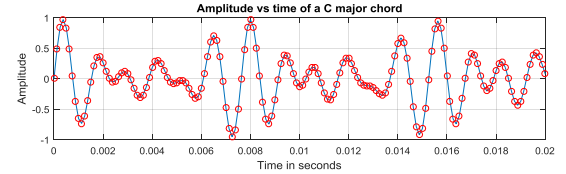
sin (2mfct) +sin (2mft) sin(2Tfct) chord(t) =
Step by Step Solution
There are 3 Steps involved in it

Get step-by-step solutions from verified subject matter experts
 Study Help