Question: Section 3.3 1- Add the following method to the Insertion Sort Program given in Section 3.3: Add a method called noDups() that removes duplicates from

Section 3.3
Section 3.3 1- Add the following method to the Insertion Sort Program

given in Section 3.3: Add a method called noDups() that removes duplicates

1- Add the following method to the Insertion Sort Program given in Section 3.3:

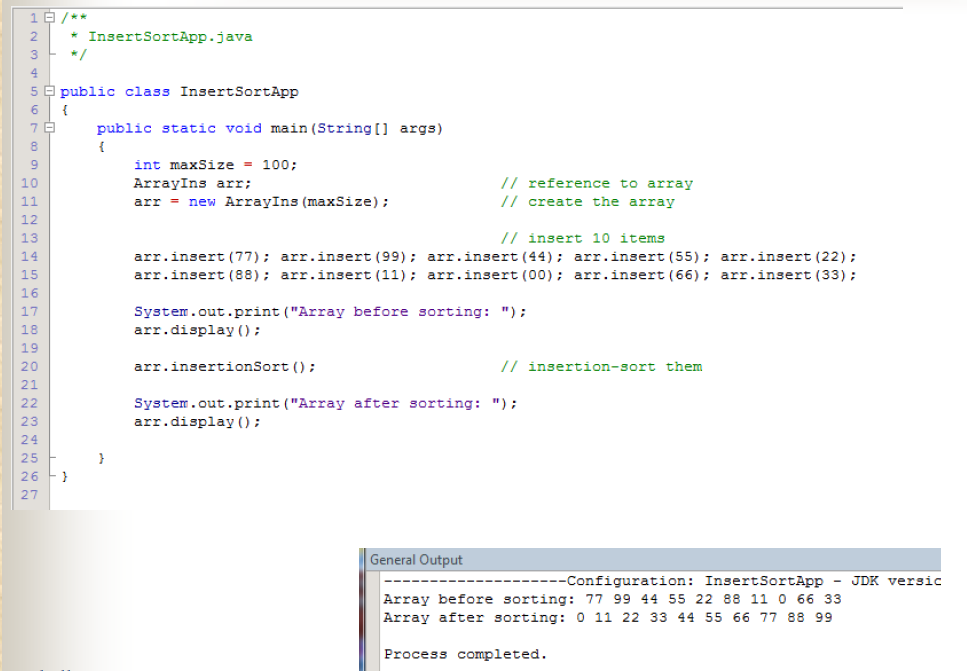
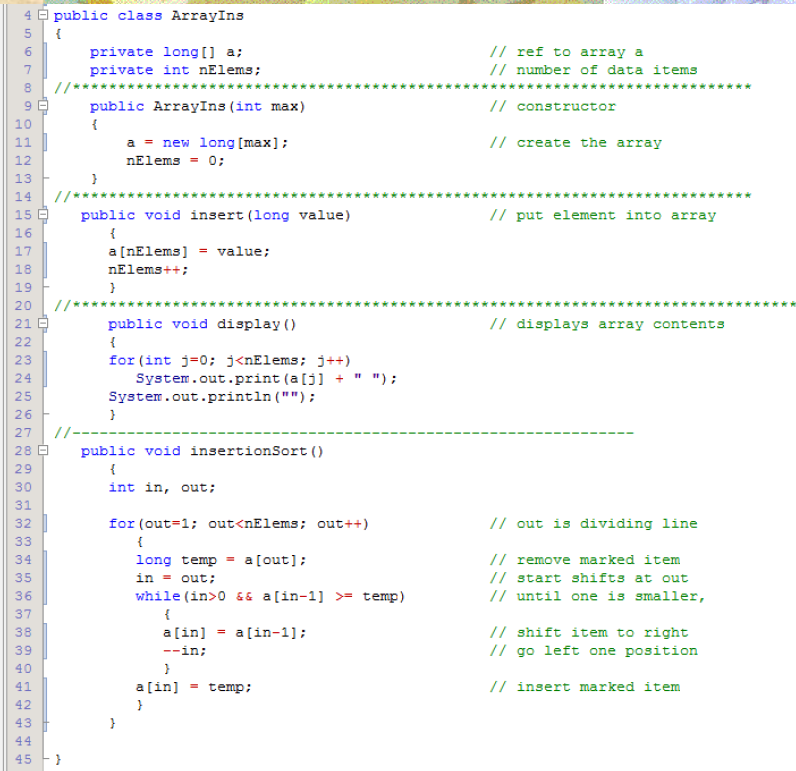
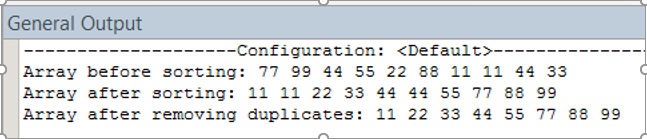
Add a method called noDups() that removes duplicates from a previously sorted array without disrupting the order. Use the insertionSort() method to sort the data. Recall that after removing the duplicates, the resulting array cannot have any holes, i.e., be sure to shift the elements such that all elements in the array are in contiguous locations.

Add appropriate code to the main() method to exercise the noDups() method.

Sample I/O:
from a previously sorted array without disrupting the order. Use the insertionSort()

4 5 public class ArrayIns { private long[] a; private int nElems; // ref to array a // number of data items public ArrayIns (int max) // constructor a = new long(max]; nElems = 0; // create the array public void insert (long value) // put element into array a[nElems] = value; nElems++; = = = = = = = = public void display() // displays array contents HHHHHHNNNNNNNNNNMMMM for(int j=0; j0 && a[in-1] >= temp) // remove marked item // start shifts at out // until one is smaller, a[in] = a[in-1]; --in; // shift item to right // go left one position " a [in] = temp; // insert marked item 1 2 3 /** + InsertSortApp.java */ public class Insert SortApp public static void main(String[] args) - int maxSize = 100; ArrayIns arr; arr = new ArrayIns (maxSize); // reference to array // create the array // insert 10 items arr.insert (77); arr.insert (99); arr.insert (44); arr.insert (55); arr.insert (22); arr.insert (88); arr.insert (11); arr.insert (00); arr.insert (66); arr.insert (33); - System.out.print("Array before sorting: "); arr.display(); arr.insertionSort(); // insertion-sort them System.out.print("Array after sorting: "); arr.display(); - General Output --------------------Configuration: Insert SortApp - JDK vergic Array before sorting: 77 99 44 55 22 88 11 0 66 33 Array after sorting: 0 11 22 33 44 55 66 77 88 99 Process completed. General Output ------------Configuration: ---------- > Array before sorting: 77 99 44 55 22 88 11 11 44 33 Array after sorting: 11 11 22 33 44 44 55 77 88 99 Array after removing duplicates: 11 22 33 44 55 77 88 99

Step by Step Solution

There are 3 Steps involved in it

1 Expert Approved Answer
Step: 1 Unlock blur-text-image
Question Has Been Solved by an Expert!

Get step-by-step solutions from verified subject matter experts

Step: 2 Unlock
Step: 3 Unlock

Students Have Also Explored These Related Databases Questions!