







Question: Section 4. Insert the IPs addresses for the following network (See Figure 3) Operating Systems: 1. Windows XP 2.Windows 7 3.Windows 2008 Server 4.Linux IP
Section 4. Insert the IPs addresses for the following network (See Figure 3) Operating Systems: 1. Windows XP 2.Windows 7 3.Windows 2008 Server 4.Linux IP Addressing: 1. Your public network address indicated is 2.203.0.0/24, where X is your group number. 2. Utilize IP addresses of 10.204.0.0/16 and 20.204.0.0/16 for the internal networks; 172.16.205.0/24 for the subnet between the two servers and the Linux Server and XP Client. X is your group number. 3. Instructor Expects to see three NICs in your Domain Controller, two NICs in the VPN Server, and various addressing for your subnets.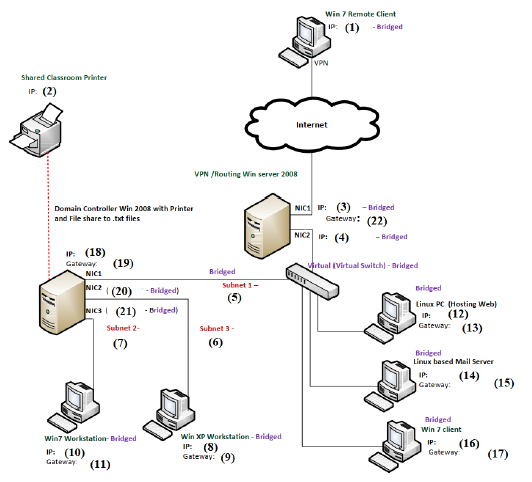
Win 7 Remote Client IP: (1) - Bridged VPN Shared classroom Printer IP: Internet VPN/Routing Win server 2008 Domain Controller Win 2008 with Printer and File share to.txt files NICI IP: (3) -Bridged Cateway (22) NICE (4) - Bridged Virtual Virtual Switch-Bridged BUTY IP: (18) Gateway (19) NICI NICZ (20) Bridged) NIC (21) Bridged) Subnet 2- Bridged Subnet 1- Bridged Linux PC Hosting Web) (12) Gateway (13) Subnet - 6) Brideed Linux based Mall Server IP: (14) (15) Gateway Win7 Workstation-Bridged IP: (10) Win XP Workstation - Bridged IP: (8) Gateway Bridged Win 7 client IP: (16) Gateway (17) Gateway (11)
Step by Step Solution
There are 3 Steps involved in it

Get step-by-step solutions from verified subject matter experts
 Study Help