







Question: Section E 23 E1 2 E2 2 E3 2. E4 3 DO ES 3 E6 The following are to be completed in the J0B_4155 Worksheet
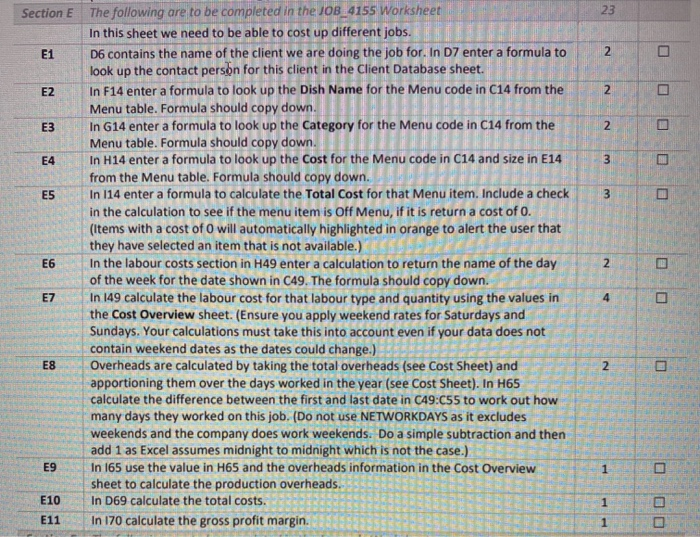
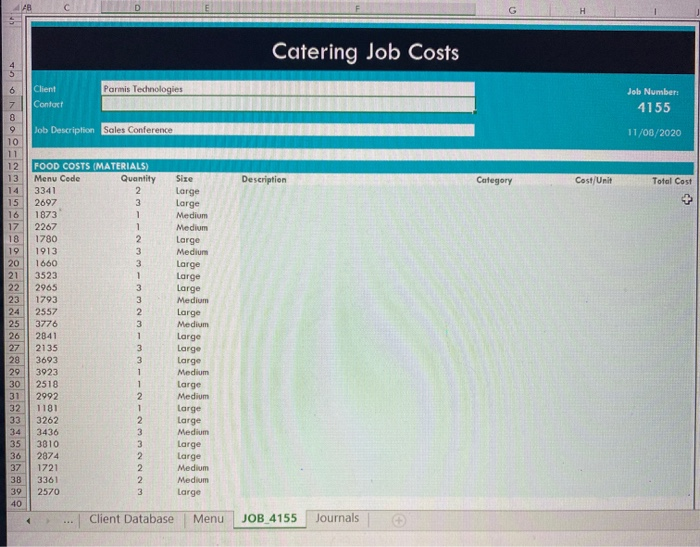
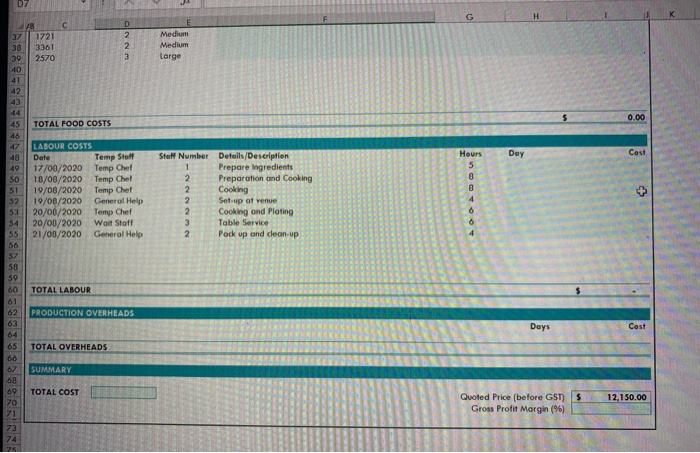
Section E 23 E1 2 E2 2 E3 2. E4 3 DO ES 3 E6 The following are to be completed in the J0B_4155 Worksheet In this sheet we need to be able to cost up different jobs. D6 contains the name of the client we are doing the job for. In D7 enter a formula to look up the contact person for this client in the Client Database sheet. In F14 enter a formula to look up the Dish Name for the Menu code in C14 from the Menu table. Formula should copy down. In G14 enter a formula to look up the Category for the Menu code in C14 from the Menu table. Formula should copy down. In H14 enter a formula to look up the cost for the Menu code in C14 and size in E14 from the Menu table. Formula should copy down. In 114 enter a formula to calculate the Total Cost for that Menu item. Include a check in the calculation to see if the menu item is off Menu, if it is return a cost of o. (Items with a cost of O will automatically highlighted in orange to alert the user that they have selected an item that is not available.) In the labour costs section in H49 enter a calculation to return the name of the day of the week for the date shown in C49. The formula should copy down. In 149 calculate the labour cost for that labour type and quantity using the values in the Cost Overview sheet. (Ensure you apply weekend rates for Saturdays and Sundays. Your calculations must take this into account even if your data does not contain weekend dates as the dates could change.) Overheads are calculated by taking the total overheads (see Cost Sheet) and apportioning them over the days worked in the year (see Cost Sheet). In H65 calculate the difference between the first and last date in C49:055 to work out how many days they worked on this job. (Do not use NETWORKDAYS as it excludes weekends and the company does work weekends. Do a simple subtraction and then add 1 as Excel assumes midnight to midnight which is not the case.) In 165 use the value in H65 and the overheads information in the Cost Overview sheet to calculate the production overheads. In D69 calculate the total costs. In 170 calculate the gross profit margin. 2 E7 4 E8 2 E9 1 E10 1 E11 1 H Catering Job Costs 5 6 Parmis Technologies Client Contact Job Number 4155 Job Description Sales Conference 11/06/2020 Description Category Cost/Unit Total Cost 7 8 9 10 11 12 13 14 15 16 17 18 19 20 21 22 23 24 25 26 27 28 29 30 31 32 33 34 35 36 37 38 39 40 FOOD COSTS (MATERIALS) Menu Code Quantity 3341 2 2697 3 1873 1 2267 1 1780 2. 1913 3 1660 3 3523 1 2965 3 1793 3 2557 2. 3776 3 2841 1 2135 3 3693 3 3923 1 2518 1 2992 2 1181 1 3262 2 3436 3 3810 3 2874 1721 2 2570 3 Size Large Large Medium Medium Large Medium Large Large Large Medium Large Medium Large Large Large Medium Large Medium large Large Medium Large large Medium Medium Large NN 3361 Client Database Menu JOB 4155 Journals D7 F G D 1721 3361 2570 2 2 3 Medium Medium Large 37 38 30 40 41 42 5 0.00 TOTAL FOOD COSTS Day Cost 45 46 47 48 49 50 51 52 53 54 55 56 LABOUR COSTS Date Temp Steff 17/08/2020 Temp Chef 18/08/2020 Temp Chef 19/08/2020 Temp Chef 19/00/2020 General Help 20/06/2020 Temp Chef 20/00/2020 Wall Staff 21/00/2020 General Help Staff Number Details/Description 1 Prepare Ingredients 2. Preparation and Cooking 2. Cooking 2 Set up at venue 2 Cooking and Plating 3 Table Service 2 Pack up and clean up Hours 5 8 8 4 3 6 58 59 60 61 TOTAL LABOUR $ PRODUCTION OVERHEADS 63 Days Cast TOTAL OVERHEADS SUMMARY 65 66 67 68 69 70 71 73 TOTAL COST $ 12,150.00 Quoted Price (before GST) Gross Profit Margin (%) Section E 23 E1 2 E2 2 E3 2. E4 3 DO ES 3 E6 The following are to be completed in the J0B_4155 Worksheet In this sheet we need to be able to cost up different jobs. D6 contains the name of the client we are doing the job for. In D7 enter a formula to look up the contact person for this client in the Client Database sheet. In F14 enter a formula to look up the Dish Name for the Menu code in C14 from the Menu table. Formula should copy down. In G14 enter a formula to look up the Category for the Menu code in C14 from the Menu table. Formula should copy down. In H14 enter a formula to look up the cost for the Menu code in C14 and size in E14 from the Menu table. Formula should copy down. In 114 enter a formula to calculate the Total Cost for that Menu item. Include a check in the calculation to see if the menu item is off Menu, if it is return a cost of o. (Items with a cost of O will automatically highlighted in orange to alert the user that they have selected an item that is not available.) In the labour costs section in H49 enter a calculation to return the name of the day of the week for the date shown in C49. The formula should copy down. In 149 calculate the labour cost for that labour type and quantity using the values in the Cost Overview sheet. (Ensure you apply weekend rates for Saturdays and Sundays. Your calculations must take this into account even if your data does not contain weekend dates as the dates could change.) Overheads are calculated by taking the total overheads (see Cost Sheet) and apportioning them over the days worked in the year (see Cost Sheet). In H65 calculate the difference between the first and last date in C49:055 to work out how many days they worked on this job. (Do not use NETWORKDAYS as it excludes weekends and the company does work weekends. Do a simple subtraction and then add 1 as Excel assumes midnight to midnight which is not the case.) In 165 use the value in H65 and the overheads information in the Cost Overview sheet to calculate the production overheads. In D69 calculate the total costs. In 170 calculate the gross profit margin. 2 E7 4 E8 2 E9 1 E10 1 E11 1 H Catering Job Costs 5 6 Parmis Technologies Client Contact Job Number 4155 Job Description Sales Conference 11/06/2020 Description Category Cost/Unit Total Cost 7 8 9 10 11 12 13 14 15 16 17 18 19 20 21 22 23 24 25 26 27 28 29 30 31 32 33 34 35 36 37 38 39 40 FOOD COSTS (MATERIALS) Menu Code Quantity 3341 2 2697 3 1873 1 2267 1 1780 2. 1913 3 1660 3 3523 1 2965 3 1793 3 2557 2. 3776 3 2841 1 2135 3 3693 3 3923 1 2518 1 2992 2 1181 1 3262 2 3436 3 3810 3 2874 1721 2 2570 3 Size Large Large Medium Medium Large Medium Large Large Large Medium Large Medium Large Large Large Medium Large Medium large Large Medium Large large Medium Medium Large NN 3361 Client Database Menu JOB 4155 Journals D7 F G D 1721 3361 2570 2 2 3 Medium Medium Large 37 38 30 40 41 42 5 0.00 TOTAL FOOD COSTS Day Cost 45 46 47 48 49 50 51 52 53 54 55 56 LABOUR COSTS Date Temp Steff 17/08/2020 Temp Chef 18/08/2020 Temp Chef 19/08/2020 Temp Chef 19/00/2020 General Help 20/06/2020 Temp Chef 20/00/2020 Wall Staff 21/00/2020 General Help Staff Number Details/Description 1 Prepare Ingredients 2. Preparation and Cooking 2. Cooking 2 Set up at venue 2 Cooking and Plating 3 Table Service 2 Pack up and clean up Hours 5 8 8 4 3 6 58 59 60 61 TOTAL LABOUR $ PRODUCTION OVERHEADS 63 Days Cast TOTAL OVERHEADS SUMMARY 65 66 67 68 69 70 71 73 TOTAL COST $ 12,150.00 Quoted Price (before GST) Gross Profit Margin (%)
Step by Step Solution
There are 3 Steps involved in it

Get step-by-step solutions from verified subject matter experts
 Study Help