







Question: SECURE CHAT SERVICE 1. You can use a programming language and toolbox of your own choice to code this project. 2. A User Interface/GUI of
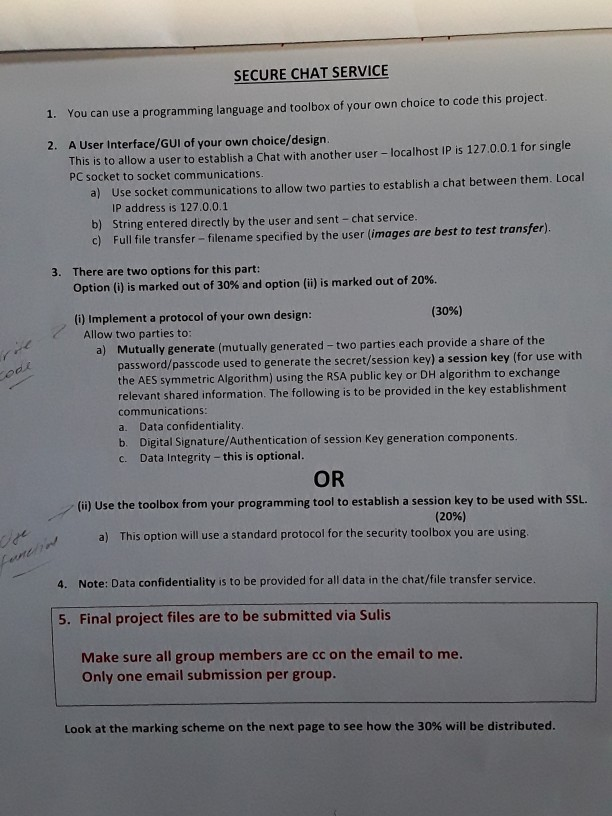
SECURE CHAT SERVICE 1. You can use a programming language and toolbox of your own choice to code this project. 2. A User Interface/GUI of your own choice/design. This is to allow a user to establish a Chat with another user - localhost IP is 127.0.0.1 for single PC socket to socket communications. a) Use socket communications to allow two parties to establish a chat between them. Local IP address is 127.0.0.1 b) String entered directly by the user and sent - chat service. c) Full file transfer - filename specified by the user images are best to test transfer). 3. There are two options for this part: Option() is marked out of 30% and option (ii) is marked out of 20%. (1) Implement a protocol of your own design: (30%) Allow two parties to: a) Mutually generate (mutually generated - two parties each provide a share of the password/passcode used to generate the secret/session key) a session key (for use with the AES symmetric Algorithm) using the RSA public key or DH algorithm to exchange relevant shared information. The following is to be provided in the key establishment communications: a. Data confidentiality. b. Digital Signature/Authentication of session Key generation components. C. Data Integrity - this is optional. OR (ii) Use the toolbox from your programming tool to establish a session key to be used with SSL. (20%) a) This option will use a standard protocol for the security toolbox you are using 4. Note: Data confidentiality is to be provided for all data in the chat/file transfer service. 5. Final project files are to be submitted via Sulis Make sure all group members are cc on the email to me. Only one email submission per group. Look at the marking scheme on the next page to see how the 30% will be distributed. SECURE CHAT SERVICE 1. You can use a programming language and toolbox of your own choice to code this project. 2. A User Interface/GUI of your own choice/design. This is to allow a user to establish a Chat with another user - localhost IP is 127.0.0.1 for single PC socket to socket communications. a) Use socket communications to allow two parties to establish a chat between them. Local IP address is 127.0.0.1 b) String entered directly by the user and sent - chat service. c) Full file transfer - filename specified by the user images are best to test transfer). 3. There are two options for this part: Option() is marked out of 30% and option (ii) is marked out of 20%. (1) Implement a protocol of your own design: (30%) Allow two parties to: a) Mutually generate (mutually generated - two parties each provide a share of the password/passcode used to generate the secret/session key) a session key (for use with the AES symmetric Algorithm) using the RSA public key or DH algorithm to exchange relevant shared information. The following is to be provided in the key establishment communications: a. Data confidentiality. b. Digital Signature/Authentication of session Key generation components. C. Data Integrity - this is optional. OR (ii) Use the toolbox from your programming tool to establish a session key to be used with SSL. (20%) a) This option will use a standard protocol for the security toolbox you are using 4. Note: Data confidentiality is to be provided for all data in the chat/file transfer service. 5. Final project files are to be submitted via Sulis Make sure all group members are cc on the email to me. Only one email submission per group. Look at the marking scheme on the next page to see how the 30% will be distributed
Step by Step Solution
There are 3 Steps involved in it

Get step-by-step solutions from verified subject matter experts
 Study Help