







Question: Securing Network Devices (Advanced) Obiective / Purpose This tab is a continuation from lab 1 (Besic device security). In this tab, students will configure secure
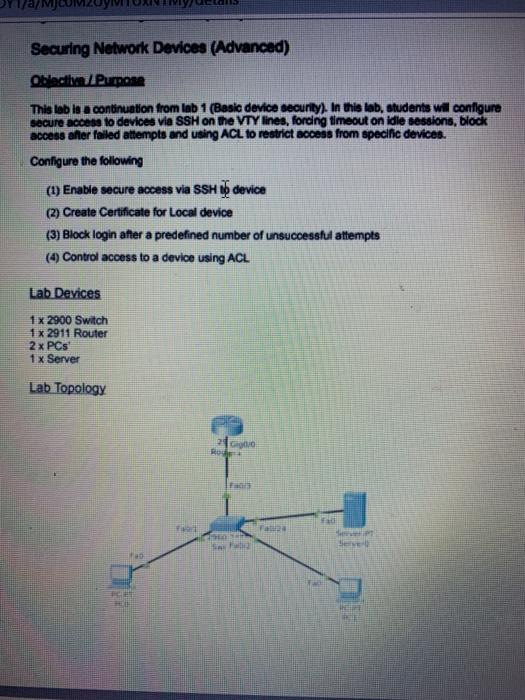
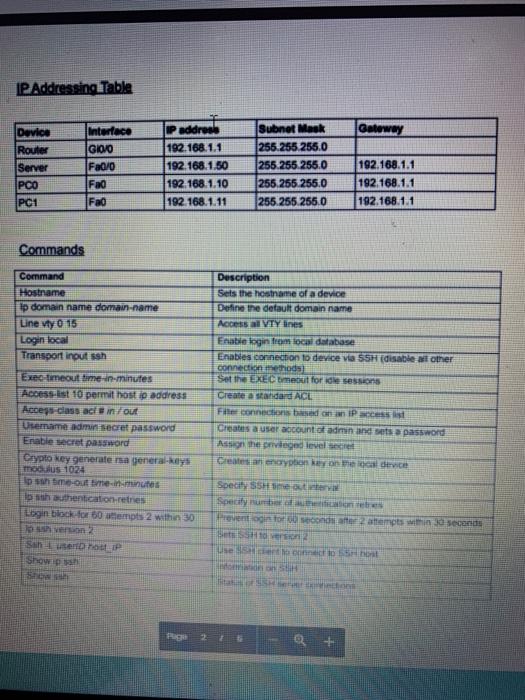
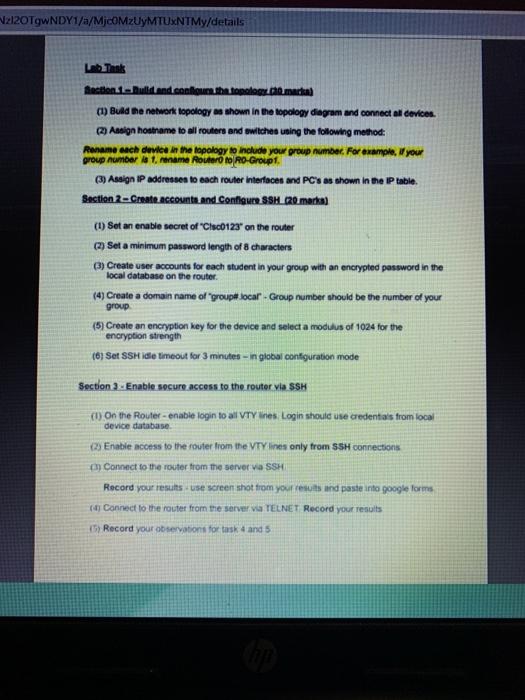
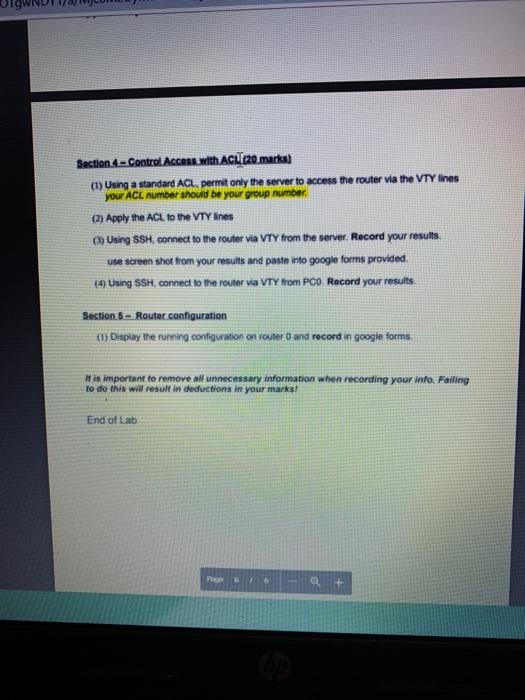
Securing Network Devices (Advanced) Obiective / Purpose This tab is a continuation from lab 1 (Besic device security). In this tab, students will configure secure access to devices via SSH on the VTY lines, fording timeout on idle sessions, block access after failed attempts and using ACL to restrict access from specific devices. Configure the following (1) Enable secure access via SSH no device (2) Create Certificate for Local device (3) Block login after a predefined number of unsucoessful attempts (4) Control access to a device using ACL Lab Devices 1 x 2900 Switch 1x 2911 Router 2 x PCs 1x Server Lab Topology GO F IP Addressing Table Gateway Device Router Server PCO PC1 Interface IGIODO Fa0/0 Fad Fao IP address 192.168.1.1 192.168.1.50 192.168.1.10 192.168.1.11 Subnet Mask 255.255.255.0 (255.255.255.0 255.255.255.0 255.255.255.0 192.168.1.1 192.168.1.1 192.168.1.1 Commands Command Hostname tp domain name domain name Line wty 0 15 Login local Transport inout seh Exec-timeout me in minutes Access-st 10 permit host ip address Access class act in fout Username admur secret password Enable secret password Crypto key generate rsa general-keys modulus 1024 Ipoh time-out time in minutes loth authentication-retres Login block for 60 attempts 2 within 30 10 version 2 Sauser IP Show! Description Sets the hostname of a device Define the default domain name Access al VIY lines Enable login from local database Enables connection to device via SSH disable al other connection methods Set the EXECUmeout for the sessions Create a standard ACE Fie connections on IP acest Creates a user account of admin and sets a password As the privileged levelse Create an encryption key on device Specify SSH me out Specify number one Prevention for second to empts within a seconds VE use ht 2 + 212OTgwNDY1/a/MjCOMzUyMTUxNTMy/details Lab Think Section Build and confiou the toplog marka (1) Bund the network topology as shown in the topology diagram and connect all devices (2) Assign hostname to all routers and switches using the following method: Rename each device in the topology to include your group number. For example, you group number 1. mame Router to RO-Group (3) Assign IP addresses to each router Interfaces and PC's as shown in the IP table Section 2 - Create accounts and Configure SSH 20 marka (1) Set an enable secret of "Cisc0123" on the router (2) Set a minimum password length of 8 characters Create user accounts for each student in your group with an encrypted password in the local database on the router. (4) Create a domain name of "groupe locar - Group number should be the number of your group (5) Create an encryption key for the device and select a modulus of 1024 for the encryption strength (6) Set SSH idle timeout for 3 minutes - in global configuration mode Section 3 - Enable secure access to the router via SSH (1) On the Router - enable login to all VTY"nes Login should use credentials from local device database os Enable access to the router from the VT lines TV lines only from SSH connections m Connect to the router from the server via SSH Record your resuts. use screen shot from your results and paste into google forme ay Connect to the route from the server va TELNET Record your results (5) Record your observations for task and Section 6 - Control Access with ACI (20 marks) (1) Using a standard ACL, permit only the server to access the router via the VTY lines your ACL number should be your group number (2) Apply the ACL to the VTY Ines Using SSH, connect to the router via VTY from the server. Record your results. use screen shot from your results and paste into google forms provided. (4) Using SSH, connect to the router via VTY from PCO Record your results Section 5 - Router.configuration (1) Display the running configuration on router and record in google forms, It is important to remove all unnecessary information when recording your info Failing to do this will result in deductions in your marks! End of Lab
Step by Step Solution
There are 3 Steps involved in it

Get step-by-step solutions from verified subject matter experts
 Study Help