







Question: sed to edit it's afer to sty in Protected View Enable Editing 7 6 Python Shell Eile Edit Shel ] Rebug Eptions Windows Help $
sed to edit it's afer to sty in Protected View
Enable Editing
Python Shell
Eile Edit Shel Rebug Eptions Windows Help
$ Welcome to Pck Up Sccks
Each player takes turns pcking up from
to stcks from a ple of stcks
Whoever Dicks up the last stick wins.
There are sticks left.
Player
how many sticks w you take?
There are sticks left.
Player
how many stcks w you take?
You can't take sticks.
How many will you take?
You can't take stcks
How many w you take?
There are sticks left.
Player
how many sticks will you take?
There are stlck s left.
Player
how many stcks w you take?
There are sticks left.
Player
how many sticks will you take?
Player wins!
Press the enter key to exit.
Press the enter key to exit.
entPython Protected View Saved to this PC V
lings
Review
View
Help
less you need to editit's safer to stay in Protected View.
Enable Editing
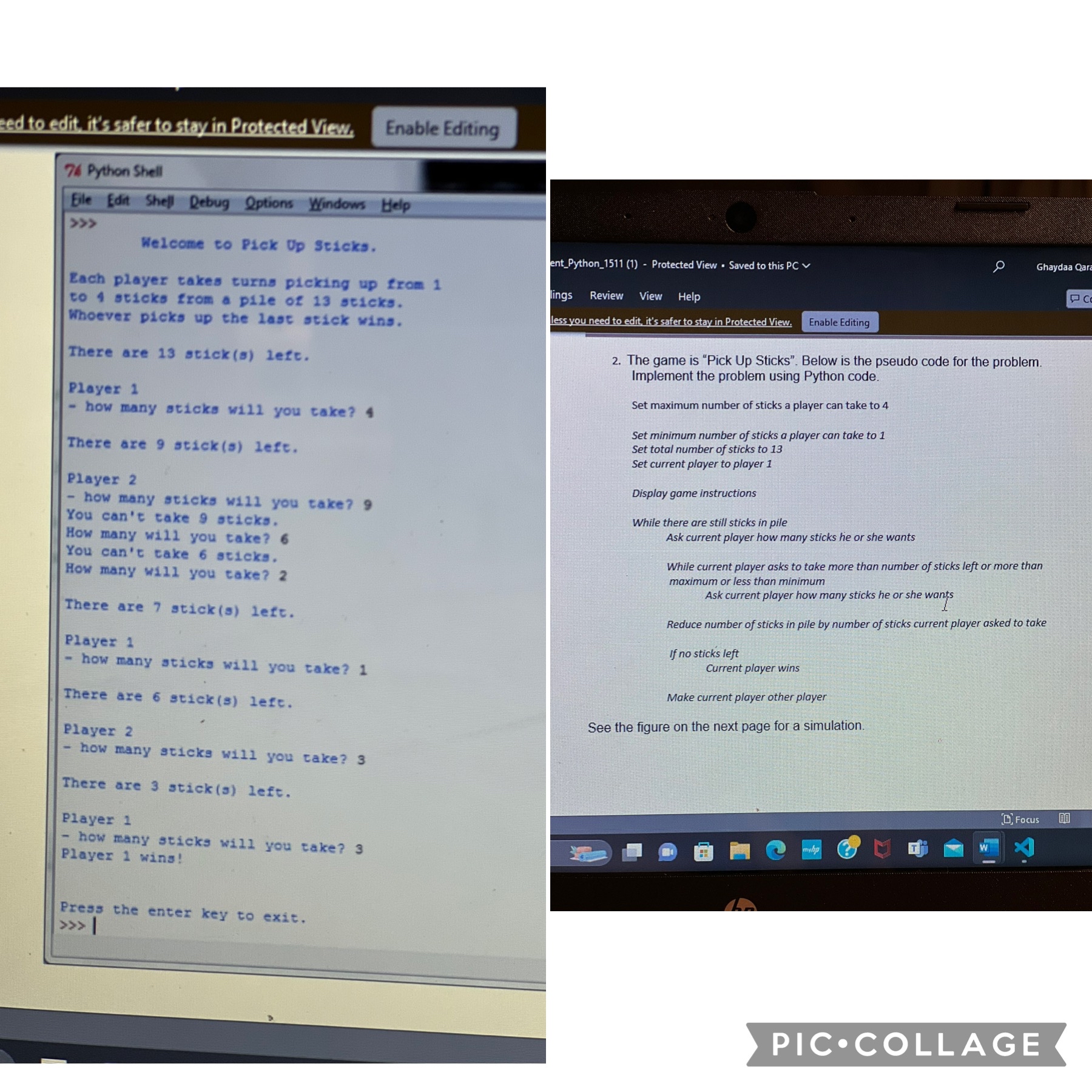
The game is "Pick Up Sticks". Below is the pseudo code for the problem. Implement the problem using Python code.
Set maximum number of sticks a player can take to
Set minimum number of sticks a player can take to
Set total number of sticks to
Set current player to player
Display game instructions
While there are still sticks in pile
Ask current player how many sticks he or she wants
While current player asks to take more than number of sticks left or more than maximum or less than minimum
Ask current player how many sticks he or she wants
Reduce number of sticks in pile by number of sticks current player asked to take
If no sticks left
Current player wins
Make current player other player
See the figure on the next page for a simulation.
See the figure on the next page for a simulation.
B Focus
Step by Step Solution
There are 3 Steps involved in it
1 Expert Approved Answer
Step: 1 Unlock

Question Has Been Solved by an Expert!
Get step-by-step solutions from verified subject matter experts
Step: 2 Unlock
Step: 3 Unlock
 Study Help