







Question: See the picture below 1. Make e the excel sheet with this data with Capacity=Actual Occupancy/ Hotel Capacity * 100 and is shown in percentage.
See the picture below
1. Make e the excel sheet with this data with Capacity=Actual Occupancy/ Hotel Capacity * 100 and is shown in percentage.
2. The borders and cell formatting should be same and the heading should include your name in it. 3. Sort the data according to hotel capacity in descending order followed by actual occupancy in descending order.
4. Copy the data in different sheet and filter according the records with cleaning expenses greater than $5, 000.
5. Your name in the heading should link to any website of your choice.
6. Copy the data in another sheet and add a row at the end, calculate total for one room, by dividing each total value by number of rooms given above.
7. All the sheets should be properly named of your choice.
8. Add a new column to show numbers for 1 to 12 and make a separate column to add names and number of months using flash fill.
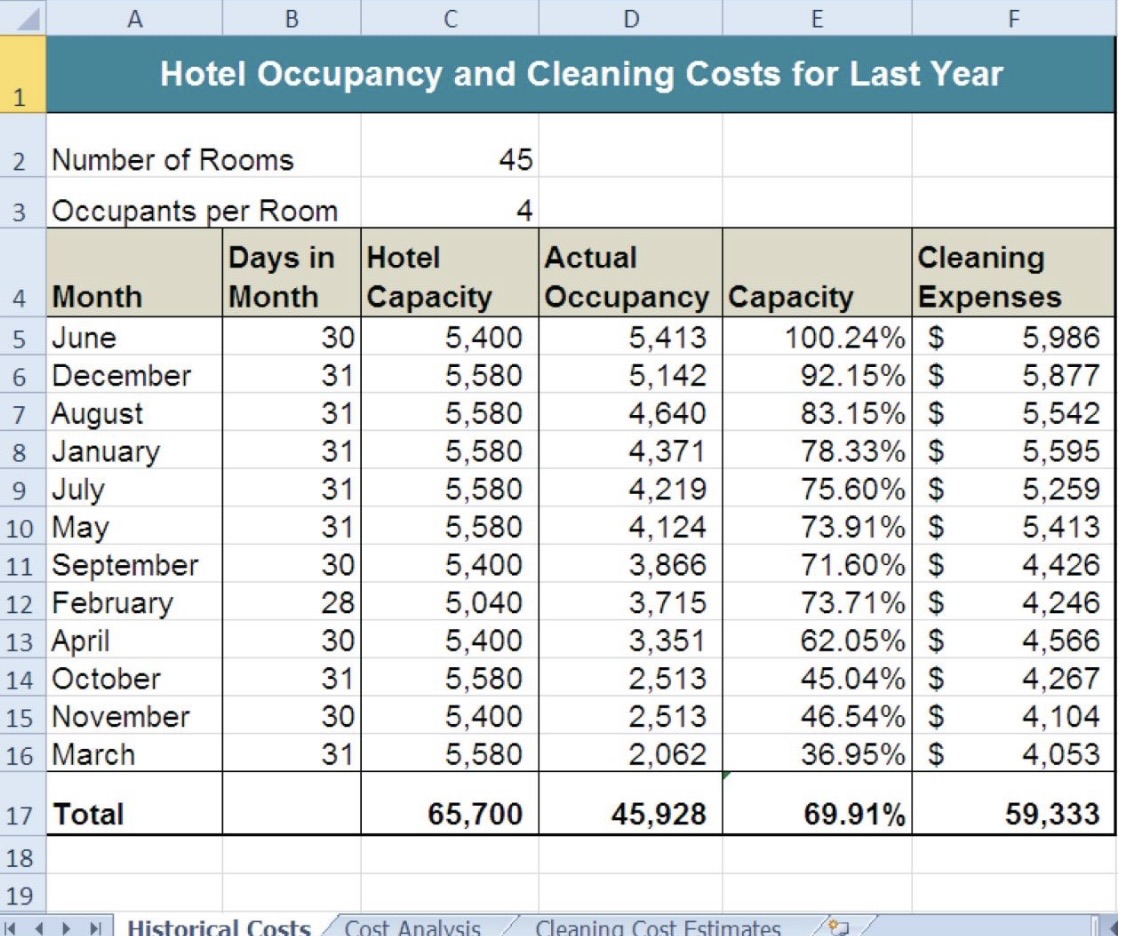
A B C D E F Hotel Occupancy and Cleaning Costs for Last Year 2 Number of Rooms 45 3 Occupants per Room 4 Days in Hotel Actual Cleaning 4 Month Month Capacity Occupancy |Capacity Expenses 5 June 30 5,400 5,413 100.24% $ 5,986 6 December 31 5,580 5,142 92.15% 5,877 7 August 31 5,580 4,640 83.15% 5,542 8 January 31 5,580 4,371 78.33% 5,595 9 July 31 5,580 4,219 75.60% 5,259 10 May 31 5,580 4,124 73.91% 5,413 11 September 30 5,400 3,866 71.60% 4.426 12 February 28 5,040 3,715 73.71% 4.246 13 April 30 5,400 3,351 62.05% 4,566 14 October 31 5,580 2,513 45.04% 4,267 15 November 30 5,400 2,513 46.54% 4, 104 16 March 31 5,580 2,062 36.95% 4,053 17 Total 65,700 45,928 69.91% 59,333 18 19 Historic ost A
Step by Step Solution
There are 3 Steps involved in it

Get step-by-step solutions from verified subject matter experts
 Study Help