







Question: Select Key C function from Driver Lib for GPIO Put arrow next to functions to use Write down parameters to use for each (port and
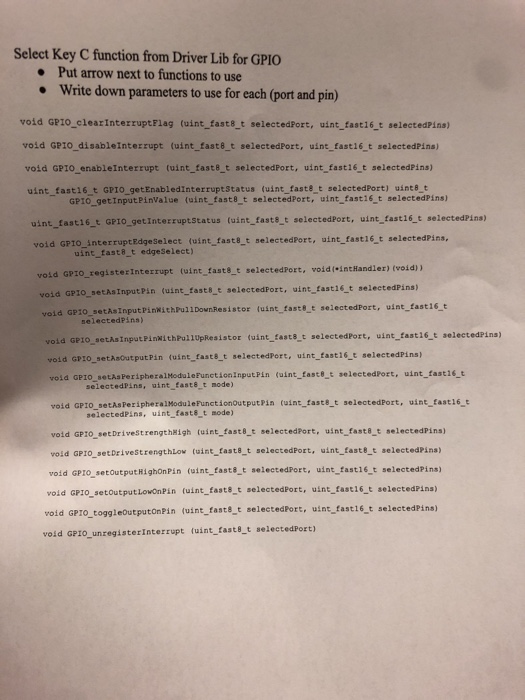
Select Key C function from Driver Lib for GPIO Put arrow next to functions to use Write down parameters to use for each (port and pin) void GPzo_clearInterruptFlag (uint_faste_t selected uint fast16 t selectedPins) vold GPIO_disableInterrupt (uint fast8 t selectedPort, uint fast16 t selectedPins) void GPIo enableInterrupt (uint fast8_t selectedPort, uint fast16 t selectedPins) uint fast16 t GPIO_getEnabledinterruptStatus (uint faste t selectedPort) uint8_t GPIO getInputPinValue (uint fast8 t selectedPort, uint fast16 t selectedPins) uint fasti6 t GPIO getInterruptStatus (uint fasts t selectedPort, uint fast16 t selectedPins) void GP10_interruptEdgeSelect (uint fast8_t selectedPort, uint fast16 t selectedPins, uint fast8 t edgeSelect) lectedPort, void( intHandler) (void)) void GPIO_registerInterrupt (uint fasts_t s void GP10 setAsInput Pin (uint_fast8_t selectedPort, uint tasti6_t selectedPins) GP10 sethsInputPinWith Pul1 Down Resistor (uint faste t selectedPort, wint fast16 t selectedPins) old GPIO sethsInputPinkithPullUpResistor (uint fasts_t selectedPort, uint fast16 t selectedPins) void GPIO sethsoutputPin (uint fasts t selectedPort, uint fasti6 t selectedPins) vola GP1o setAaPeripheralModuleFunct.ioninputPin (uint faste t selectedPort, uint_fast16 t selectedPins, int fasts t mode) void GPI0 setAsPeripheralModuleFunctionoutputPin (uint_fast8_t selectedPort, uint fast16 selectedPins, uint fasts t mode) vold GP1O setDrivestrengthkigh (uint fast8t selectedPort, uint faste t selectedPins) void GPIO setDrivestrengthLow (uint fast8 t selectedPort, wint fast& t selectedPina) void GPIO setoutput RighonPin (uint fast8 t selectedPort, uint fast16t selectedPins) void GPIO setoutputlowonPin (uint fasts t selectedPort, uint fast16 t selectedPins) void GPIO_toggleoutputonPin (uint fasts t selectedPort, uint fast16 t selectedPins) void GPIO_unregisterInterrupt fuint fast8_t selectedPort) Select Key C function from Driver Lib for GPIO Put arrow next to functions to use Write down parameters to use for each (port and pin) void GPzo_clearInterruptFlag (uint_faste_t selected uint fast16 t selectedPins) vold GPIO_disableInterrupt (uint fast8 t selectedPort, uint fast16 t selectedPins) void GPIo enableInterrupt (uint fast8_t selectedPort, uint fast16 t selectedPins) uint fast16 t GPIO_getEnabledinterruptStatus (uint faste t selectedPort) uint8_t GPIO getInputPinValue (uint fast8 t selectedPort, uint fast16 t selectedPins) uint fasti6 t GPIO getInterruptStatus (uint fasts t selectedPort, uint fast16 t selectedPins) void GP10_interruptEdgeSelect (uint fast8_t selectedPort, uint fast16 t selectedPins, uint fast8 t edgeSelect) lectedPort, void( intHandler) (void)) void GPIO_registerInterrupt (uint fasts_t s void GP10 setAsInput Pin (uint_fast8_t selectedPort, uint tasti6_t selectedPins) GP10 sethsInputPinWith Pul1 Down Resistor (uint faste t selectedPort, wint fast16 t selectedPins) old GPIO sethsInputPinkithPullUpResistor (uint fasts_t selectedPort, uint fast16 t selectedPins) void GPIO sethsoutputPin (uint fasts t selectedPort, uint fasti6 t selectedPins) vola GP1o setAaPeripheralModuleFunct.ioninputPin (uint faste t selectedPort, uint_fast16 t selectedPins, int fasts t mode) void GPI0 setAsPeripheralModuleFunctionoutputPin (uint_fast8_t selectedPort, uint fast16 selectedPins, uint fasts t mode) vold GP1O setDrivestrengthkigh (uint fast8t selectedPort, uint faste t selectedPins) void GPIO setDrivestrengthLow (uint fast8 t selectedPort, wint fast& t selectedPina) void GPIO setoutput RighonPin (uint fast8 t selectedPort, uint fast16t selectedPins) void GPIO setoutputlowonPin (uint fasts t selectedPort, uint fast16 t selectedPins) void GPIO_toggleoutputonPin (uint fasts t selectedPort, uint fast16 t selectedPins) void GPIO_unregisterInterrupt fuint fast8_t selectedPort)
Step by Step Solution
There are 3 Steps involved in it

Get step-by-step solutions from verified subject matter experts
 Study Help