







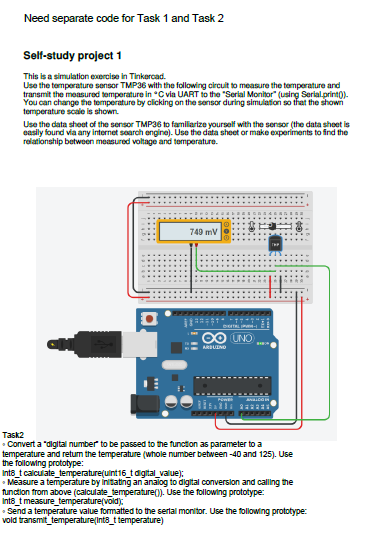
Question: Self - study project 1 This is a simulation exercise in Tinkercad. Use the temperature sensor TMP 3 6 with the following circuit to measure
Selfstudy project
This is a simulation exercise in Tinkercad.
Use the temperature sensor TMP with the following circuit to measure the temperature and
transmit the measured temperature in deg C via UART to the Serial Monitorusing Serial.print
You can change the temperature by clicking on the sensor during simulation so that the shown
temperature scale is shown.
Use the data sheet of the sensor TMP to familiarize yourself with the sensor the data sheet is
easily found via any internet search engine Use the data sheet or make experiments to find the
relationship between measured voltage and temperature.
Task
Convert a digital number to be passed to the function as parameter to a
temperature and return the temperature whole number between and Use
the following prototype:
intt calculatetemperatureuintt digitalvalue;
Measure a temperature by initiating an analog to digital conversion and calling the
function from above calculatetemperature Use the following prototype:
intt measuretemperaturevoid;
Send a temperature value formatted to the serial monitor. Use the following prototype:
void transmittemperatureintt temperature
Step by Step Solution
There are 3 Steps involved in it
1 Expert Approved Answer
Step: 1 Unlock

Question Has Been Solved by an Expert!
Get step-by-step solutions from verified subject matter experts
Step: 2 Unlock
Step: 3 Unlock
 Study Help