



Question: Set the bus bar type to 33 kV and also set the Nominal Voltage of the bus to 33 kV Set the middle busbar to
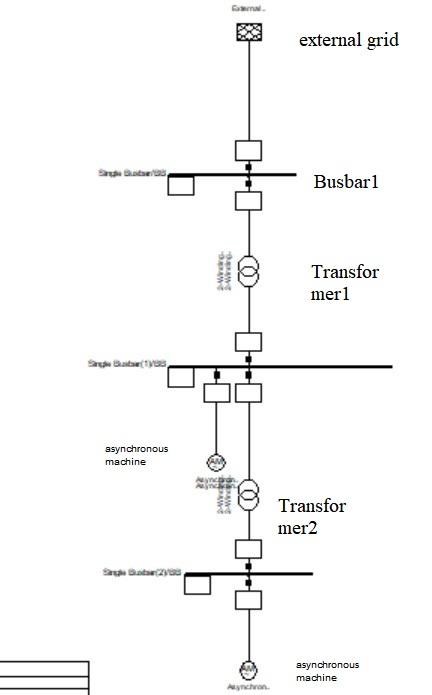
Set the bus bar type to 33 kV and also set the Nominal Voltage of the bus to 33 kV
Set the middle busbar to 11 kV and the lower busbar to 3.3 kV in the same way.
- transformer was connected in the one line diagram. Select
Type > Select Project Type
TR2 20;33/11;10%.
In the same way set the values for the bottom transformer. Select
Type / Select Project Type
TR2 5;11/3.3;5%.
Open the dialogue window to edit the external network. It is important to note that the
external grid element has no type and all electrical data is stored in the element itself.
Set the Load Flow and Short Circuit data as follows:
Load Flow data: Bus Type = "SL'' (slack); Angle = 0.0 deg; Voltage Set Point = 1.0 p.u.
VDE/IEC Short-Circuit: Short Circuit Power Sk''max = 10000 MVA; R/X ratio = 0.1
Open the dialogue window to the 11 kV asynchronous machine. Click
Type / Select Project Type
ASM 11kV 5MVA
Load Flow data: Active Power = 4 MW.
Open the dialogue window to the 3.3 kV asynchronous machine. Click
Type / Select Project Type
ASM 3.3kV 2MVA
Load Flow data: Active Power = 1 MW
Need Dlgsilent powerfactory file in .pdf format of this .
Gm external grid Busbar1 DRAW Transfor mer1 asynchronous machine NAWE ww Transfor mer2 asynchronous machine Gm external grid Busbar1 DRAW Transfor mer1 asynchronous machine NAWE ww Transfor mer2 asynchronous machine
Step by Step Solution
There are 3 Steps involved in it

Get step-by-step solutions from verified subject matter experts