







Question: Set up as Excel Spreadsheet. Table fits on page 1. Apply Wrap Text as needed. Do not crowd or abbreviate words. Formula screen shot &
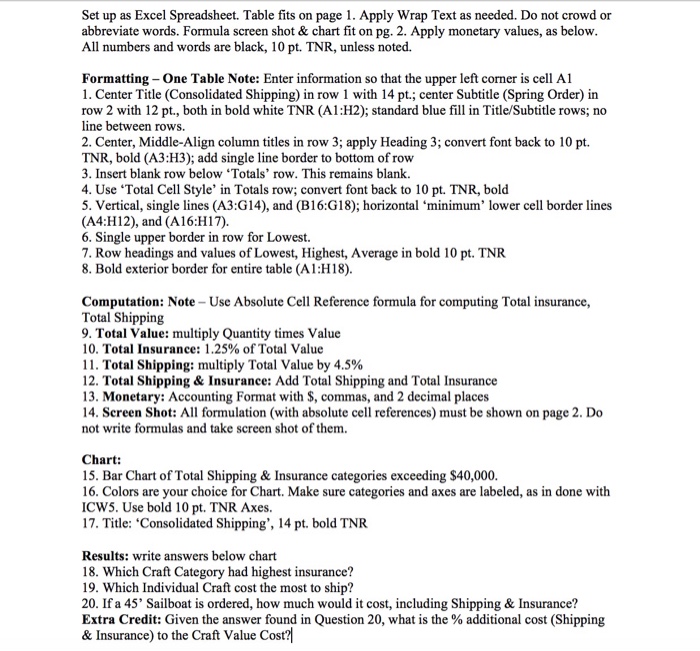
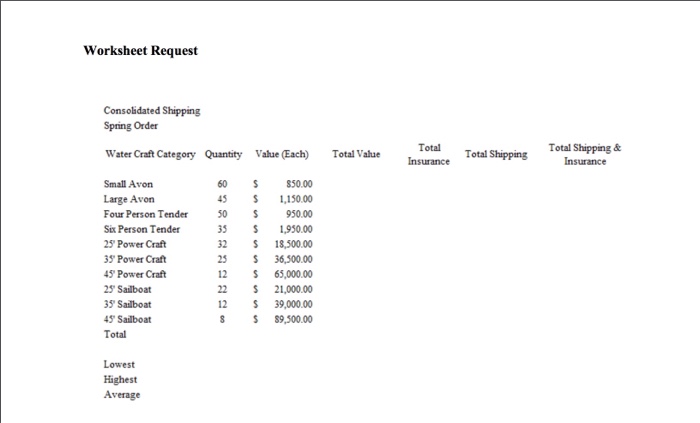
Set up as Excel Spreadsheet. Table fits on page 1. Apply Wrap Text as needed. Do not crowd or abbreviate words. Formula screen shot & chart fit on pg. 2. Apply monetary values, as below All numbers and words are black, 10 pt. TNR, unless noted. Formatting One Table Note: Enter information so that the upper left corner is cell Al 1. Center Title (Consolidated Shipping) in row 1 with 14 pt.; center Subtitle (Spring Order) in row 2 with 12 pt., both in bold white TNR (A1:H2); standard blue fill in Title/Subtitle rows; no line between rows. 2. Center, Middle-Align column titles in row 3; apply Heading 3; convert font back to 10 pt. TNR, bold (A3:H3); add single line border to bottom of row 3. Insert blank row below Totals' row. This remains blank 4. Use 'Total Cell Style' in Totals row; convert font back to 10 pt. TNR, bold 5. Vertical, single lines (A3:G14), and (B16:G18); horizontal 'minimum' lower cell border lines (A4:H12), and (A16:H17). 6. Single upper border in row for Lowest. 7. Row headings and values of Lowest, Highest, Average in bold 10 pt. TNR 8. Bold exterior border for entire table (A1:H18). Computation: Note-Use Absolute Cell Reference formula for computing Total insurance, Total Shipping 9. Total Value: multiply Quantity times Value 10. Total Insurance: 1.25% ofTotal Value 11. Total Shipping: multiply Total Value by 4.5% 12. Total Shipping&Insurance: Add Total Shipping and Total Insurance 13. Monetary: Accounting Format with S, commas, and 2 decimal places 14. Screen Shot: All formulation (with absolute cell references) must be shown on page 2. Do not write formulas and take screen shot of them. Chart: 15. Bar Chart of Total Shipping & Insurance categories exceeding $40,000. 16. Colors are your choice for Chart. Make sure categories and axes are labeled, as in done with ICW5. Use bold 10 pt. TNR Axes. 17. Title: 'Consolidated Shipping', 14 pt. bold TNR Results: write answers below chart 18. Which Craft Category had highest insurance? 19. Which Individual Craft cost the most to ship? 20. If a 45' Sailboat is ordered, how much would it cost, including Shipping&Insurance? Extra Credit: Given the answer found in Question 20, what is the % additional cost (Shipping & Insurance) to the Craft Value Cost
Step by Step Solution
There are 3 Steps involved in it

Get step-by-step solutions from verified subject matter experts
 Study Help