







Question: Setting up the project ( 2 points ) Create a new Java project called Module02Test . Add a package called m02 and inside this package,
Setting up the project ( 2 points )
Create a new Java project called Module02Test. Add a package called m02 and inside this package, a class Module02 that includes a main method. Add DryerSetting.java Download DryerSetting.java to the package. This enum class is provided for you. Soon you will add more files as you implement the classes shown in the UML class diagram.
Style | Doc Comments | Best Practices (5 points)
Follow the guidelines and expectations regarding style and best practices. Please pay special attention to doc comments (2 out of 5 points) Other areas to focus on: using @Override whenever overriding methods, adding a single empty line after each method declaration, use of descriptive names, removing //TODO comments once a method has been implemented, grouping, and proper indentation,
Requirements:
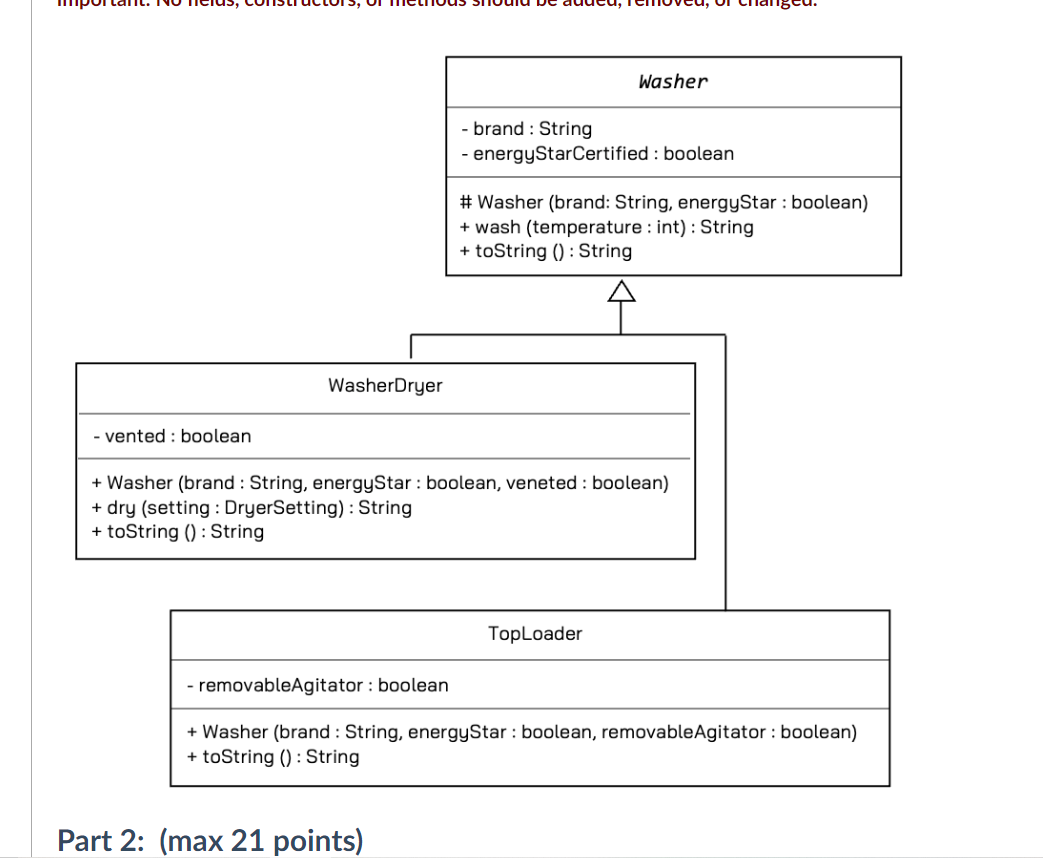
Implement the classes as specified in the UML Class Diagram and the instructions below.
Part 1: (max 15 points)
Declare the classes, fields, constructors, and methods as specified in the UML class diagram.
All classes should be declared public. Please pay close attention to details like -, +, #, arrowheads, use of italic, etc. Note that there is only one word written in italic; I used a different font to make it stand out. Important: No fields, constructors, or methods should be added, removed, or changed.
Part 2: (max 21 points)
Step by Step Solution
There are 3 Steps involved in it

Get step-by-step solutions from verified subject matter experts
 Study Help