







Question: Settings Help Unit 3 Discussion 1 : Attack Vectors and Security Controls Subscribe The human resource ( HR ) specialist for TRex, Inc. is the
Settings
Help
Unit Discussion : Attack Vectors and Security Controls
Subscribe
The human resource HR specialist for TRex, Inc. is the only person who is authorized to access the data for the TRex HR department. The data is inputted through the keyboard into the spreadsheet. As the HR specialist performs updates to the spreadsheet, the data is displayed to the screen using the laptop memory and processes. When the HR specialist has completed editing the spreadsheet, the HR specialist saves the spreadsheet to the laptop's hard drive and prints it through a wireless network connection. To ensure the spreadsheet can be restored if ever lost from the production environment, the HR specialist copies the latest version of the spreadsheet from the laptop hard drive to a USB flash drive as a backup.
Consider the answers to the following questions to identify attack vectors Phase
and security controls for mitigating those attack vectors Phase :
What are all the system components in the scenario that can process, transmit, andor store information?
What are the authorized locations for the data as it pertains to storage,
Notification Sugge
transmission, execution environment, input, and output?
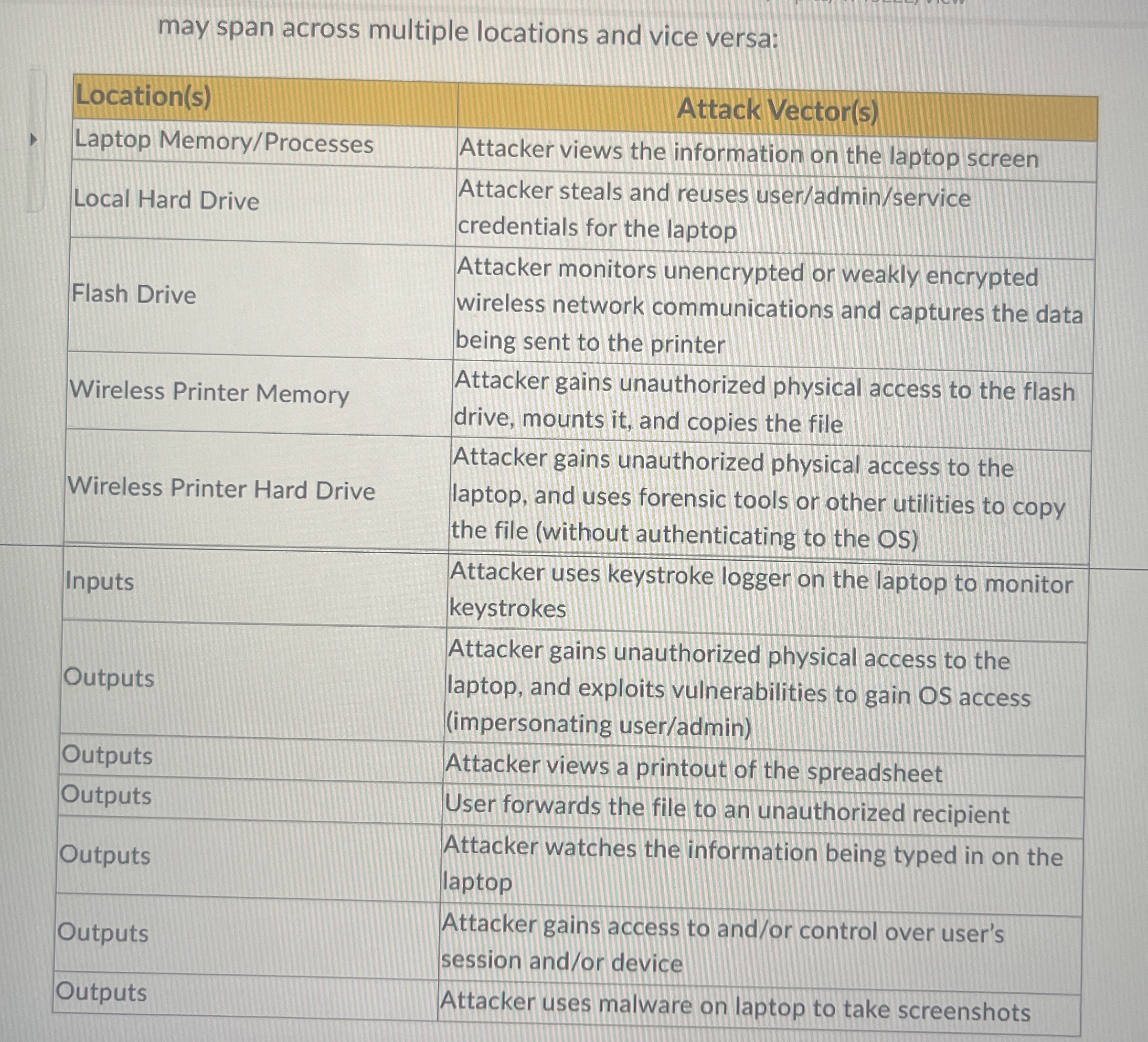
Match the following attack vectors to applicable locations Attack vectors may span across multiple locations and vice versa:
may span across multiple locations and vice versa:
tableLocationsAttack VectorsLaptop MemoryProcessesAttacker views the information on the laptop screenLocal Hard Drive,tableAttacker steals and reuses useradminservicecredentials for the laptopFlash Drive,tableAttacker monitors unencrypted or weakly encryptedwireless network communications and captures the databeing sent to the printerWireless Printer Memory,tableAttacker gains unauthorized physical access to the flashdrive mounts it and copies the fileWireless Printer Hard Drive,tableAttacker gains unauthorized physical access to thelaptop and uses forensic tools or other utilities to copythe file without authenticating to the OSInputstableAttacker uses keystroke logger on the laptop to monitorkeystrokesOutputstableAttacker gains unauthorized physical access to thelaptop and exploits vulnerabilities to gain OS accessimpersonating useradminOutputsAttacker views a printout of the spreadsheetOutputsUser forwards the file to an unauthorized recipientOutputstableAttacker watches the information being typed in on thelaptopOutputstableAttacker gains access to andor control over user'ssession andor deviceOutputsAttacker uses malware on laptop to take screenshots
Step by Step Solution
There are 3 Steps involved in it
1 Expert Approved Answer
Step: 1 Unlock

Question Has Been Solved by an Expert!
Get step-by-step solutions from verified subject matter experts
Step: 2 Unlock
Step: 3 Unlock
 Study Help