







Question: Seve&Ext Submt value 5.00 points Laurman, Inc is considering a new project and has provided the details of the investment Use the information included in
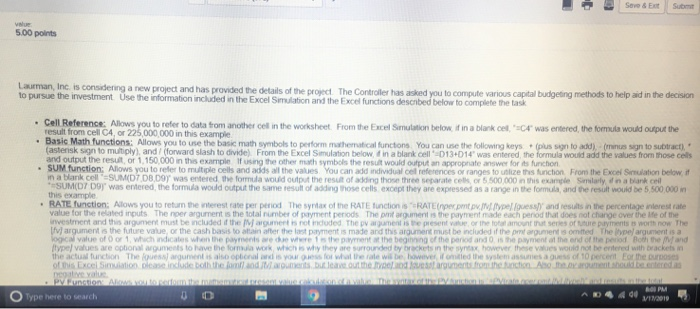
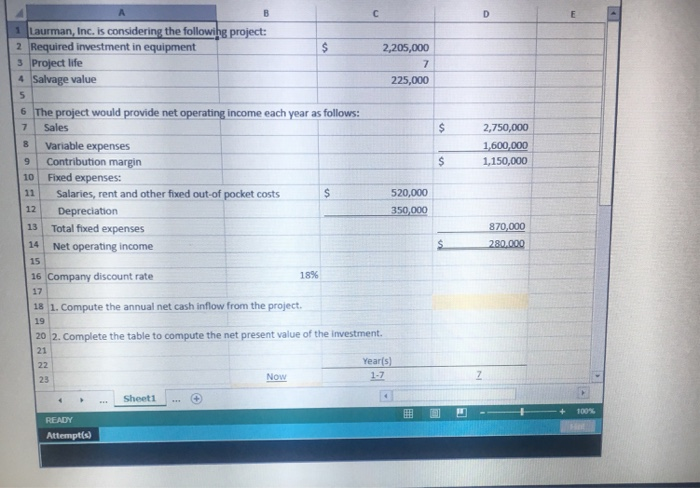
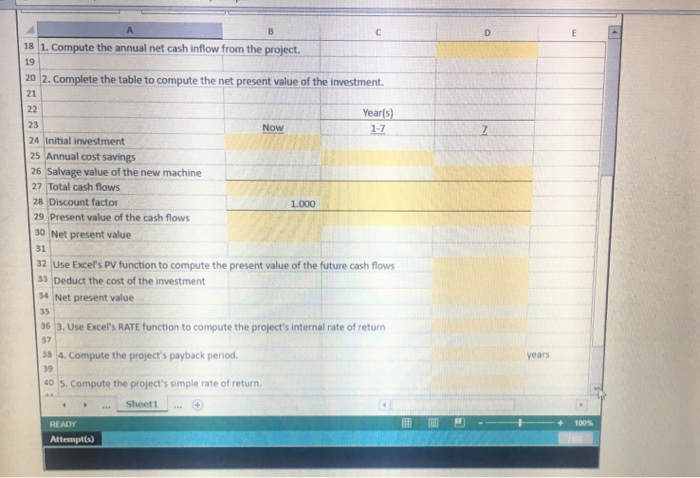
Seve&Ext Submt value 5.00 points Laurman, Inc is considering a new project and has provided the details of the investment Use the information included in the Excel Simulation and the Excel functions descnbed below to complete the tas project The Controller has asked you to compute various capital budgeting methods to help aid in the decision result from cell C4, or 225,000,000 in this example . Basic Math functions: Allows you to use the basic math symbols to perform mathematical functions You can use the following keys (pus sign to add), (minus sign to subtract) asterisk sign to mutiply), and forward slash to divide) From the Excel Se ulation below d in a blark ell-D13+D14, was entered the would add the values from those cells output the resuit, or 1,150,000 in this example If using the other math symbols the resuit would output an appropnate answer for ts furchon SUM function; Allows you to refer to multiple cels and adds al the values You can add individual cef references or ranges to unlize thes function From the Excel Sinulation below, it m -SUM(DT Doy was entered, the formua would output the same result of adding those cells except they are expressed as a range in the formula, and the result oud be 5,3 this example RATE function; Allows you to retum the interest rate per period The syntax of the RATE function is RATE (permtpy. tpe quess) and resuts in the percentage interest rate value for the related inputs The nper argunenit is the total number of payment periods The pnt argument is the payment made each peniod that does not change over the ife of the nvestment and this argunert must be r cluded if the M a'gurner. ts ret included The pv argxament is pesent vaie or the totar amour nat series of Mure payments worth now The argument is the future value, or the cash basis to atain after the last paryment is made and this argument must be included if the pnt argument is omted The Iveel argument is a value of O or 1, vhuch indicales when he payments are de where 1 s the payment at the beginning of the period and 0 is the payment at the end of the period Both the j and typel values are opional argumeets to have the formula work, which is why they are surrounded by brackets in the syntax, however these values would not be entered with brackes n the actual funct on The guess argument rs also opbonal awxl S y guess fos whal the rate wil be haen er " cnidled the syste assunies a guess of 10 percent or e onoses the Jomtl aodJrouments bu.leae.outthe. uesst arguments.om.hection Ao eo yalue O Type here to search U D 1 Laurman, Inc. is considering the followihg project: Required investment in equipment 3 Project life 4 Salvage value 5 6 The project would provide net operating income each year as follows: 7 Sales 8 Variable expenses contribution margin 101 Fixed expenses: 11Salaries, rent and other fixed out-of pocket costs 12 Depreciation 13 Total fixed expenses 2,205,000 225,000 $2,750,000 600,000 1,150,000 520,000 870,000 14 Net operating income 15 16 17 18 1. Compute the annual net cash inflow from the project 19 20 2. Complete the table to compute the net present value of the investment. 21 discount rate 18% Year(s) 23 Sheet1 + 100% - Attempt(s) 18 1. Compute the annual net cash inflow from the project. 19 20 2. Complete the table to compute the net present value of the investment 21 Yearfs) 23 24 Initial investment 25 Annual cost savings 26 Salvage value of the new machine Now Total cash flows 28 Discount factor 1.000 29 Present value of the cash flows 30 Net present value 31 32 Use Excer's PV function to compute the present value of the future cash flows 3 Deduct the cost of the investment 34 Net present value 35 63. Use Excel's RATE function to compute the project's internal rate of return 37 8 4. Compute the project's payback period years 40 S. Compute the project's simple rate of return, Sheet1 100% Attempts)
Step by Step Solution
There are 3 Steps involved in it

Get step-by-step solutions from verified subject matter experts
 Study Help