







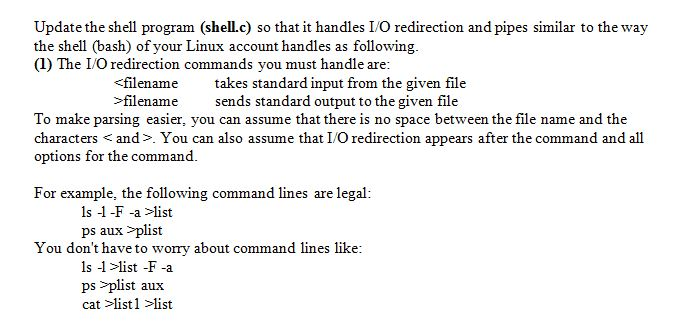
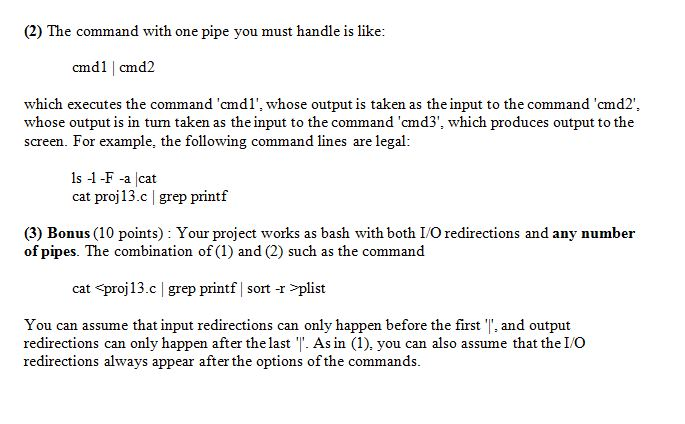
Question: Shell.c: #include #include #include #include #include #include #include #include #include #include #define BUFFER_LENGTH 1024 using namespace std; int main(){ //set the variables char line[BUFFER_LENGTH]; char*
Shell.c:
#include
#include
#include
#include
#include
#include
#include
#include
#include
#include
#define BUFFER_LENGTH 1024
using namespace std;
int main(){
//set the variables
char line[BUFFER_LENGTH];
char* argv[100];
char* path= "/bin/";
char execmd[20];
int arguments;
while(1){
//begin the shell command line
printf("My shell>> ");
if(!fgets(line, BUFFER_LENGTH, stdin)){
size_t length = strlen(line);
if (line[length - 1] == ' ')
line[length - 1] = '\0';
}
if(strcmp(line, "exit")==0){
break;
}
char *token;
token = strtok(line," ");
int i=0;
while(token!=NULL){
argv[i]=token;
token = strtok(NULL," ");
i++;
}
argv[i]=NULL;
arguments=i;
for(i=0; i printf("%s ", argv[i]); } strcpy(execmd, path); strcat(execmd, argv[0]); for(i=0; i if(execmd[i]==' '){ execmd[i]='\0'; } } int pid = fork(); if(pid==0){ execvp(execmd,argv); fprintf(stderr, "Child process could not do execvp "); //exit the child }else{ wait(NULL); printf("Child exited "); } } }
Step by Step Solution
There are 3 Steps involved in it

Get step-by-step solutions from verified subject matter experts
 Study Help