Question: should be in Excel can share with me. COMPUTER PROJECT #2 [SPREADSHEET EXERCISE #21 USING TODAY', FUNCTION AND IF, FUNCTION FORMULA (using Excel) In this
should be in Excel can share with me.
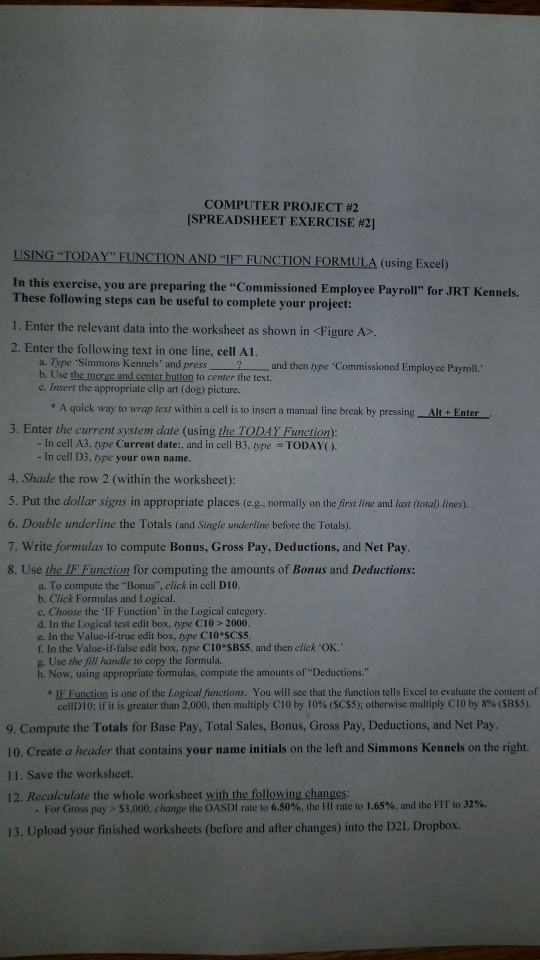
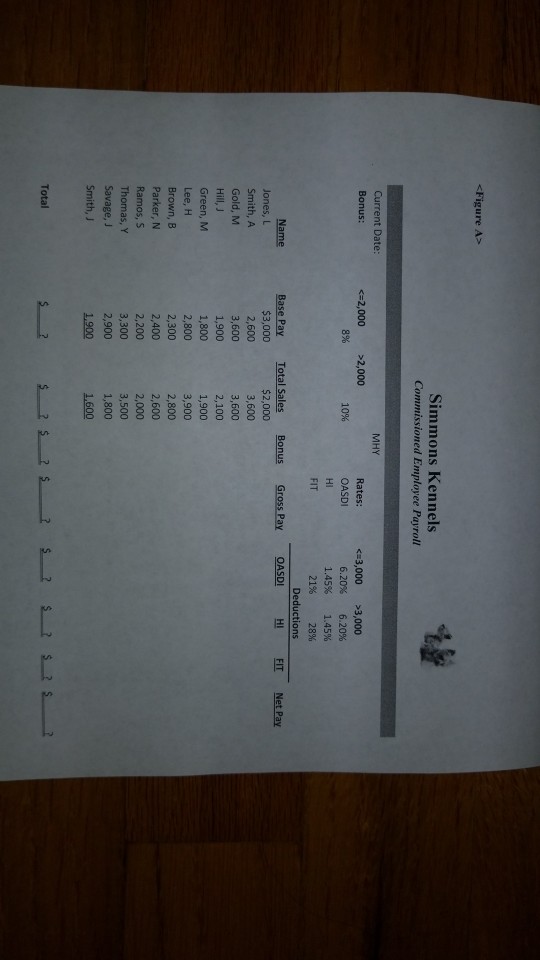
COMPUTER PROJECT #2 [SPREADSHEET EXERCISE #21 USING "TODAY', FUNCTION AND "IF, FUNCTION FORMULA (using Excel) In this exercise, you are preparing the "Commissioned Employee Payroll" for JRT Kennels. These following steps can be useful to complete your project: 1. Enter the relevant data into the worksheet as shown in 2. Enter the following text in one line, cell Al. a. Type 'Simmons Kennels' and press b. Use 2 and then type 'Commissioned Employee Payrol. to center the text. c. Insert the appropriate clip art (dog) picture. " A quick way to wrap text within a cell is to insert a manual line break by pressing Alt+Enter 3. Enter the current system date (using the TODAY Function): TODAYO. - In cell A3, type Current date:, and in cell B3, type -In cell D3type your own name 4. Shade the row 2 (within the worksheet): 5. Put the dollar signs in appropriate places (e.g., normally on the first line and last (toal) lines). 6. Double underline the Totals (and Single wnderline before the Totalby) 7. Write formulas to compute Bonus, Gross Pay, Deductions, and Net Pay 8. Use the IF Function for computing the amounts of Bonus and Deductions: a. To compute the "Bonus", click in cell D10 b. Click Formulas and Logical. c. Choose the IF Function' in the Logical category d. In the Logical test edit boxtype C10 > 2000 e. In the Value-if-true edit box, type CI0 SCSS. f. In the Value-if-false edit box, type C10 SBS5, and then click 'OK. g. Use the fill handle to copy the formula. h. Now, using appropriate formulas, compute the amounts ofDeductions." IFE Function is one of the Logical functions. You will see that the function tells Excel to evaluate the content of cellD 10; if it is greater than 2,000, then multiply C10 by 10% (SC$5); otherwise multiply C10 by 8% (SBS5). 9. Compute the Totals for Base Pay, Total Sales, Bonus, Gross Pay, Deductions, and Net Pay. 10. Create a header that contains your name initials on the left and Simmons Kennels on the right. 11. Save the worksheet. 12. Recalculate the whole worksheet with the following changes For Gross pay > $3,000, change the OASDI rate to 6.50%, the HI rate to 1.65%, and the FIT to 32%. 13. Upload your finished worksheets (before and after changes) into the D2L. Dropbox
Step by Step Solution
There are 3 Steps involved in it
1 Expert Approved Answer
Step: 1 Unlock
Question Has Been Solved by an Expert!
Get step-by-step solutions from verified subject matter experts
Step: 2 Unlock
Step: 3 Unlock
Students Have Also Explored These Related Databases Questions!









 Study Help