







Question: Show commands for each step. Unix 2. Copy data file ../../bio425/data/mystery_seql.fas into your home directry 3. Add /data/biocs/b/bio425/bin to your the SPATH variable in the
Show commands for each step. Unix
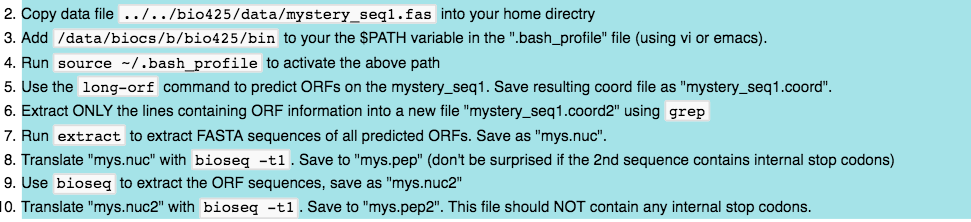
2. Copy data file ../../bio425/data/mystery_seql.fas into your home directry 3. Add /data/biocs/b/bio425/bin to your the SPATH variable in the ".bash_profile" file (using vi or emacs). 4. Run source -1.bash_profile to activate the above path 5. Use the long-orf command to predict ORFs on the mystery_seq1. Save resulting coord file as "mystery_seq1.coord". 6. Extract ONLY the lines containing ORF information into a new file "mystery_seq1.coord2" using grep 7. Run extract to extract FASTA sequences of all predicted ORFs. Save as "mys.nuc" 8. Translate "mys.nuc" with bioseq -tl. Save to "mys.pep" (don't be surprised if the 2nd sequence contains internal stop codons) 9. Use bioseq to extract the ORF sequences, save as "mys.nuc2" 0. Translate "mys.nuc2" with bioseq -t1. Save to "mys.pep2". This file should NOT contain any internal stop codons 2. Copy data file ../../bio425/data/mystery_seql.fas into your home directry 3. Add /data/biocs/b/bio425/bin to your the SPATH variable in the ".bash_profile" file (using vi or emacs). 4. Run source -1.bash_profile to activate the above path 5. Use the long-orf command to predict ORFs on the mystery_seq1. Save resulting coord file as "mystery_seq1.coord". 6. Extract ONLY the lines containing ORF information into a new file "mystery_seq1.coord2" using grep 7. Run extract to extract FASTA sequences of all predicted ORFs. Save as "mys.nuc" 8. Translate "mys.nuc" with bioseq -tl. Save to "mys.pep" (don't be surprised if the 2nd sequence contains internal stop codons) 9. Use bioseq to extract the ORF sequences, save as "mys.nuc2" 0. Translate "mys.nuc2" with bioseq -t1. Save to "mys.pep2". This file should NOT contain any internal stop codons
Step by Step Solution
There are 3 Steps involved in it

Get step-by-step solutions from verified subject matter experts
 Study Help