







Question: Show how to make the formatted table on Matlab. Please show all commands and steps. Write a MATLAB function (not a script) that takes one
Show how to make the formatted table on Matlab. Please show all commands and steps.
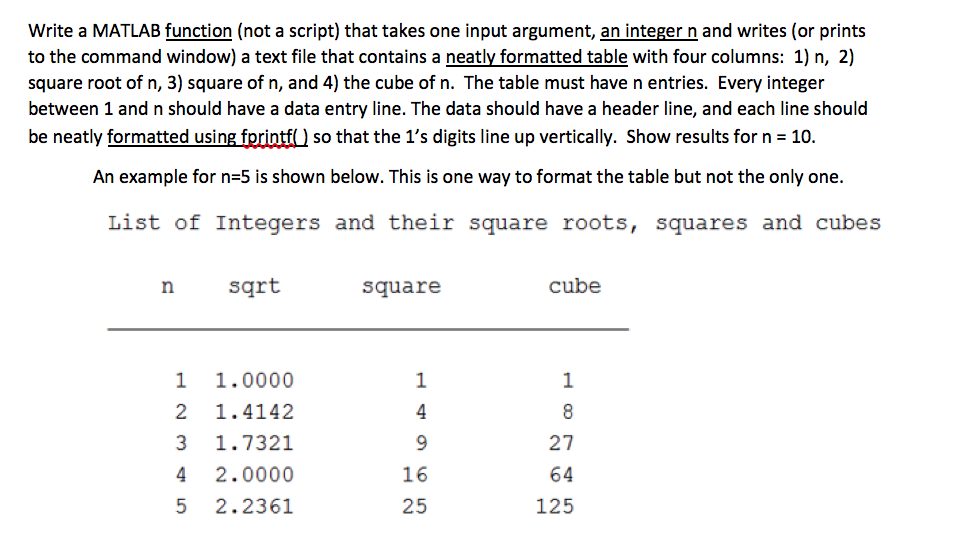
Write a MATLAB function (not a script) that takes one input argument, an integer n and writes (or prints to the command window) a text file that contains a neatly formatted table with four columns: 1) n, 2) square root of n, 3) square of n, and 4) the cube of n. The table must have n entries. Every integer between 1 and n should have a data entry line. The data should have a header line, and each line should be neatly formatted using f so that the 1's digits line up vertically. Show results for n 10 An example for n 5 is shown below. This is one way to format the table but not the only one. List of Integers and their square roots, squares and cubes sqrt square cube 1 1.0000 2 1.4142 3 1.7321 4 2.0000 5 2.2361 1 4 1 16 25 27 64 125
Step by Step Solution
There are 3 Steps involved in it

Get step-by-step solutions from verified subject matter experts
 Study Help