







Question: Show me the steps to solve on microsoft access. IDS 2 0 0 Fall 2 0 2 4 Assignment 1 Due Friday 9 / 2
Show me the steps to solve on microsoft access.
IDS Fall Assignment
Due Friday
points
Instructions
Deadline
In order to receive full credit, this assignment must be submitted by Friday, September th at :pm Submitting your assignment early is recommended. Late submissions will be accepted with a pt penalty up to one week after the submission deadline. After that, assignments will not be accepted.
Assignment Overview
Built a Microsoft Access database file for managing employee, project, and vendor data with tables, fields, relationships, and queries as given below.
Submit your Access file the accdb file NOT any lock file with the laccdb extension.
Tables should not include any record data TAs may import data to test your work. However, you may find it useful to temporarily add some data to your tables for query testing.
Checklist
Here are some sensible checks before you click that upload button:
Check your fields and make sure they match all the assignment specifications.
Check your relationships referential integrity is unnecessary here and can make testing more difficult.
Test your queries: write one matching & one nonmatching record for each query. then, when you run the query, you should get only the matching result. and if you do then your query is probably correct.
Delete any records you have created in step
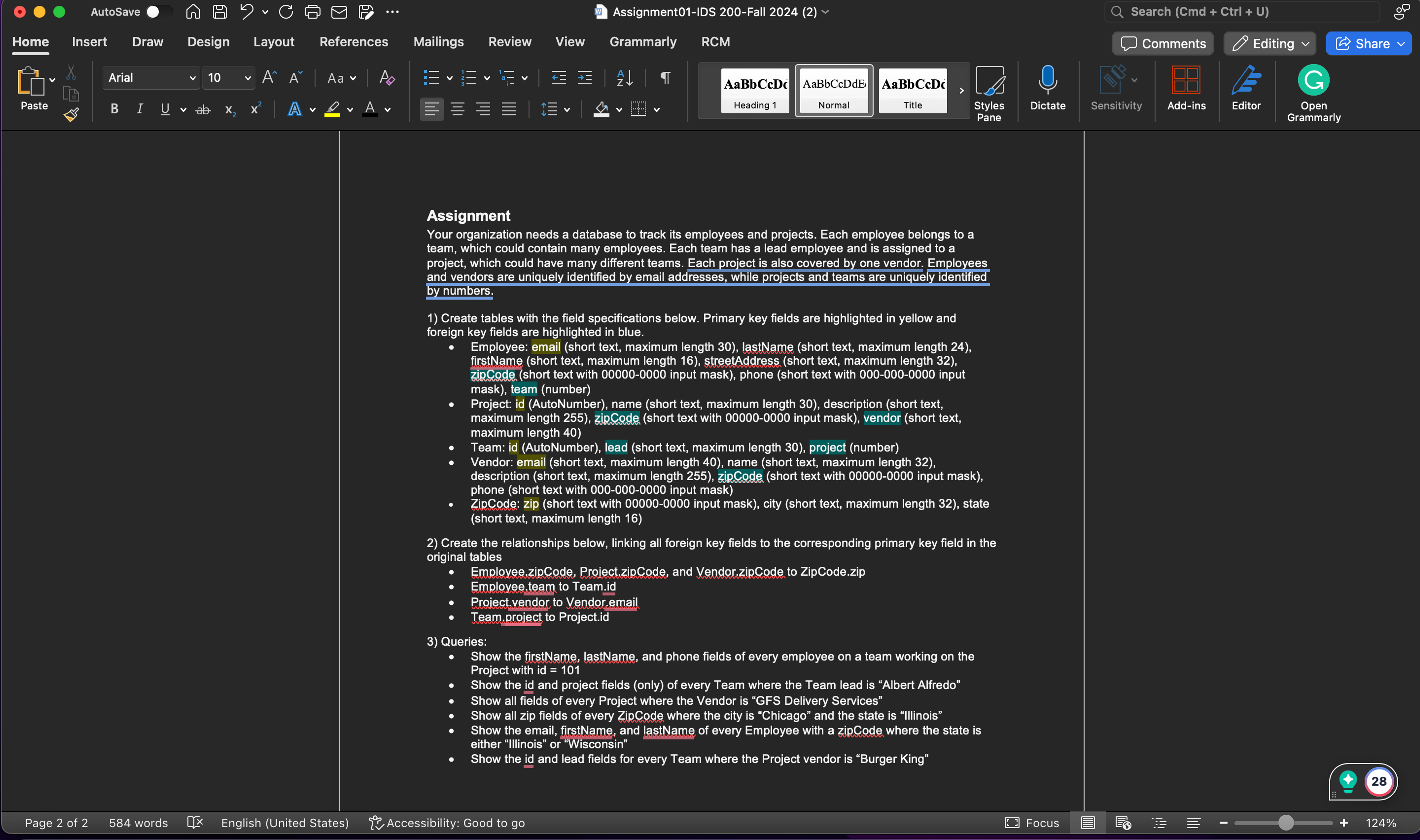
Assignment
Your organization needs a database to track its employees and projects. Each employee belongs to a team, which could contain many employees. Each team has a lead employee and is assigned to a project, which could have many different teams. Each project is also covered by one vendor. Employees and vendors are uniquely identified by email addresses, while projects and teams are uniquely identified by numbers.
Create tables with the field specifications below. Primary key fields are highlighted in yellow and foreign key fields are highlighted in blue.
Employee: email short text, maximum length lastName short text, maximum length firstName short text, maximum length streetAddress short text, maximum length zipCode short text with input mask phone short text with input mask team number
Project: id AutoNumber name short text, maximum length description short text, maximum length zipCode short text with input mask vendor short text, maximum length
Team: id AutoNumber lead short text, maximum length project number
Vendor: email short text, maximum length name short text, maximum length description short text, maximum length zipCode short text with input mask phone short text with input mask
ZipCode: zip short text with input mask city short text, maximum length state short text, maximum length
Create the relationships below, linking all foreign key fields to the corresponding primary key field in the original tables
Employee.zipCode, Project.zipCode, and Vendor.zipCode to ZipCode.zip
Employee.team to Team.id
Project.vendor to Vendor.email
Team.project to Project.id
Queries:
Show the firstName, lastName, and phone fields of every employee on a team working on the Project with id
Show the id and project fields only of every Team where the Team lead is Albert Alfredo
Show all fields of every Project where the Vendor is GFS Delivery Services
Show all zip fields of every ZipCode where the city is Chicago and the state is Illinois
Show the email, firstName, and lastName of every Employee with a zipCode where the state is either Illinois or Wisconsin
Show the id and lead fields for every Team where the Project vendor is Burger King
Step by Step Solution
There are 3 Steps involved in it
1 Expert Approved Answer
Step: 1 Unlock

Question Has Been Solved by an Expert!
Get step-by-step solutions from verified subject matter experts
Step: 2 Unlock
Step: 3 Unlock
 Study Help