







Question: Show me the steps to solve Problem 3 : Implementing a Shopping Cart Implement a simple shopping cart using an array of objects. Files Provided:
Show me the steps to solve Problem : Implementing a Shopping Cart
Implement a simple shopping cart using an array of
objects.
Files Provided:
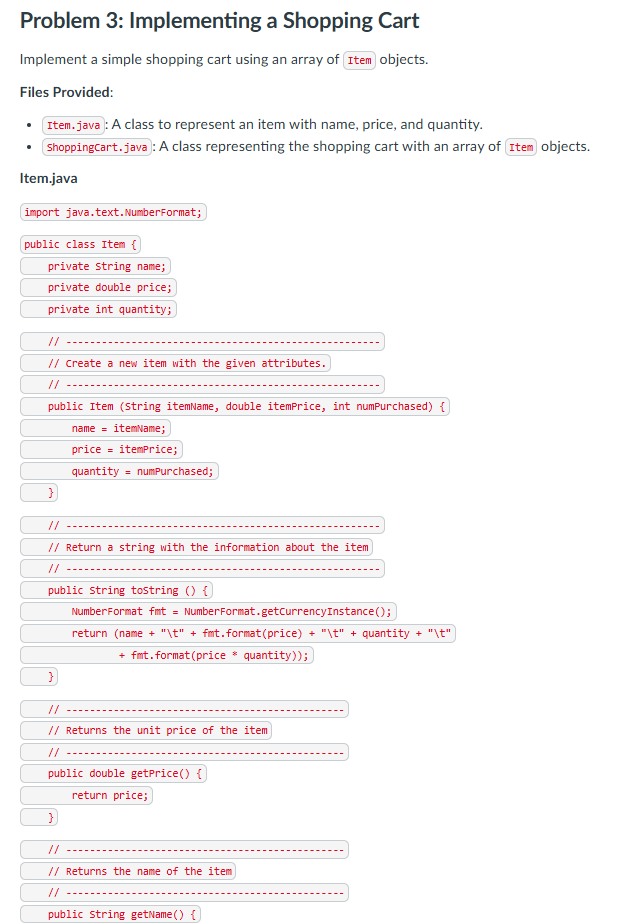
: A class to represent an item with name, price, and quantity.
ShoppingCart.java: A class representing the shopping cart with an array of objects.
Item.java
import java.text.NumberFormat;
public class Item
private String name;
private double price;
private int quantity;
Create a new item with the given attributes.
public Item String itemName, double itemPrice, int numPurchased
name itemName;
price itemPrice;
quantity numpurchased;
Return a string with the information about the item
public string tostring
NumberFormat fmt NumberFormat.getCurrencyInstance;
return name t fmtformatpricet quantity t
fmtformatprice quantity;
Returns the unit price of the item
public double getPrice
return price;
Returns the name of the item
public string getName return name;
Returns the quantity of the item
public int getquantity
return quantity;
ShoppingCart.java
import java.text.NumberFormat;
public class ShoppingCart
private int itemCount; total number of items in the cart
private double totalprice; total price of items in the cart
private int capacity; current cart capacity
Creates an empty shopping cart with a capacity of items.
public ShoppingCart
capacity ;
itemCount ;
totalPrice ;
Adds an item to the shopping cart.
public void addToCartString itemName, double price, int quantity
Implementation of adding item to cart should go here
Returns the contents of the cart together with summary information.
public string toString
NumberFormat fmt NumberFormat.getCurrencyInstance;
string contents
shopping Cart
;
contents
ItemttUnit PricetQuantitytTotal
;
for int i ; i itemCount; i
contents cartitostring
;
contents
Total Price: fmtformattotalPrice;
contents
;
return contents;
Increases the capacity of the shopping cart by
private void increaseSize
Implementation of increasing the cart size should go here
Instructions:
In declare an array of Item objects and initialize it with a capacity of
Implement to expand the cart's capacity by if more space is needed.
Implement to add items to the cart and update the total price.
Example:
Input:
Name: Pen, Price: Quantity:
Output:
The file contains a program to test the variable length method average from Section of the text. Note that average must be a static method since it is called from the static method main. Write a program to test variablelength parameter lists.
Parameters.java
import java.util.scanner;
public class Parameters
Calls the average and minimum methods with
different numbers of parameters.
public static void mainString args
double mean mean;
mean average ;
mean average;
System.out.printlnmean mean;
system.out.printlnmean mean;
Returns the average of its parameters.
public static double average int list
double result ;
if list length
int sum ;
for int num : list
sum num;
result double sum list.length;
return result;
Steps:
Implement a method that calculates the average of any number of integer arguments.
Test the method with different sets of arguments, including a single integer and an empty parameter list.
Add an interactive part that accepts a series of nonnegative integers up to from the user and stops when a negative number is entered.
Add a method that finds the minimum value in the passed parameters and use it to test each set of arguments.
Instructions:
Input:
Output:
Mean:
Minimum:
Step by Step Solution
There are 3 Steps involved in it
1 Expert Approved Answer
Step: 1 Unlock

Question Has Been Solved by an Expert!
Get step-by-step solutions from verified subject matter experts
Step: 2 Unlock
Step: 3 Unlock
 Study Help