





Question: show steps in screenshot Resources Needed: * VCASTLE Pod designed for this class * Prior Guided Practices and Performance Assesoments have been completed Level of

show steps in screenshot
show steps in screenshot Resources Needed: *
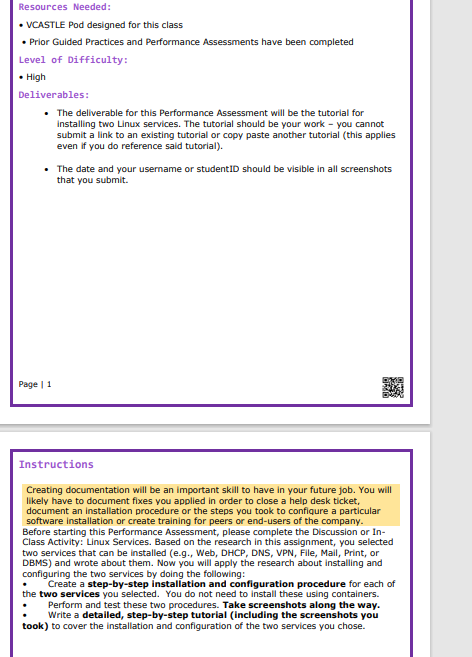
Resources Needed: * VCASTLE Pod designed for this class * Prior Guided Practices and Performance Assesoments have been completed Level of Difficulty: High Deliverables: The deliverable for this Performance Assessment will be the tutorial for installing two Linux services. The tutorial should be your work - you cannot submit a link to an existing tutorial or copy paste another tutorial (this applies even if you do reference said tutorial). The date and your usemame or studentiD should be visible in all screenshots that you submit. me i Instructions Creating documentation will be an important skill to have in your future job. You will likely have to document fixes you applied in order to clase a help desk ticket, document an installation procedure or the steps you took to configure a particular software installation or create training for peers or end-users of the company. Before starting this Performance Assessment, please complete the Discussion or In- Class Activity: Linux Services. Based on the research in this assignment, you selected bwo services that can be installed (e.g., Web, DHCP, ONS, VPN, File, Mail, Print, or DBMS) and wrote about them. Now you will apply the research about installing amd configuring the bwo services by doing the following: " Create a step-by-step installation and configuration procedure for each of the two services you selected. You do not need to install these using containers. " Perform and test these two procedures. Take screenshots along the way. " Write a detailed, step-by-step tutorial (including the screenshots you teok) to cover the installation and configuration of the two services you chose

Step by Step Solution

There are 3 Steps involved in it

1 Expert Approved Answer
Step: 1 Unlock blur-text-image

Question Has Been Solved by an Expert!

Get step-by-step solutions from verified subject matter experts

Step: 2 Unlock
Step: 3 Unlock

Students Have Also Explored These Related Accounting Questions!