







Question: Show the output of the following code segments. Java Aliasing Worksheet2 Pened Show the output of the following code segments. If an error occurs, print
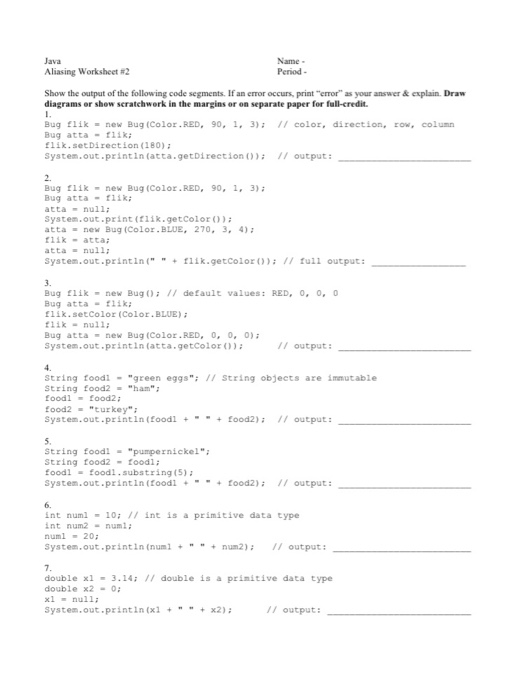
Java Aliasing Worksheet2 Pened Show the output of the following code segments. If an error occurs, print error" as your answer & explain Draw diagrams or show scratchwork in the margins or e parate paper for full credit. // color, direction, row, column Bug Flik = new Bug (Color.RED, 90, 1, 3); Bugatta - 1 111k.setDirection (180); System.out.println(atta.getDirection ()); // output: Bug flik - new Bug (Color. RED, 90, 1, 3); Bugatta - 111; atta null; System.out.print (lik.getColor()); atta - new Bug (Color.BLUE, 270, 3, 4); likatta; atta null, System.out.println(" flik.getColor(); // full output: Bug flik - new Bug(); // default values: RED, 0, 0, 0 Bugatta - flik; flik.setColor (Color.BLUE); flik - null; Bugatta - new Bug (Color.RED, 0, 0, 0); System.out.println(atta.getColor()); // output: string foodl - "green eggs"; // String objects are immutable String food2 - "ham"; foodl food2 food 2 - turkey": System.out.println (foodl +-+ food2); // output: String food! - "pumpernickel"; String food2 - foodl; food -foodl.substring(5) System.out.println (foodl - food2); 11 output: int numl - 10; // int is a primitive data type int num -num numl -20 System.out.println(numl num2); // output: double xl - 3.14; // double is a primitive data type double x2 - 0; System.out.println (x1 +x2); // output
Step by Step Solution
There are 3 Steps involved in it

Get step-by-step solutions from verified subject matter experts
 Study Help