







Question: Shown below is a valid BMP file that has been opened in a hex editor. Based on the data visible, answer the following questions. Indicate
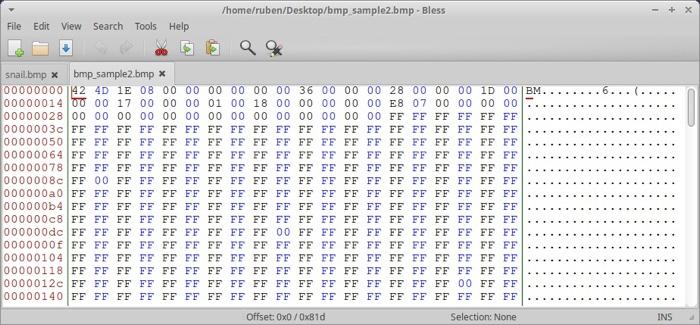
a. How large is the file?
b. What is the width and height of this image?
c. How many bits per pixel are used?
d. Using b and c, how many bytes are required for each row? How many are for padding?
THIS ANSWER BELOW IS INCORRECT (DO NOT GIVE ME THIS ANSWER OR WILL THUMBS DOWN):
/home/ruben/Desktop/bmp sample2.bmp-Bless File Edit View Search Tools Help snail.bmp * bmp_sample2.bmp X 00000000142 4D 1E 08 00 00 00 00 00 00 36 00 00 00 28 00 00 00 10 00 BM. 0000001400 00 17 00 00 00 01 00 18 00 00 00 00 00 E8 07 00 00 00 00 00000028 00 00 00 00 00 00 00 00 00 00 00 00 00 00 FF FF FF FF FF FF 00000030 FF FF FF FF FF FF FF FF FF FF FF FF FF FF FF FF FF FF FF FF 00000050 FF FF FF FF FF FF FF FF FF FF FF FF FF FF FF FF FF FF FF FF 00000064 FF FF FF FF FF FF FF FF FF FF FF FF FF FF FF FF FF FF FF FF 00000078 FE FF FF FF FF FF FF FF FF FF FF FE FF FF FF FF FF FF FF FF 00000080 FF 00 FF FF FF FF FF FF FF FF FF FF FF FF FF FF FF FF FF FF 000000a0 FF FF FF FF FF FF FF FF FF FF FF FF FF FF FF FF FF FF FF FF 0 00 000b4 FF FF FF FF FF FF FF FF FF FF FF FF FF FF FF FF FF FF FF FF 00000008 FF FF FF FF FF FF FF FF FF FF FF FF FF FF FF FF FF FF FF FF 000000dc FF FF FF FF FF FF FF FF FF 00 FF FF FF FF FF FF FF FF FF FF 0000000f FF FF FF FF FF FF FF FF FF FF FF FF FF FF FF FF FF FF FF FF 00000104 FF FF FF FF FF FF FF FF FF FF FF FF FF FF FF FF FF FF FF FF 00000118 FF FF FF FF FF FF FF FF FF FF FF FF FF FF FF FF FF FF FF FF 00000120 FF FF FF FF FF FF FF FF FF FF FF FF FF FF FF FF FF 00 FF FF 00000140 FF FF FF FF FF FF FF FF FF FF FF FF FF FF FE FF FF FF FF FF Offset: OxO/OxBld Selection: None INS Capture a snapshot for the screen having all the information related to the various network connections that you collected during your warwalkin TIT What different versions of 802.11 did you see, what were their maximum speeds, and what channels were used? You can examine the "PHY Types" column and see that most APs are 802.11n, although there are three older 802.11g APs. Values in the "Maximum Speed" column are quite variable. There are some newer 8011. n APs that are running at the top speed of 450 Mbps. Some 802.11n APs provide 144 Mbps, which suggests that these WLANs are likely to be older APs that are not capable of the higher speeds of newer 802.11n APs. You can also see that there are three 802.11g APs that provide only 54 Mbps. The "Channel" column shows a fairly even distribution of channels 1. 6, and 11, indicating that most users have configured them to use the three standard channels. However, the owner of the FatJesse WLAN has configured it to run on channel 2. How many networks were secure? All the APs in this neighborhood were secure. They had implemented encryption. However, the very first AP (2WIRE935) was using WEP, which is a very old standard. It's better than nothing, but its owner should switch to WPA or WPA2. What is your overall assessment of the WLAN usage with respect to security? If you look closely, you'll see that this only shows a small subset of the APs that were visible to NetView. There were more than 50 APs in total. In this case, you'll see a more standard configuration, with virtually all the APs being 802.11n running at 216 Mbps in channels 1.6, and 12 (although you can't see the ones in channel 12). All the APs on the IU Secure or eduaroam are secured, whereas attwifi and IU Guest are not secured. You can also see two rogue APs (both have names starting with "PD") that are 802.11g. WEP-secured, running at 54 Mbps
Step by Step Solution
There are 3 Steps involved in it

Get step-by-step solutions from verified subject matter experts
 Study Help