Question: SIMPLE CODES PLS! THANK YOU Complete the missing code of a Java GUI program which receives the user input of length in kilometer. Then the
SIMPLE CODES PLS! THANK YOU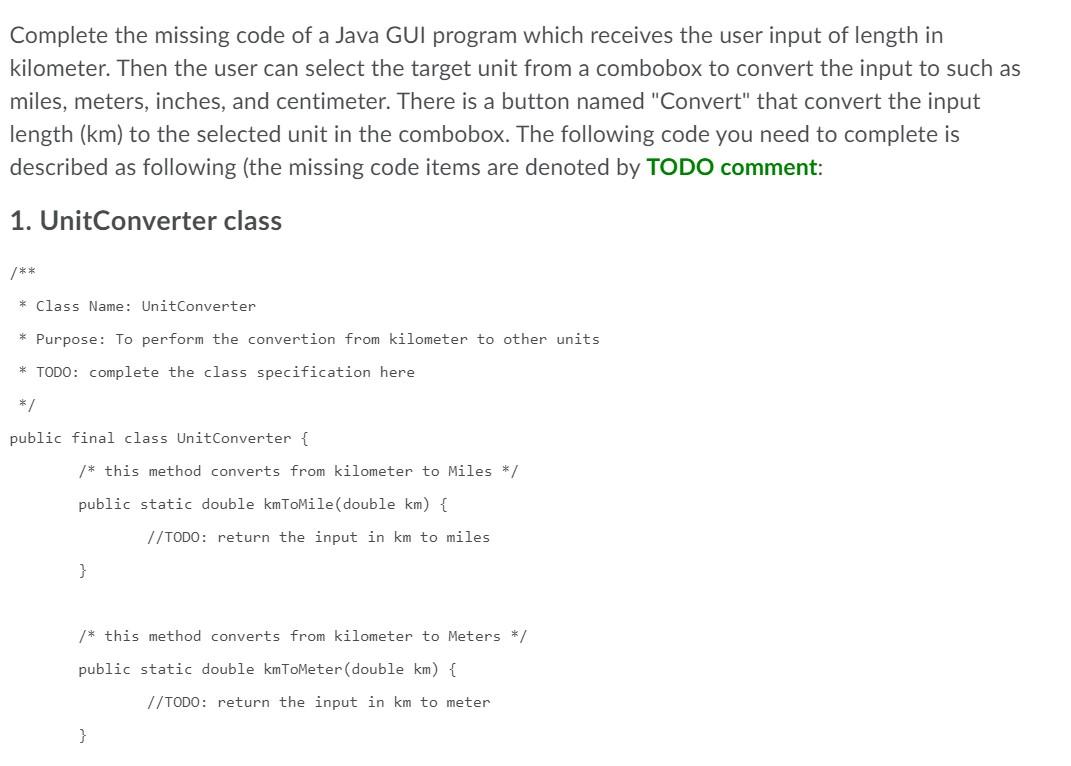
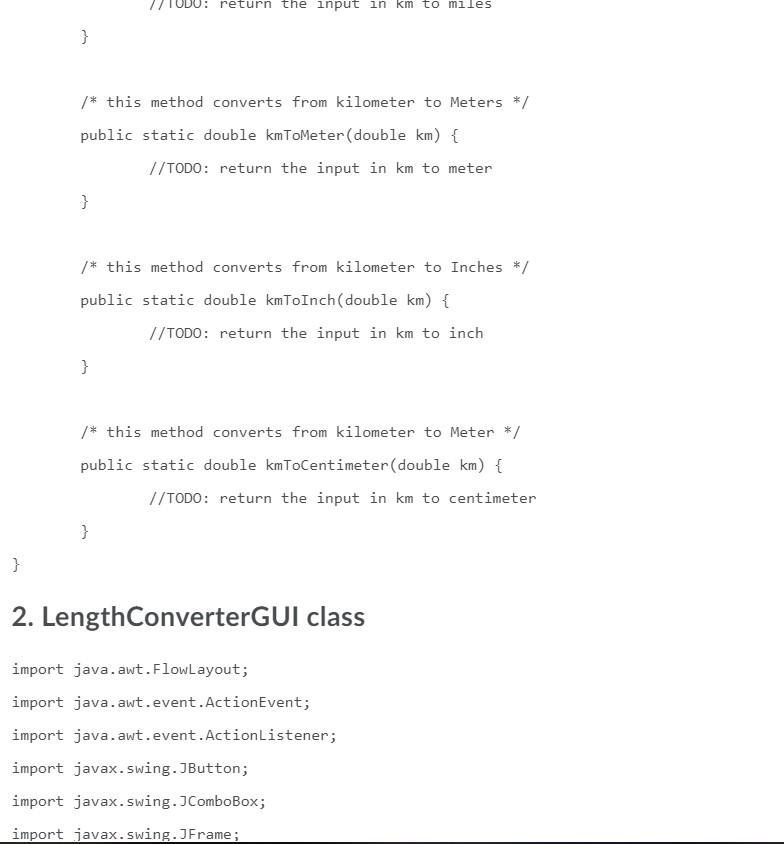
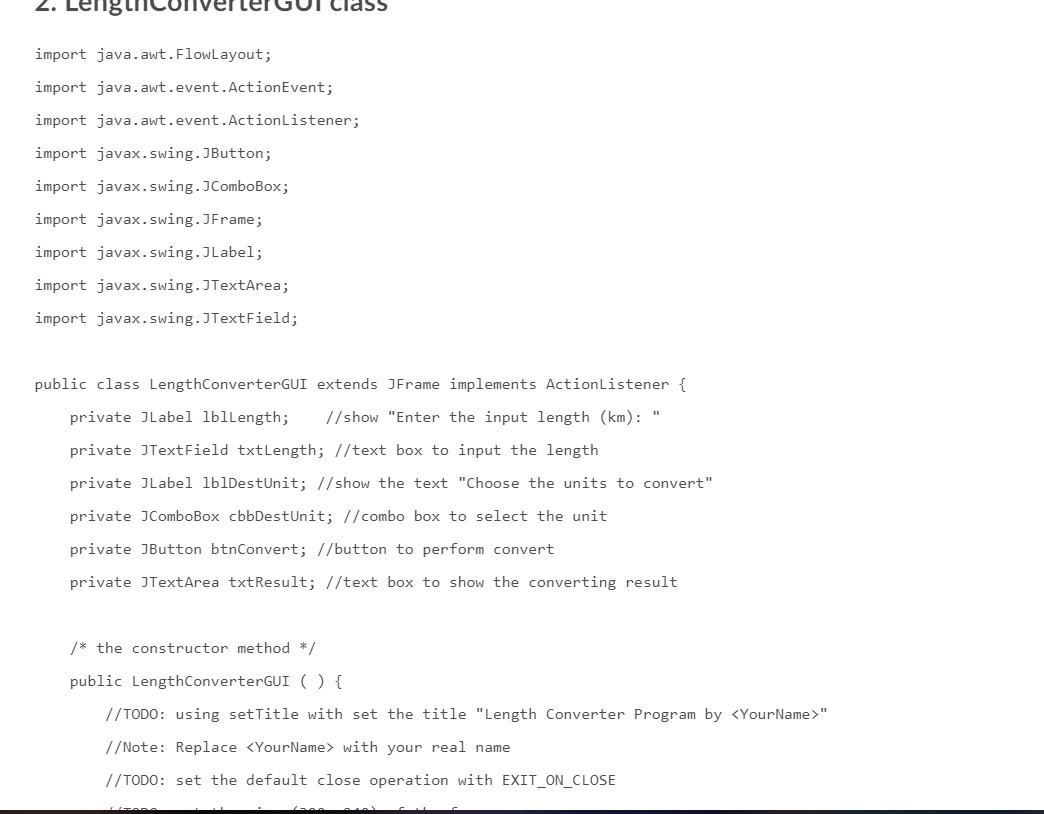
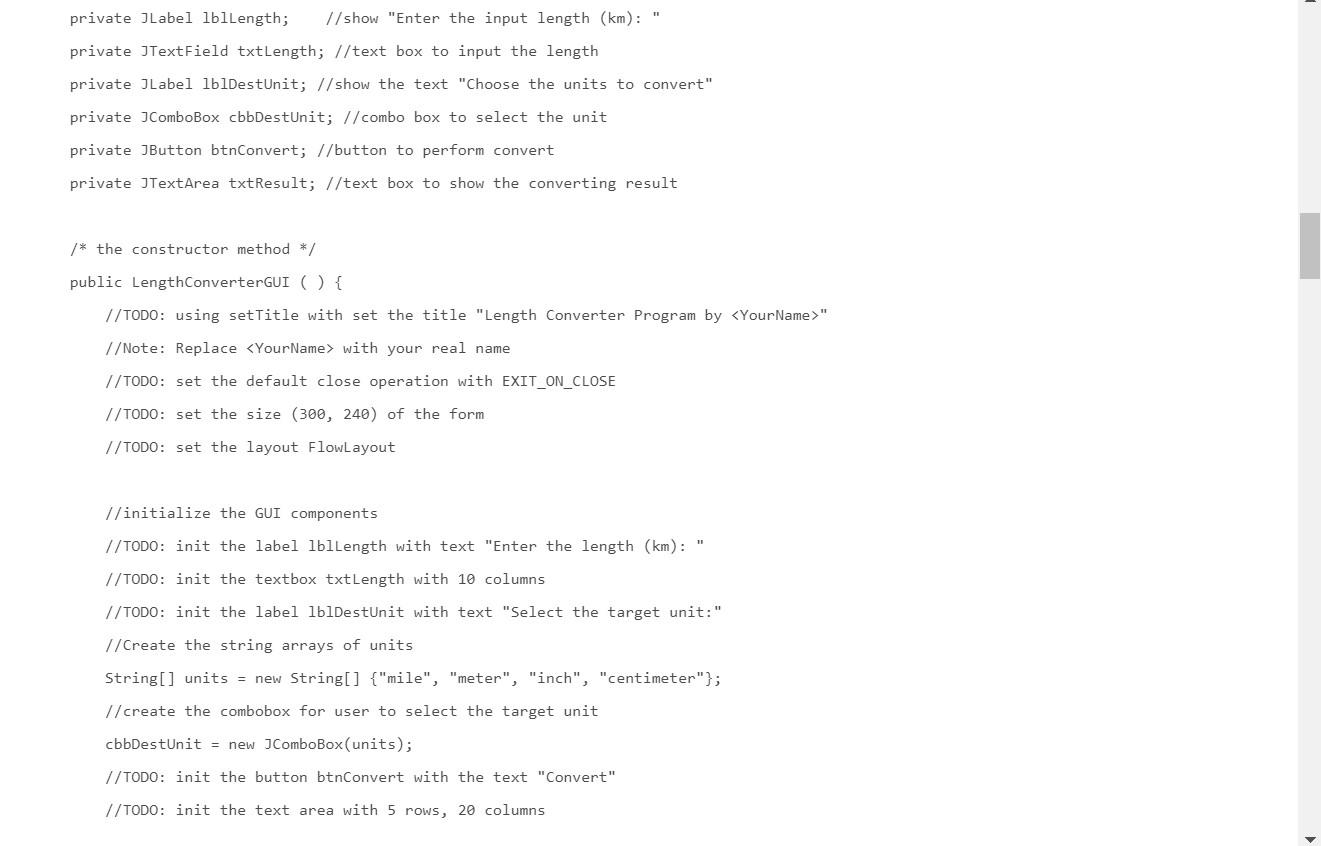
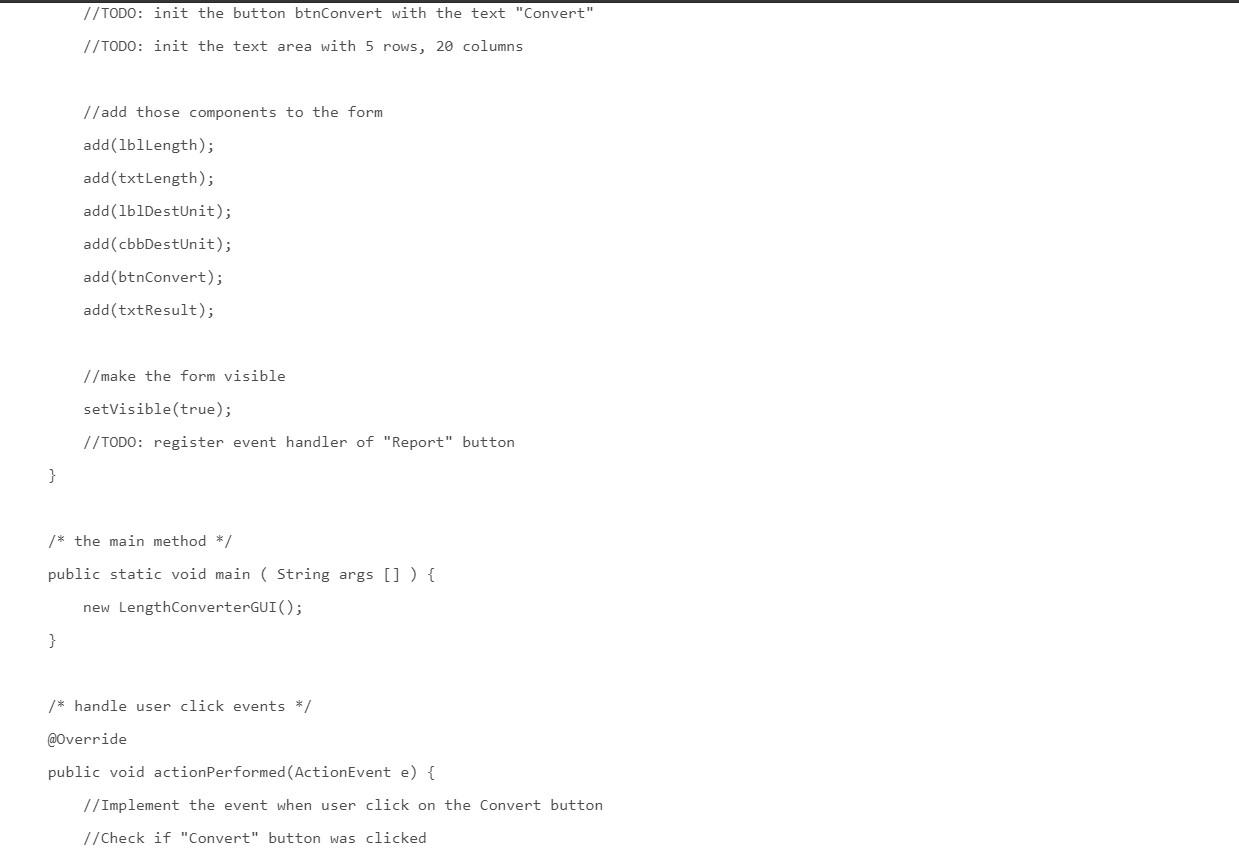
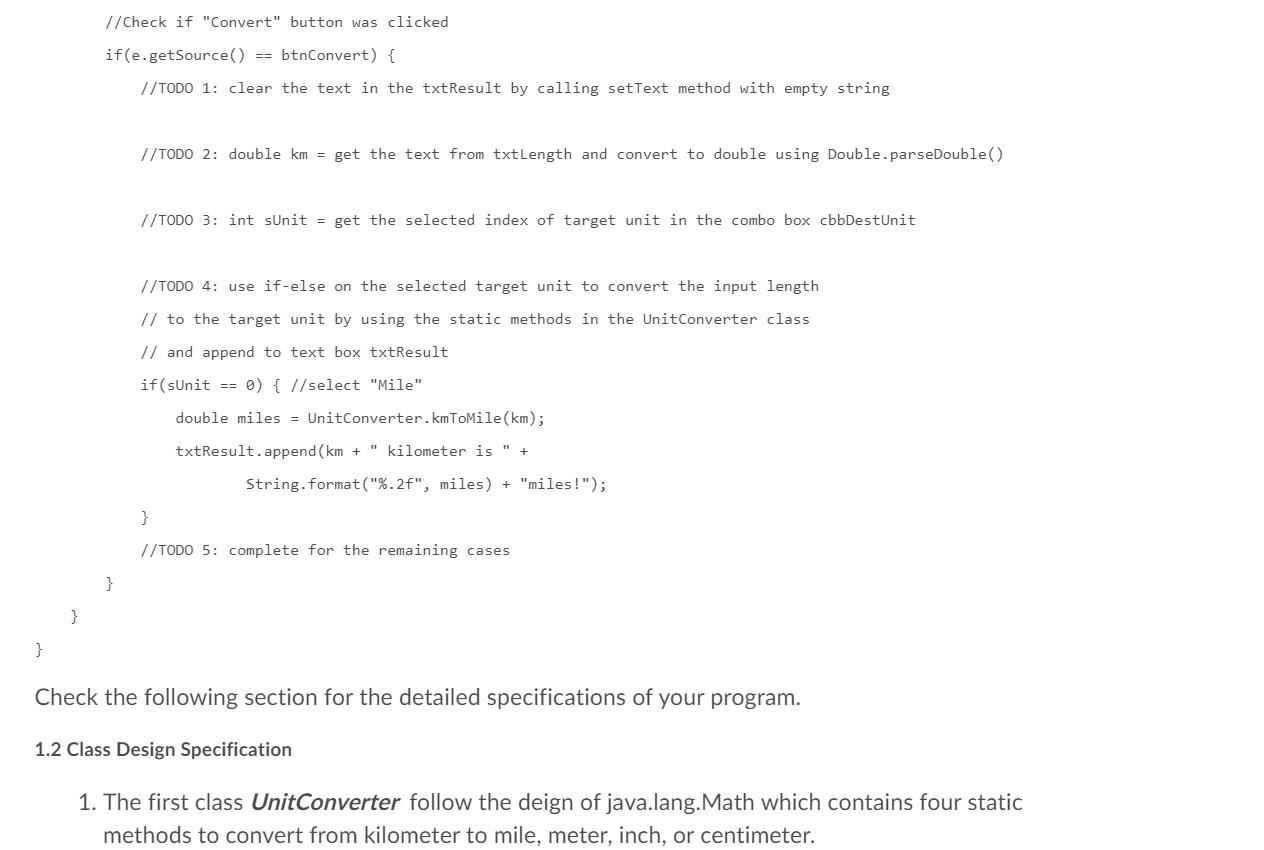
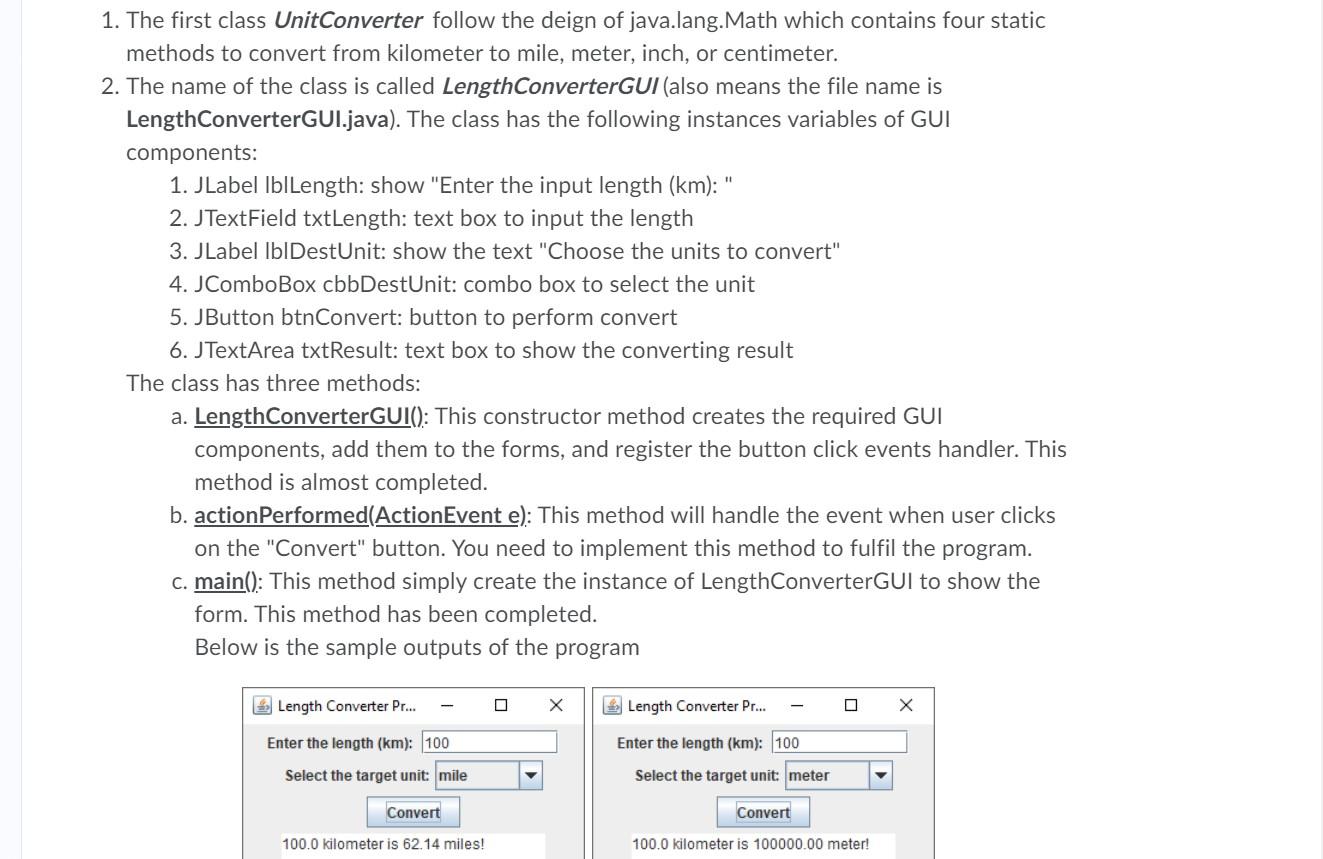
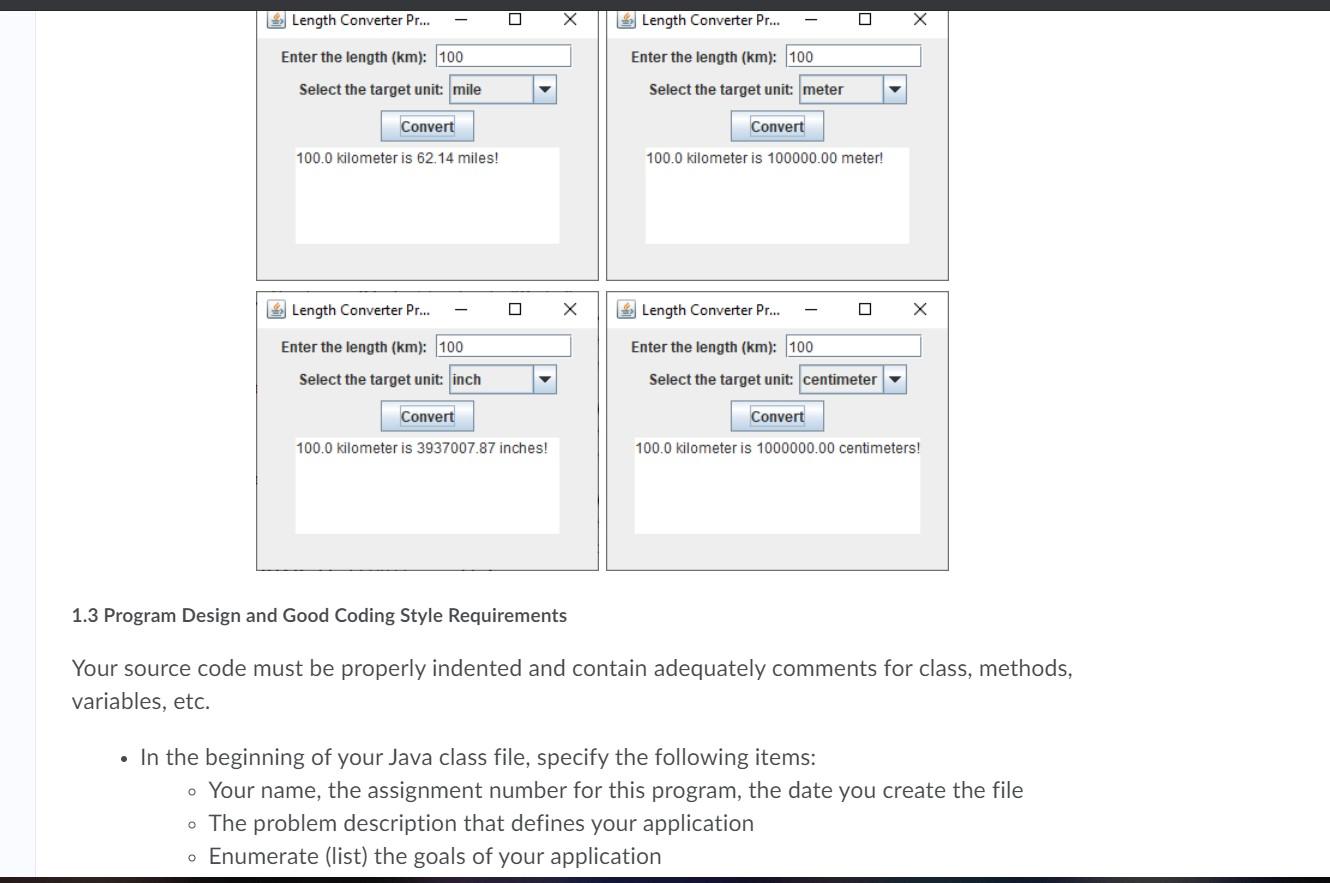
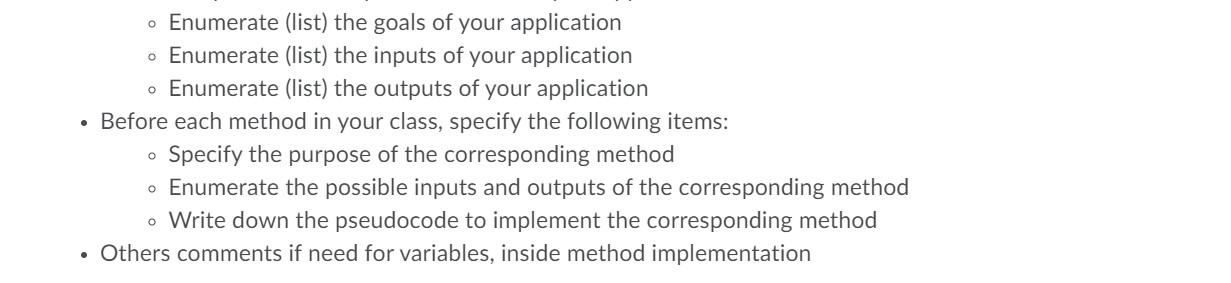
Complete the missing code of a Java GUI program which receives the user input of length in kilometer. Then the user can select the target unit from a combobox to convert the input to such as miles, meters, inches, and centimeter. There is a button named "Convert" that convert the input length (km) to the selected unit in the combobox. The following code you need to complete is described as following (the missing code items are denoted by TODO comment: 1. UnitConverter class /** * Class Name: Unit Converter Purpose: To perform the convertion from kilometer to other units TODO: complete the class specification here */ public final class Unit Converter { 7* this method converts from kilometer to Miles */ public static double kmToMile(double km) { //TODO: return the input in km to miles } /* this method converts from kilometer to Meters */ public static double kmToMeter (double km) { //TODO: return the input in km to meter } return the input in km to miles } /* this method converts from kilometer to Meters */ public static double kmToMeter (double km) { //TODO: return the input in km to meter } /* this method converts from kilometer to Inches */ public static double kmToInch (double km) { //TODO: return the input in km to inch } /* this method converts from kilometer to Meter */ public static double kmToCentimeter(double km) { //TODO: return the input in km to centimeter } } 2. LengthConverterGUI class import java.awt. FlowLayout; import java.awt.event. ActionEvent; import java.awt.event. ActionListener; import javax.swing.JButton; import javax.swing. J ComboBox; import javax.swing. JFrame; import java.awt. FlowLayout; import java.awt.event. ActionEvent; import java.awt.event. ActionListener; import javax.swing. JButton; import javax.swing.J ComboBox; import javax.swing.JFrame; import javax.swing. JLabel; import javax.swing.JTextArea; import javax.swing. JTextField; public class LengthConverterGUI extends JFrame implements ActionListener { private JLabel lblLength; // show "Enter the input length (km): private JTextField txtLength; //text box to input the length private JLabel lblDestUnit; // show the text "Choose the units to convert" private ComboBox cbbDestUnit; // combo box to select the unit private JButton btnConvert; //button to perform convert private JTextArea txtResult; //text box to show the converting result /* the constructor method */ public Length ConverterGUI () { //TODO: using setTitle with set the title "Length Converter Program by with your real name //TODO: set the default close operation with EXIT_ON_CLOSE private JLabel lblLength; // show "Enter the input length (km): private JTextField txtLength; //text box to input the length private JLabel lblDestUnit; // show the text "Choose the units to convert" private ComboBox cobDestUnit; // combo box to select the unit private JButton btnConvert; //button to perform convert private JTextArea txtResult; //text box to show the converting result /* the constructor method */ public LengthConverterGUI () { //TODO: using setTitle with set the title "Length Converter Program by " //Note: Replace with your real name //TODO: set the default close operation with EXIT_ON_CLOSE //TODO: set the size (300, 240) of the form //TODO: set the layout FlowLayout //initialize the GUI components //TODO: init the label lbl Length with text "Enter the length (km): " //TODO: init the textbox txtLength with 10 columns //TODO: init the label lblDestUnit with text "Select the target unit:" //Create the string arrays of units String[] units = new String[] {"mile", "meter", "inch", "centimeter"}; //create the combobox for user to select the target unit cbbDestUnit = new ComboBox(units); //TODO: init the button btnConvert with the text "Convert" //TODO: init the text area with 5 rows, 20 columns //TODO: init the button btnConvert with the text "Convert" //TODO: init the text area with 5 rows, 20 columns //add those components to the form add(lblLength); add(txtLength); add(lblDestUnit); add(cbbDestUnit); add(btnConvert); add(txtResult); //make the form visible setVisible(true); //TODO: register event handler of "Report" button } /* the main method */ public static void main(String args []) { new LengthConverterGUI(); } /* handle user click events */ @Override public void actionPerformed (ActionEvent e) { //Implement the event when user click on the Convert button //Check if "Convert" button was clicked //Check if "Convert" button was clicked if(e.getSource() == btnConvert) { //TODO 1: clear the text in the txtResult by calling setText method with empty string //TODO 2: double km = get the text from txtLength and convert to double using Double.parseDouble() //TODO 3: int sUnit = get the selected index of target unit in the combo box cbbDestUnit //TODO 4: use if-else on the selected target unit to convert the input length // to the target unit by using the static methods in the Unit Converter class // and append to text box txtResult if (sUnit == 0) { // select "Mile" double miles = UnitConverter.kmToMile(km); txtResult.append(km + " kilometer is " + String.format("%.2f", miles) + "miles!"); } //TODO 5: complete for the remaining cases } } } Check the following section for the detailed specifications of your program. 1.2 Class Design Specification 1. The first class UnitConverter follow the deign of java.lang. Math which contains four static methods to convert from kilometer to mile, meter, inch, or centimeter. 1. The first class UnitConverter follow the deign of java.lang. Math which contains four static methods to convert from kilometer to mile, meter, inch, or centimeter. 2. The name of the class is called LengthConverterGUI (also means the file name is LengthConverterGUl.java). The class has the following instances variables of GUI components: 1. JLabel lblLength: show "Enter the input length (km): " 2. JTextField txtLength: text box to input the length 3. JLabel lblDestUnit: show the text "Choose the units to convert" 4. JComboBox cbbDestUnit: combo box to select the unit 5. JButton btnConvert: button to perform convert 6. JTextArea txtResult: text box to show the converting result The class has three methods: a. LengthConverterGUI(): This constructor method creates the required GUI components, add them to the forms, and register the button click events handler. This method is almost completed. b. action Performed(ActionEvent e): This method will handle the event when user clicks on the "Convert" button. You need to implement this method to fulfil the program. c. main(): This method simply create the instance of LengthConverterGUI to show the form. This method has been completed. Below is the sample outputs of the program Length Converter Pr... Length Converter Pr... Enter the length (km): 100 Enter the length (km): 100 Select the target unit: mile Select the target unit: meter Convert Convert 100.0 kilometer is 62.14 miles! 100.0 kilometer is 100000.00 meter! Length Converter Pr... Length Converter Pr... Enter the length (km): 100 Enter the length (km): 100 Select the target unit: mile Select the target unit: meter Convert Convert 100.0 kilometer is 62.14 miles! 100.0 kilometer is 100000.00 meter! * Length Converter Pr... Length Converter Pr... X Enter the length (km): 100 Enter the length (km): 100 Select the target unit: inch Select the target unit: centimeter Convert Convert 100.0 kilometer is 3937007.87 inches! 100.0 kilometer is 1000000.00 centimeters! 1.3 Program Design and Good Coding Style Requirements Your source code must be properly indented and contain adequately comments for class, methods, variables, etc. In the beginning of your Java class file, specify the following items: Your name, the assignment number for this program, the date you create the file - The problem description that defines your application Enumerate (list) the goals of your application Enumerate (list) the goals of your application Enumerate (list) the inputs of your application Enumerate (list) the outputs of your application Before each method in your class, specify the following items: Specify the purpose of the corresponding method Enumerate the possible inputs and outputs of the corresponding method o Write down the pseudocode to implement the corresponding method Others comments if need for variables, inside method implementation Complete the missing code of a Java GUI program which receives the user input of length in kilometer. Then the user can select the target unit from a combobox to convert the input to such as miles, meters, inches, and centimeter. There is a button named "Convert" that convert the input length (km) to the selected unit in the combobox. The following code you need to complete is described as following (the missing code items are denoted by TODO comment: 1. UnitConverter class /** * Class Name: Unit Converter Purpose: To perform the convertion from kilometer to other units TODO: complete the class specification here */ public final class Unit Converter { 7* this method converts from kilometer to Miles */ public static double kmToMile(double km) { //TODO: return the input in km to miles } /* this method converts from kilometer to Meters */ public static double kmToMeter (double km) { //TODO: return the input in km to meter } return the input in km to miles } /* this method converts from kilometer to Meters */ public static double kmToMeter (double km) { //TODO: return the input in km to meter } /* this method converts from kilometer to Inches */ public static double kmToInch (double km) { //TODO: return the input in km to inch } /* this method converts from kilometer to Meter */ public static double kmToCentimeter(double km) { //TODO: return the input in km to centimeter } } 2. LengthConverterGUI class import java.awt. FlowLayout; import java.awt.event. ActionEvent; import java.awt.event. ActionListener; import javax.swing.JButton; import javax.swing. J ComboBox; import javax.swing. JFrame; import java.awt. FlowLayout; import java.awt.event. ActionEvent; import java.awt.event. ActionListener; import javax.swing. JButton; import javax.swing.J ComboBox; import javax.swing.JFrame; import javax.swing. JLabel; import javax.swing.JTextArea; import javax.swing. JTextField; public class LengthConverterGUI extends JFrame implements ActionListener { private JLabel lblLength; // show "Enter the input length (km): private JTextField txtLength; //text box to input the length private JLabel lblDestUnit; // show the text "Choose the units to convert" private ComboBox cbbDestUnit; // combo box to select the unit private JButton btnConvert; //button to perform convert private JTextArea txtResult; //text box to show the converting result /* the constructor method */ public Length ConverterGUI () { //TODO: using setTitle with set the title "Length Converter Program by with your real name //TODO: set the default close operation with EXIT_ON_CLOSE private JLabel lblLength; // show "Enter the input length (km): private JTextField txtLength; //text box to input the length private JLabel lblDestUnit; // show the text "Choose the units to convert" private ComboBox cobDestUnit; // combo box to select the unit private JButton btnConvert; //button to perform convert private JTextArea txtResult; //text box to show the converting result /* the constructor method */ public LengthConverterGUI () { //TODO: using setTitle with set the title "Length Converter Program by " //Note: Replace with your real name //TODO: set the default close operation with EXIT_ON_CLOSE //TODO: set the size (300, 240) of the form //TODO: set the layout FlowLayout //initialize the GUI components //TODO: init the label lbl Length with text "Enter the length (km): " //TODO: init the textbox txtLength with 10 columns //TODO: init the label lblDestUnit with text "Select the target unit:" //Create the string arrays of units String[] units = new String[] {"mile", "meter", "inch", "centimeter"}; //create the combobox for user to select the target unit cbbDestUnit = new ComboBox(units); //TODO: init the button btnConvert with the text "Convert" //TODO: init the text area with 5 rows, 20 columns //TODO: init the button btnConvert with the text "Convert" //TODO: init the text area with 5 rows, 20 columns //add those components to the form add(lblLength); add(txtLength); add(lblDestUnit); add(cbbDestUnit); add(btnConvert); add(txtResult); //make the form visible setVisible(true); //TODO: register event handler of "Report" button } /* the main method */ public static void main(String args []) { new LengthConverterGUI(); } /* handle user click events */ @Override public void actionPerformed (ActionEvent e) { //Implement the event when user click on the Convert button //Check if "Convert" button was clicked //Check if "Convert" button was clicked if(e.getSource() == btnConvert) { //TODO 1: clear the text in the txtResult by calling setText method with empty string //TODO 2: double km = get the text from txtLength and convert to double using Double.parseDouble() //TODO 3: int sUnit = get the selected index of target unit in the combo box cbbDestUnit //TODO 4: use if-else on the selected target unit to convert the input length // to the target unit by using the static methods in the Unit Converter class // and append to text box txtResult if (sUnit == 0) { // select "Mile" double miles = UnitConverter.kmToMile(km); txtResult.append(km + " kilometer is " + String.format("%.2f", miles) + "miles!"); } //TODO 5: complete for the remaining cases } } } Check the following section for the detailed specifications of your program. 1.2 Class Design Specification 1. The first class UnitConverter follow the deign of java.lang. Math which contains four static methods to convert from kilometer to mile, meter, inch, or centimeter. 1. The first class UnitConverter follow the deign of java.lang. Math which contains four static methods to convert from kilometer to mile, meter, inch, or centimeter. 2. The name of the class is called LengthConverterGUI (also means the file name is LengthConverterGUl.java). The class has the following instances variables of GUI components: 1. JLabel lblLength: show "Enter the input length (km): " 2. JTextField txtLength: text box to input the length 3. JLabel lblDestUnit: show the text "Choose the units to convert" 4. JComboBox cbbDestUnit: combo box to select the unit 5. JButton btnConvert: button to perform convert 6. JTextArea txtResult: text box to show the converting result The class has three methods: a. LengthConverterGUI(): This constructor method creates the required GUI components, add them to the forms, and register the button click events handler. This method is almost completed. b. action Performed(ActionEvent e): This method will handle the event when user clicks on the "Convert" button. You need to implement this method to fulfil the program. c. main(): This method simply create the instance of LengthConverterGUI to show the form. This method has been completed. Below is the sample outputs of the program Length Converter Pr... Length Converter Pr... Enter the length (km): 100 Enter the length (km): 100 Select the target unit: mile Select the target unit: meter Convert Convert 100.0 kilometer is 62.14 miles! 100.0 kilometer is 100000.00 meter! Length Converter Pr... Length Converter Pr... Enter the length (km): 100 Enter the length (km): 100 Select the target unit: mile Select the target unit: meter Convert Convert 100.0 kilometer is 62.14 miles! 100.0 kilometer is 100000.00 meter! * Length Converter Pr... Length Converter Pr... X Enter the length (km): 100 Enter the length (km): 100 Select the target unit: inch Select the target unit: centimeter Convert Convert 100.0 kilometer is 3937007.87 inches! 100.0 kilometer is 1000000.00 centimeters! 1.3 Program Design and Good Coding Style Requirements Your source code must be properly indented and contain adequately comments for class, methods, variables, etc. In the beginning of your Java class file, specify the following items: Your name, the assignment number for this program, the date you create the file - The problem description that defines your application Enumerate (list) the goals of your application Enumerate (list) the goals of your application Enumerate (list) the inputs of your application Enumerate (list) the outputs of your application Before each method in your class, specify the following items: Specify the purpose of the corresponding method Enumerate the possible inputs and outputs of the corresponding method o Write down the pseudocode to implement the corresponding method Others comments if need for variables, inside method implementation









 Study Help