







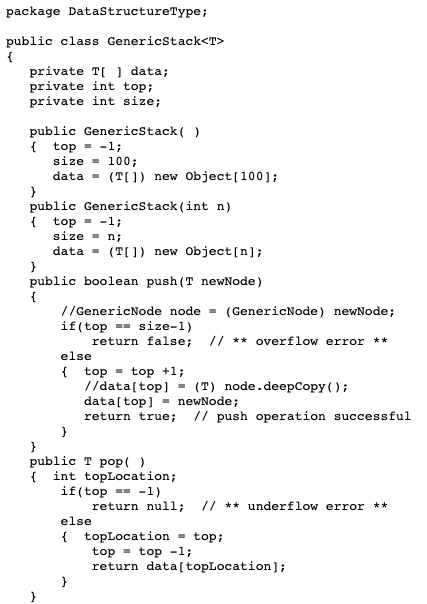
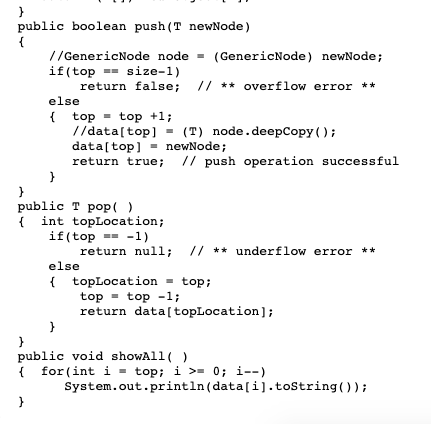
Question: simple java coding please provide solution for part 1 and 2 public boolean push(T newNode) //GenericNode node -(GenericNode) newNode; if (top else size-1) return false;
 node.deepCopy); data topnewNode;](https://s3.amazonaws.com/si.experts.images/answers/2024/09/66d9676a7b683_81866d9676a0b5b1.jpg)
![data[ topLocation]; public void showAll ) for (int i - top; >.](https://s3.amazonaws.com/si.experts.images/answers/2024/09/66d9676c4ef23_81966d9676bd5f70.jpg)
![0; i--) System.out.println (data[i].toString()) TASK1: INSERT 3 NODES TO STRUCTURE Asking for](https://s3.amazonaws.com/si.experts.images/answers/2024/09/66d9676cdb75c_82066d9676c7f2c2.jpg)
simple java coding
please provide solution for part 1 and 2
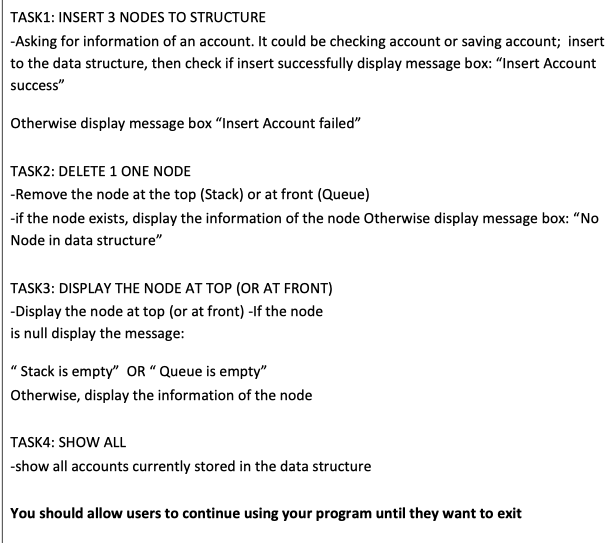
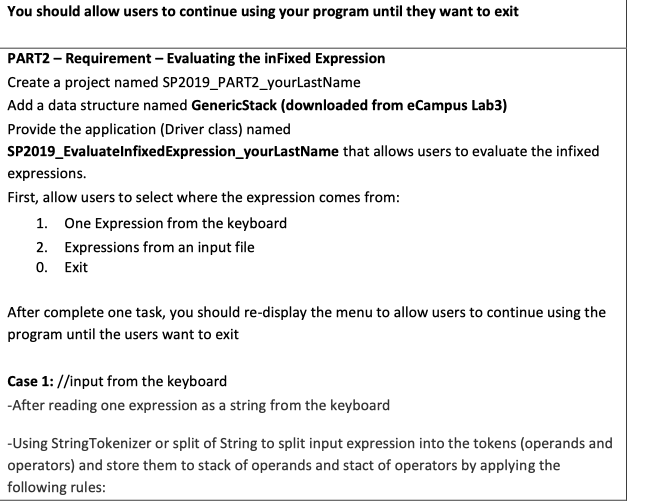
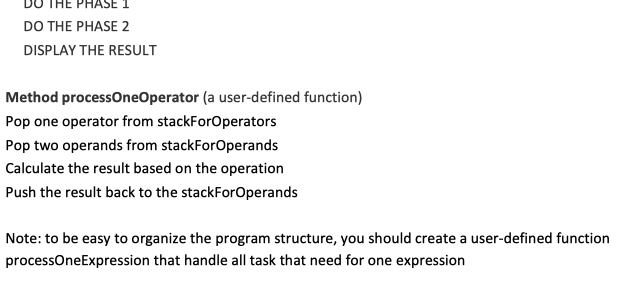
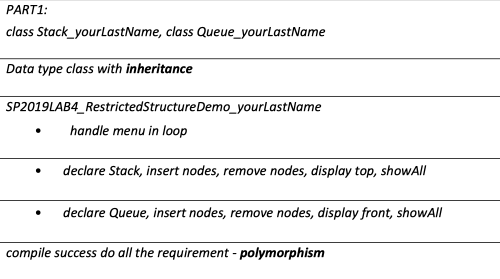
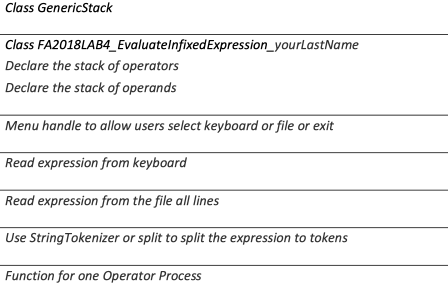
public boolean push(T newNode) //GenericNode node -(GenericNode) newNode; if (top else size-1) return false; *overflow error ** top top +1; //data[top](T) node.deepCopy); data topnewNode; return true; // push operation successful public T pop() ( int topLocation; if(top 1) return null; /*underflow error ** else topLocation-top; top-top -1; return data[ topLocation]; public void showAll ) for (int i - top; >. 0; i--) System.out.println (data[i].toString()) TASK1: INSERT 3 NODES TO STRUCTURE Asking for information of an account. It could be checking account or saving account; insert to the data structure, then check if insert successfully display message box: "Insert Account success" Otherwise display message box "Insert Account failed" TASK2: DELETE 1 ONE NODE Remove the node at the top (Stack) or at front (Queue) -if the node exists, display the information of the node Otherwise display message box: "No Node in data structure" TASK3: DISPLAY THE NODE AT TOP (OR AT FRONT) -Display the node at top (or at front) -If the node is null display the message: " Stack is empty" OR " Queue is empty" Otherwise, display the information of the node TASK4: SHOW ALL -show all accounts currently stored in the data structure You should allow users to continue using your program until they want to exit You should allow users to continue using your program until they want to exit PART2 Requirement Evaluating the inFixed Expression Create a project named SP2019_PART2_yourLastName Add a data structure named GenericStack (downloaded from eCampus Lab3) Provide the application (Driver class) named SP2019_EvaluatelnfixedExpression_yourLastName that allows users to evaluate the infixed expressions. First, allow users to select where the expression comes from: 1. 2. 0. One Expression from the keyboard Expressions from an input file Exit After complete one task, you should re-display the menu to allow users to continue using the program until the users want to exit Case 1://input from the keyboard -After reading one expression as a string from the keyboard -Using StringTokenizer or split of String to split input expression into the tokens (operands and operators) and store them to stack of operands and stact of operators by applying the following rules: PHASE 2: Clean the stackForOperators Create a loop to Process all the operators that are left in the stackForOperators until the stack empty by calling the method oprocessOneOperator DISPLAY THE RESULT The final result will be the last number in the stackForOpereands The output should be (if expression is "22+4 12 15+7)") 22 +4 12 (187) 45//45 is popped from the stack Case 2: input from a file Read file name Open file Loop to read file Read each line as one String that is an expression DO THE PHASE DO THE PHASE 2 DISPLAY THE RESULT Method processOneOperator (a user-defined function) Pop one operator from stackForOperators Pop two operands from stackForOperands Calculate the result based on the operation Push the result back to the stackForOperands Note: to be easy to organize the program structure, you should create a user-defined function processOneExpression that handle all task that need for one expression PART1 class Stack yourLastName, class Queue_yourLastName Data type class with inheritance SP2019LAB4_RestrictedStructureDemo_yourLastName .handle menu in loop . declare Stack, insert nodes, remove nodes, display top, showAII . declare Queue, insert nodes, remove nodes, display front, showAll compile success do all the requirement - polymorphisnm Class GenericStack Class FA2018LAB4 EvaluatelnfixedExpression_yourLastName Declare the stack of operators Declare the stack of operands Menu handle to allow users select keyboard or file or exit Read expression from keyboard Read expression from the file all lines Use StringTokenizer or split to split the expression to tokens Function for one Operator Process public boolean push(T newNode) //GenericNode node -(GenericNode) newNode; if (top else size-1) return false; *overflow error ** top top +1; //data[top](T) node.deepCopy); data topnewNode; return true; // push operation successful public T pop() ( int topLocation; if(top 1) return null; /*underflow error ** else topLocation-top; top-top -1; return data[ topLocation]; public void showAll ) for (int i - top; >. 0; i--) System.out.println (data[i].toString()) TASK1: INSERT 3 NODES TO STRUCTURE Asking for information of an account. It could be checking account or saving account; insert to the data structure, then check if insert successfully display message box: "Insert Account success" Otherwise display message box "Insert Account failed" TASK2: DELETE 1 ONE NODE Remove the node at the top (Stack) or at front (Queue) -if the node exists, display the information of the node Otherwise display message box: "No Node in data structure" TASK3: DISPLAY THE NODE AT TOP (OR AT FRONT) -Display the node at top (or at front) -If the node is null display the message: " Stack is empty" OR " Queue is empty" Otherwise, display the information of the node TASK4: SHOW ALL -show all accounts currently stored in the data structure You should allow users to continue using your program until they want to exit You should allow users to continue using your program until they want to exit PART2 Requirement Evaluating the inFixed Expression Create a project named SP2019_PART2_yourLastName Add a data structure named GenericStack (downloaded from eCampus Lab3) Provide the application (Driver class) named SP2019_EvaluatelnfixedExpression_yourLastName that allows users to evaluate the infixed expressions. First, allow users to select where the expression comes from: 1. 2. 0. One Expression from the keyboard Expressions from an input file Exit After complete one task, you should re-display the menu to allow users to continue using the program until the users want to exit Case 1://input from the keyboard -After reading one expression as a string from the keyboard -Using StringTokenizer or split of String to split input expression into the tokens (operands and operators) and store them to stack of operands and stact of operators by applying the following rules: PHASE 2: Clean the stackForOperators Create a loop to Process all the operators that are left in the stackForOperators until the stack empty by calling the method oprocessOneOperator DISPLAY THE RESULT The final result will be the last number in the stackForOpereands The output should be (if expression is "22+4 12 15+7)") 22 +4 12 (187) 45//45 is popped from the stack Case 2: input from a file Read file name Open file Loop to read file Read each line as one String that is an expression DO THE PHASE DO THE PHASE 2 DISPLAY THE RESULT Method processOneOperator (a user-defined function) Pop one operator from stackForOperators Pop two operands from stackForOperands Calculate the result based on the operation Push the result back to the stackForOperands Note: to be easy to organize the program structure, you should create a user-defined function processOneExpression that handle all task that need for one expression PART1 class Stack yourLastName, class Queue_yourLastName Data type class with inheritance SP2019LAB4_RestrictedStructureDemo_yourLastName .handle menu in loop . declare Stack, insert nodes, remove nodes, display top, showAII . declare Queue, insert nodes, remove nodes, display front, showAll compile success do all the requirement - polymorphisnm Class GenericStack Class FA2018LAB4 EvaluatelnfixedExpression_yourLastName Declare the stack of operators Declare the stack of operands Menu handle to allow users select keyboard or file or exit Read expression from keyboard Read expression from the file all lines Use StringTokenizer or split to split the expression to tokens Function for one Operator Process
Step by Step Solution
There are 3 Steps involved in it

Get step-by-step solutions from verified subject matter experts
 Study Help