







Question: Simple Python Exchange Rate Calculator EXCHANGE RATE CALCULATOR INTRODUCTION: For this problem, you will need to calculate how much canadian dollars is worth if you
Simple Python Exchange Rate Calculator
EXCHANGE RATE CALCULATOR
INTRODUCTION:
For this problem, you will need to calculate how much canadian dollars is worth if you exchange it for another type of currency. You will receive an exchange rate (float) and a 3-letter code (string) for the other currency you are changing to. (e.g. 'USD' for U.S. dollars, 'CNY' for Chinese yuan, 'EUR' for Euro, etc.).
- Your job is to convert $100.00 CAD (Canadian dollars) to the currency specified by input.
- The input and output parts of the program have been taken care of already. All you need to do is write the Python code to calculate the amount of the other currency.
INPUT:
The input section of the program is already written for you. This description is here to explain what is happening.
The program receives two lines of input:
- The first will be the 3-character code (string) representing the abbreviation for the new currency. This is stored in a variable called currencyCode.
- The second is a the exchange rate (float). This is the value of $1 CAD in the new currency. This is stored in a variable called exchangeRate.
PROCESSING:
Calculate the value of $100 CAD in the new currency. Store this to a variable called convertedAmount.
OUTPUT:
The output section of the program is already written for you. This description is here to explain what is happening.
Output will be of the form:
100.00 CAD = 1234.56 ABC
where the ABC is the currency code for the new currency and each dollar value, original and converted, is rounded to 2 decimal places and formatted so that exactly two decimal places are always shown. In addition, in case the currency code was inputted in lowercase characters, it is raised to uppercase in the output.
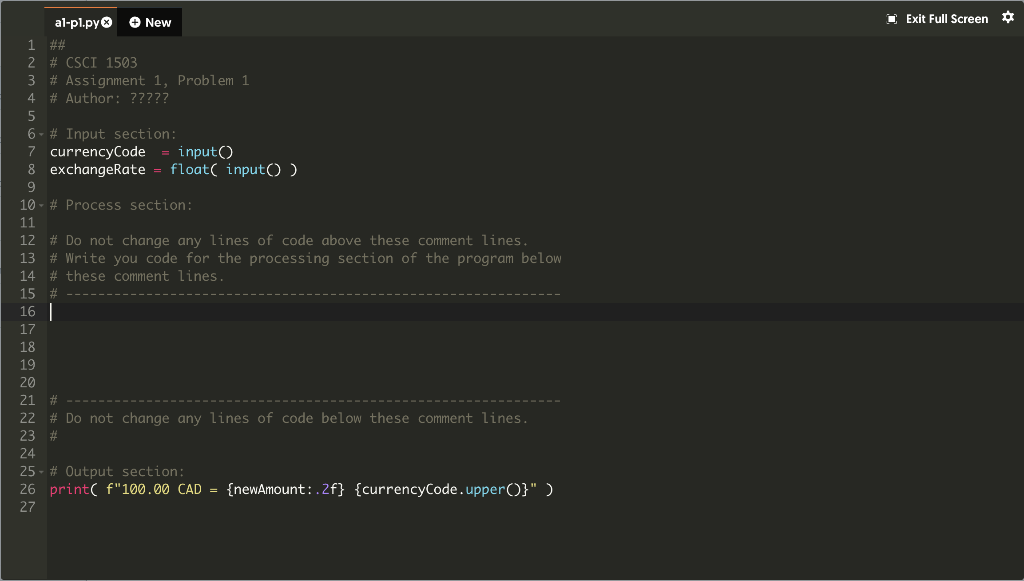
1 Exit Full Screen al-pl.py New 1 ## 2 # CSCI 1503 3 # Assignment 1, Problem 1 4 # Author: ????? 5 6- # Input section: 7 currencyCode input) 8 exchangeRate float( input) 9 10- # Process section: 11 12 # Do not change any lines of code above these comment lines. 13 # Write you code for the processing section of the program below 14 # these comment lines. 15 # 16 17 18 19 20 21 # 22# Do not change any lines of code below these comment lines. 23 # 24 25 - # Output section: 26 print( f"100.00 CAD = {newAmount:.2f} {currencyCode.upper(}" ) 27
Step by Step Solution
There are 3 Steps involved in it

Get step-by-step solutions from verified subject matter experts
 Study Help