







Question: Simulate blinking Christmas lights in LabVIEW program. Five rows lights form a tree shape. Write a program to make the lights blink every second based
Simulate blinking Christmas lights in LabVIEW program. Five rows lights form a tree shape. Write a program to make the lights blink every second based on the following pattern: at the very beginning, t=0, the 1 st rows light is on. At t=1 sec., the 2 nd rows lights are on, at t= 2 sec. the 3rd rows lights are on, at t= 3 sec. the 4 the rows lights are on, at t= 4 sec. the 5th rows lights are on, at t = 5 sec, all lights are off. Then the whole process repeats from the very beginning: at t= 6 sec, the 1 st rows light is on, and so on. The program should be able to continue to run until Stop button is clicked.
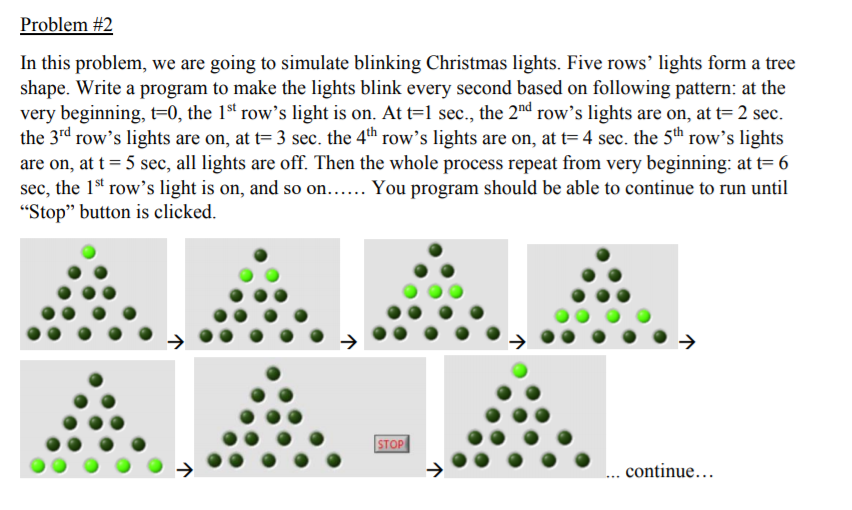
In this problem, we are going to simulate blinking Christmas lights. Five rows' lights form a tree shape. Write a program to make the lights blink every second based on following pattern: at the very beginning, t-0, the 1st row's light is on. At t-1 sec., the 2nd row's lights are on, at t-2 sec the 3rd row's lights are on, at t 3 sec. the 4th row's lights are on, at t 4 sec. the 5th row's lights are on, at t = 5 sec, all lights are off. Then the whole process repeat from very beginning: at t sec, the 1st row's light is on, and so on...... You program should be able to continue to run until "Stop" button is clicked STOP continue.. In this problem, we are going to simulate blinking Christmas lights. Five rows' lights form a tree shape. Write a program to make the lights blink every second based on following pattern: at the very beginning, t-0, the 1st row's light is on. At t-1 sec., the 2nd row's lights are on, at t-2 sec the 3rd row's lights are on, at t 3 sec. the 4th row's lights are on, at t 4 sec. the 5th row's lights are on, at t = 5 sec, all lights are off. Then the whole process repeat from very beginning: at t sec, the 1st row's light is on, and so on...... You program should be able to continue to run until "Stop" button is clicked STOP continue
Step by Step Solution
There are 3 Steps involved in it

Get step-by-step solutions from verified subject matter experts
 Study Help