







Question: Skeleton is as follows: CLASS DrawingPanel import java.awt.*; import java.util.*; import javax.swing.*; // Class that defines the panel for drawing the images class DrawingPanel extends
Skeleton is as follows: CLASS DrawingPanel import java.awt.*; import java.util.*; import javax.swing.*; // Class that defines the panel for drawing the images class DrawingPanel extends JPanel { private ArrayList
CLASS HollowPolygon import java.awt.*; // Abstract class that defines all hollow polygons abstract class HollowPolygon extends Polygon_ { // Constructor that calls super constructor public HollowPolygon(Color color, int vertexCount) { super(color, vertexCount); } } CLASS Image import java.awt.*; // Abstract base class that defines all image objects abstract class Image { private Color color; // Constructor that can only be called by the subclasses to initialize the color public Image(Color color) { this.color = color; } // Sets the color of the image to be drawn. Must be called first by the draw function of the subclasses public void colorDrawing(Graphics graphics) { graphics.setColor(color); } abstract void draw(Graphics graphics);}
CLASS Lexer import java.io.*; // This class provides the lexical analyzer class Lexer { private static final int KEYWORDS = 8; private StreamTokenizer tokenizer; private String punctuation = ",;.()"; private Token[] punctuationTokens = {Token.COMMA, Token.SEMICOLON, Token.PERIOD, Token.LEFT_PAREN, Token.RIGHT_PAREN }; // Constructor that creates a lexical analyzer object given the source file public Lexer(File file) throws FileNotFoundException { tokenizer = new StreamTokenizer(new FileReader(file)); tokenizer.ordinaryChar('.'); tokenizer.quoteChar('"'); } // Returns the next token in the input stream public Token getNextToken() throws LexicalError, IOException { int token = tokenizer.nextToken(); switch (token) { case StreamTokenizer.TT_NUMBER: return Token.NUMBER; case StreamTokenizer.TT_WORD: for (Token aToken : Token.values()) { if (aToken.ordinal() == KEYWORDS) break; if (aToken.name().replace("_","").equals(tokenizer.sval.toUpperCase())) return aToken; } return Token.IDENTIFIER; case StreamTokenizer.TT_EOF: return Token.EOF; default: for (int i = 0; i
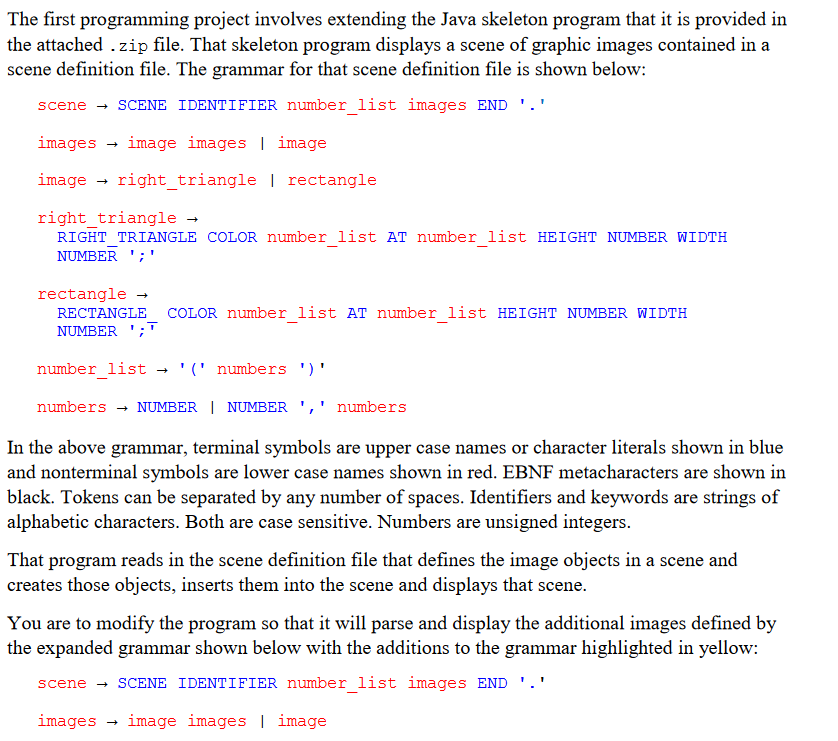
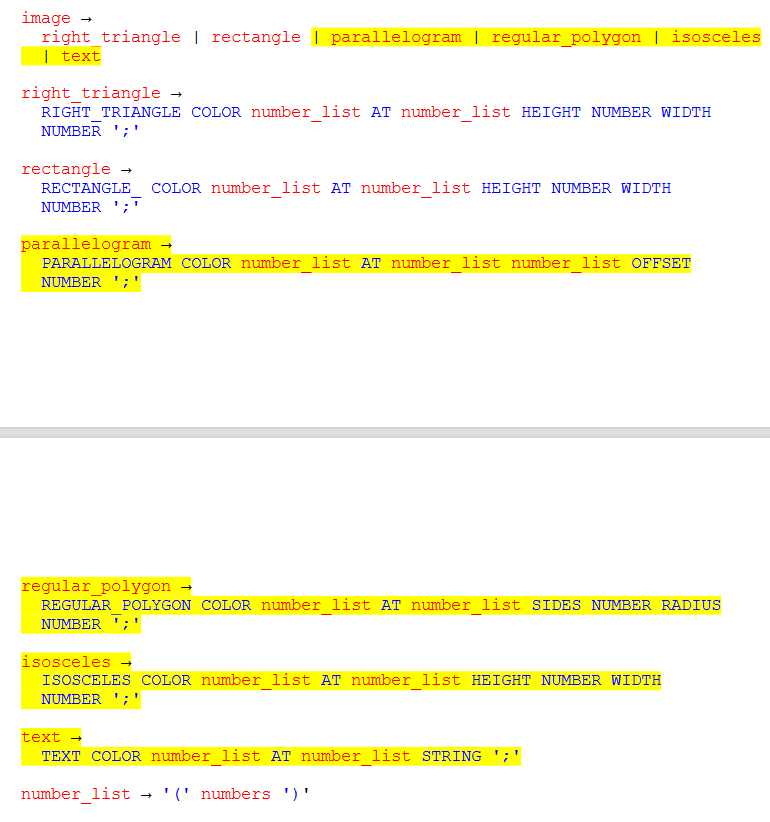
The first programming project involves extending the Java skeleton program that it is provided in the attached . zip file. That skeleton program displays a scene of graphic images contained in a scene definition file. The grammar for that scene definition file is shown below: scene SCENE IDENTIFIER number_list images END ' ' images image images I image image right_triangle I rectangle right_triangle RIGHTT TRIANGLE COLOR number_list AT number_list HEIGHT NUMBER WIDTH NUMBER ';' rectangle RECTANGLE_COLOR number_list AT number_list HEIGHT NUMBER WIDTH NUMBER '; number_list ' (' numbers ')' numbers NUMBER I NUMBER ' ', numbers In the above grammar, terminal symbols are upper case names or character literals shown in blue and nonterminal symbols are lower case names shown in red. EBNF metacharacters are shown in black. Tokens can be separated by any number of spaces. Identifiers and keywords are strings of alphabetic characters. Both are case sensitive. Numbers are unsigned integers. That program reads in the scene definition file that defines the image objects in a scene and creates those objects, inserts them into the scene and displays that scene. You are to modify the program so that it will parse and display the additional images defined by the expanded grammar shown below with the additions to the grammar highlighted in yellow: scene SCENE IDENTIFIER number_list images END '.' images image images image image right triangle | rectangle | parallelogram | regular_polygon | isosceles | text right_triangle RIGHT_TRIANGLE COLOR number_list AT number_list HEIGHT NUMBER WIDTH NUMBER ';' rectangle RECTANGLE_COLOR number_list AT number_list HEIGHT NUMBER WIDTH NUMBER '; parallelogram PARALLELOGRAM COLOR number_list AT number_list number_list OFFSET NUMBER ';' regular_polygon REGUL_AR_POLYGON COLOR number_list AT number_list SIDES NUMBER RADIUS NUMBER ';' isosceles ISOSCELES COLOR number_list AT number_list HEIGHT NUMBER WIDTH NUMBER ';' text TEXT COLOR number_list AT number_list STRING ';' number_list ' (' numbers ')
Step by Step Solution
There are 3 Steps involved in it

Get step-by-step solutions from verified subject matter experts
 Study Help