







Question: Sketch Format on graph paper; scale: 1 = 1-0 The student is to draw the assigned detail by way of one (1) of the following
Sketch Format on graph paper; scale: 1 = 1-0
The student is to draw the assigned detail by way of one (1) of the following drafting methods:
(i) Sketch Format on graph paper; scale: 1 = 1-0 . 1 box = 2 or Manually drafting on blank paper; scale: 1 = 1-0
DETAIL B Exterior Wall, Eave, and Roof system
Exterior Wall Type - 4 Brick Veneer
Wall Studs - 2x6 @ 16 o/c
Eaves O.H. - 12 O.H.
Heel Condition - Raised Heel (Raised Eave
Roof System - 2x6 Rafter @ 16 o/c
- 2x8 Ceiling Joist @ 16 o/c
- 2x4 Collar Tie @ 16 o/c
- 5/12 roof slope Students are to draw the appropriate detail specifics as well as indicate ALL component parts.
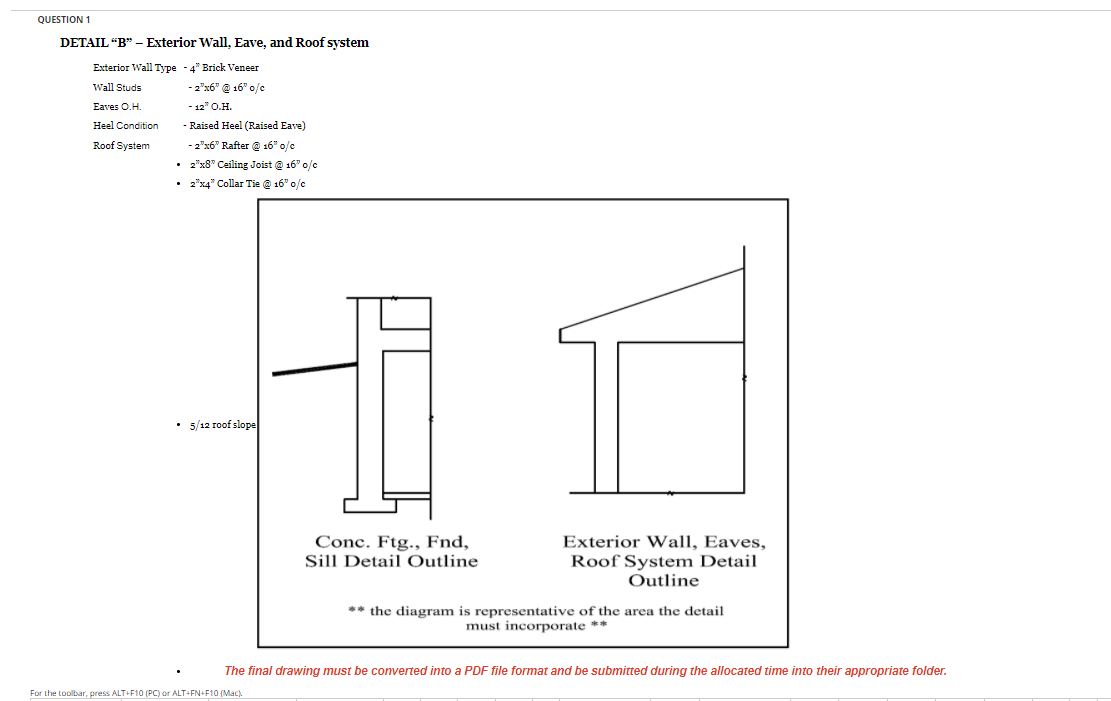
QUESTION 1 DETAIL "B" - Exterior Wall, Eave, and Roof system Exterior Wall Type - 4" Brick Veneer Wall Studs - 2"x6" @ 16"/c Saves OH - 12" O.H. Heel Condition - Raised Heel (Raised Eave) Roof System - 2"x6" Rafter @ 16" / 2x8" Ceiling Joist @ 16'oc 2"x4" Collar Tie 16'oc 5/12 roof slope Conc. Ftg., Fnd, Sill Detail Outline Exterior Wall, Eaves, Roof System Detail Outline ** the diagram is representative of the area the detail must incorporate ** The final drawing must be converted into a PDF file format and be submitted during the allocated time into their appropriate folder. For the toolbar, press ALT+F10 (PC) or ALT+FN+F10 (Mac). QUESTION 1 DETAIL "B" - Exterior Wall, Eave, and Roof system Exterior Wall Type - 4" Brick Veneer Wall Studs - 2"x6" @ 16"/c Saves OH - 12" O.H. Heel Condition - Raised Heel (Raised Eave) Roof System - 2"x6" Rafter @ 16" / 2x8" Ceiling Joist @ 16'oc 2"x4" Collar Tie 16'oc 5/12 roof slope Conc. Ftg., Fnd, Sill Detail Outline Exterior Wall, Eaves, Roof System Detail Outline ** the diagram is representative of the area the detail must incorporate ** The final drawing must be converted into a PDF file format and be submitted during the allocated time into their appropriate folder. For the toolbar, press ALT+F10 (PC) or ALT+FN+F10 (Mac)
Step by Step Solution
There are 3 Steps involved in it

Get step-by-step solutions from verified subject matter experts
 Study Help