







Question: Small C program PIC18F4620 1.Write a C subroutine to initialise PORTC as needed to interface with the devices 2.Write a C function that checks if
Small C program PIC18F4620
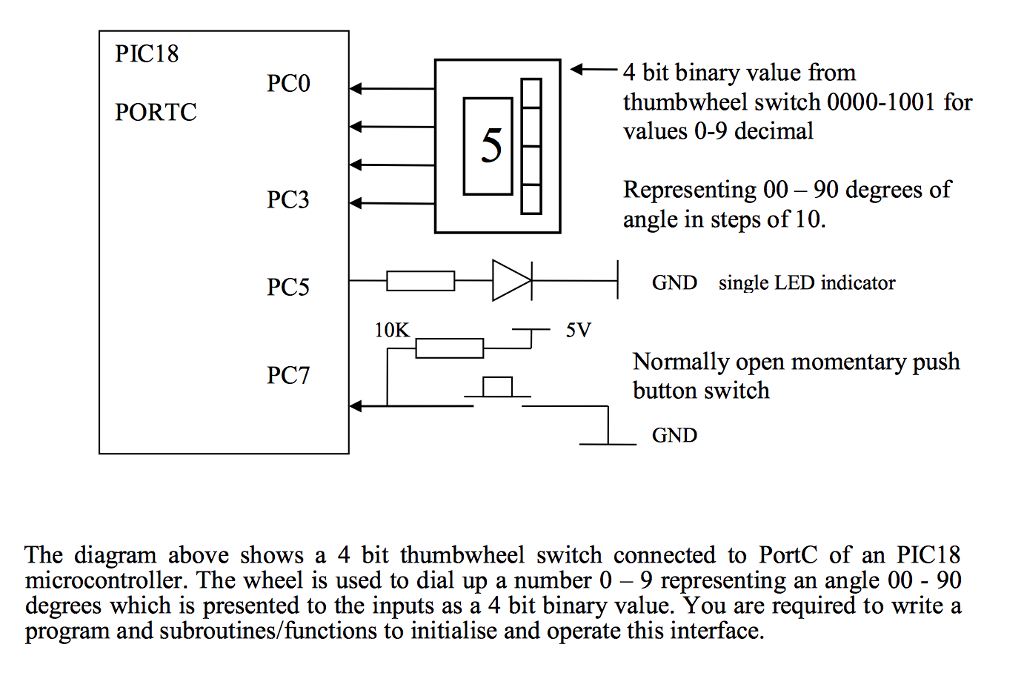
1.Write a C subroutine to initialise PORTC as needed to interface with the devices
2.Write a C function that checks if the push button is pressed or not, returning 1 if it is pressed or 0 if not pressed. This routine is not to wait for the press.
3.Write a C function that reads the thumb wheel switch, returning the angle. (Dont forget there are other pins used on this port)
4. Write a C subroutine that sets the LED on or off given a value of 1 or 0. (Don't forget there are other pins used on this port)
5. Write a C main program that clears the LED, waits for the button to be pressed, sets the LED on, reads the angle set by the thumb wheel switch and saves that value in a variable called angle.
PIC18 4 bit binary value from PCO thumb wheel switch 0000-1001 for PORTC values 0-9 decimal Representing 00-90 degrees of PC3 angle in steps of 10 PO5 St GND single LED indicator SV 10K Normally open momentary push PC7 button switch GND The diagram above shows a 4 bit thumbwheel switch connected to PortC of an PIC18 microcontroller. The wheel is used to dial up a number 0-9 representing an angle 00 90 degrees which is presented to the inputs as a 4 bit binary value. You are required to write a program and subroutines/functions to initialise and operate this interface. PIC18 4 bit binary value from PCO thumb wheel switch 0000-1001 for PORTC values 0-9 decimal Representing 00-90 degrees of PC3 angle in steps of 10 PO5 St GND single LED indicator SV 10K Normally open momentary push PC7 button switch GND The diagram above shows a 4 bit thumbwheel switch connected to PortC of an PIC18 microcontroller. The wheel is used to dial up a number 0-9 representing an angle 00 90 degrees which is presented to the inputs as a 4 bit binary value. You are required to write a program and subroutines/functions to initialise and operate this interface
Step by Step Solution
There are 3 Steps involved in it

Get step-by-step solutions from verified subject matter experts
 Study Help