







Question: so here is my code and here is the question i was asked to do it i did all the question except 2, i do
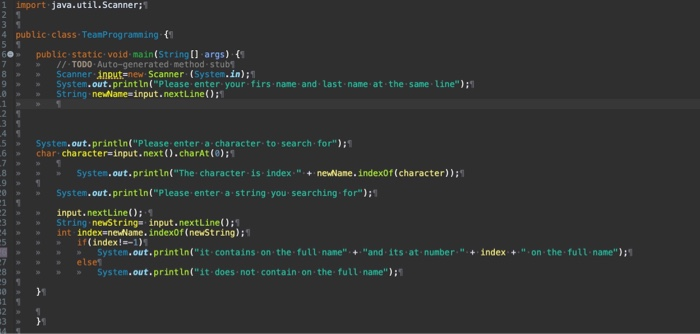
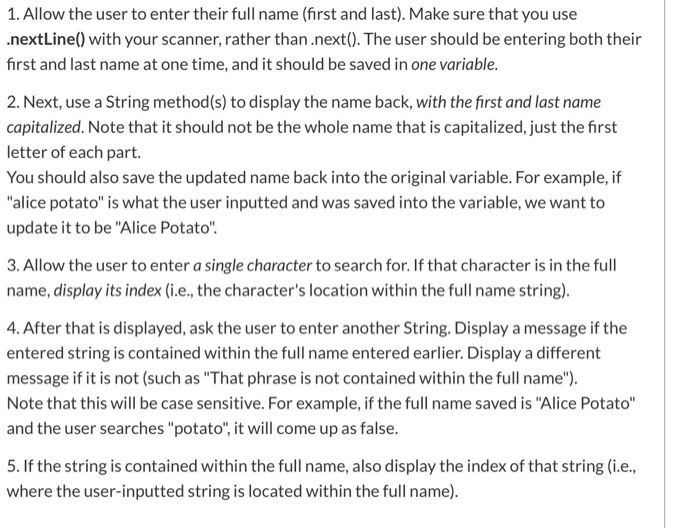
1 import java.util.Scanner; 4 public class TeamProgramming {! 60 7 8 > 9 .6 > public static void main(String[] args) { // TODO Auto-generated method. stubs Scanner Anrutenew Scanner (System.in); System.out.println("Please enter your firs name and last name at the same line"); > String newName=input.nextLine(); System.out.println("Please enter a character to search for"); char character input.next().charAt(0); NM System.out.println("The character is index: " + newane.indexOf(character)) System.out.println("Please enter a string you searching for"); input.nextLine(): String newString= input.nextLine(); int index=newame.indexOf(newstring): if(index!=-1) System.out.println("it contains on the full name" + "and its at number:" + index +.". on the full name") else System.out.println("it does not contain on the full name) > NM 1. Allow the user to enter their full name (first and last). Make sure that you use .nextLine() with your scanner, rather than.next(). The user should be entering both their first and last name at one time, and it should be saved in one variable. 2. Next, use a String method(s) to display the name back, with the first and last name capitalized. Note that it should not be the whole name that is capitalized, just the first letter of each part. You should also save the updated name back into the original variable. For example, if "alice potato" is what the user inputted and was saved into the variable, we want to update it to be "Alice Potato". 3. Allow the user to enter a single character to search for. If that character is in the full name, display its index (i.e., the character's location within the full name string). 4. After that is displayed, ask the user to enter another String. Display a message if the entered string is contained within the full name entered earlier. Display a different message if it is not (such as "That phrase is not contained within the full name"). Note that this will be case sensitive. For example, if the full name saved is "Alice Potato" and the user searches "potato", it will come up as false. 5. If the string is contained within the full name, also display the index of that string (i.e., where the user-inputted string is located within the full name)
Step by Step Solution
There are 3 Steps involved in it

Get step-by-step solutions from verified subject matter experts
 Study Help