







Question: Soda Machine in Java The machine has three buttons: a coin slot, a coin return lever and a vend soda button. There are three states:
Soda Machine in Java
The machine has three buttons: a coin slot, a coin return lever and a vend soda button. There are three states: zero cents, twenty-five cents and fifty cents. The buttons behave differently depending on how much money is in the system
The Coin Button:
1) In the zero cent state depositing a coin (quarter dollars only) puts the machine in the twenty-five cent state and prints "Total entered: $0.25".
2) In the twenty-five cent state depositing a coin puts the machine in the fifty cent state state and prints "Total entered: $0.50".
3) In the fifty cent state depositing coin displays the message"Coin returned - $0.50 already deposited" and the coin is returned.
The Return button:
1) In the zero cent state pulling the coin return lever prints "Return $0.00".
2) In the twenty-five cent state pulling the coin return lever prints "Return $0.25" and returns the machine to the zero state.
3) In the fifty cent state pulling the coin return lever prints "Return $0.50" and returns the machine to the zero state.
Soda Button
1) In the zero cent state pulling pushing the button says "Deposit 50 cents first".
2) In the twenty-five cent state pushing the button says "Enter 25 cents more".
3) In the fifty cent state pushing the button prints "Your soda has been vended" and returns the machine to the zero state.
The program should have a small GUI that looks exactly like this:
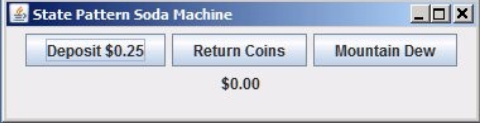
380 x 100 in a FlowLayout. The $0.00 field is a label (not a text field). All printed output is through this one label.
The program must use the State Design pattern.
EXAMPLE OF HOW PROGRAM SHOULD LOOK:
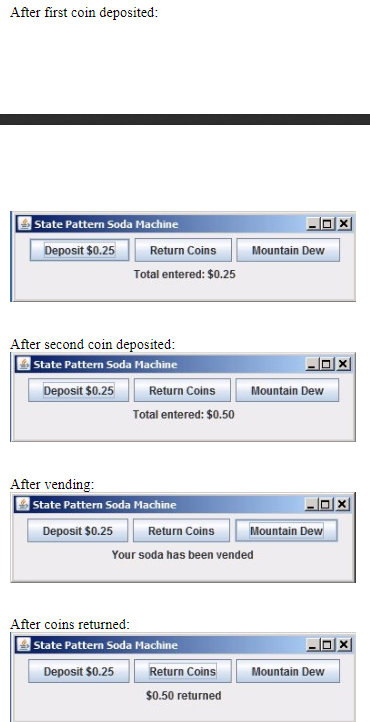
State Pattern Soda Machine Deposit $0.25 Return Coins Mountain Dew $0.00
Step by Step Solution
There are 3 Steps involved in it

Get step-by-step solutions from verified subject matter experts
 Study Help