







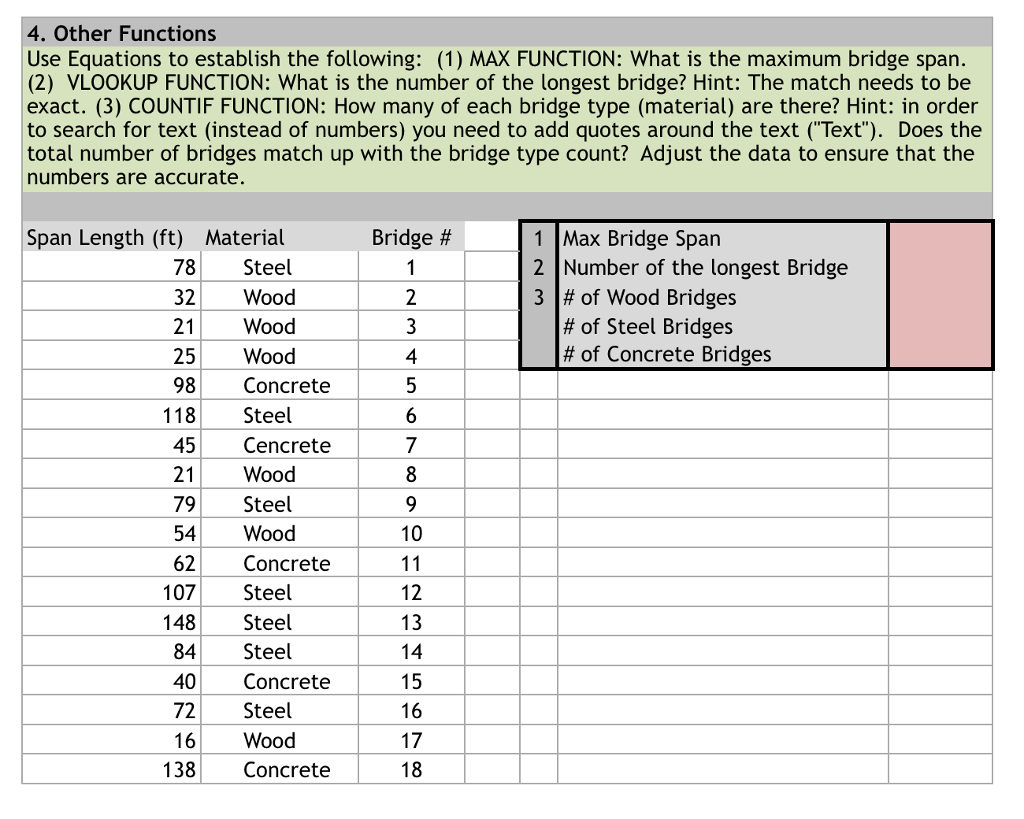
Question: ?Software is microsoft Excel 4. Other Functions Use Equations to establish the following: (1) MAX FUNCTION: What is the maximum bridge span. (2) VLOOKUP FUNCTION:
 ?Software is microsoft Excel
4. Other Functions Use Equations to establish the following: (1) MAX FUNCTION: What is the maximum bridge span. (2) VLOOKUP FUNCTION: What is the number of the longest bridge? Hint: The match needs to be exact. (3) COUNTIF FUNCTION: How many of each bridge type (material) are there? Hint: in order to search for text (instead of numbers) you need to add quotes around the text ('Text"). Does the total number of bridges match up with the bridge type count? Adjust the data to ensure that the numbers are accurate. Bridge # 1 Span Length (ft) Material 1 Max Bridge Sparn 2 |Number of the longest Bridge 3 # of Wood Bridges 78Steel 32 Wood 21Wood 25 Wood 98Concrete # of Steel Bridges # of Concrete Bridges 4 118 Steel 7 45 Cencrete 21Wood 79 Steel 54Wood 62Concrete 107 Steel 148 Steel 13 84 Steel 40Concretee 72 Steel 16 Wood 15 138Concrete 18 4. Other Functions Use Equations to establish the following: (1) MAX FUNCTION: What is the maximum bridge span. (2) VLOOKUP FUNCTION: What is the number of the longest bridge? Hint: The match needs to be exact. (3) COUNTIF FUNCTION: How many of each bridge type (material) are there? Hint: in order to search for text (instead of numbers) you need to add quotes around the text ('Text"). Does the total number of bridges match up with the bridge type count? Adjust the data to ensure that the numbers are accurate. Bridge # 1 Span Length (ft) Material 1 Max Bridge Sparn 2 |Number of the longest Bridge 3 # of Wood Bridges 78Steel 32 Wood 21Wood 25 Wood 98Concrete # of Steel Bridges # of Concrete Bridges 4 118 Steel 7 45 Cencrete 21Wood 79 Steel 54Wood 62Concrete 107 Steel 148 Steel 13 84 Steel 40Concretee 72 Steel 16 Wood 15 138Concrete 18
Step by Step Solution
There are 3 Steps involved in it

Get step-by-step solutions from verified subject matter experts
 Study Help