







Question: Software Product to develop: Web based course registration system for university (ex, CSUN UCLA). First develop a processing narrative as a set of user stories
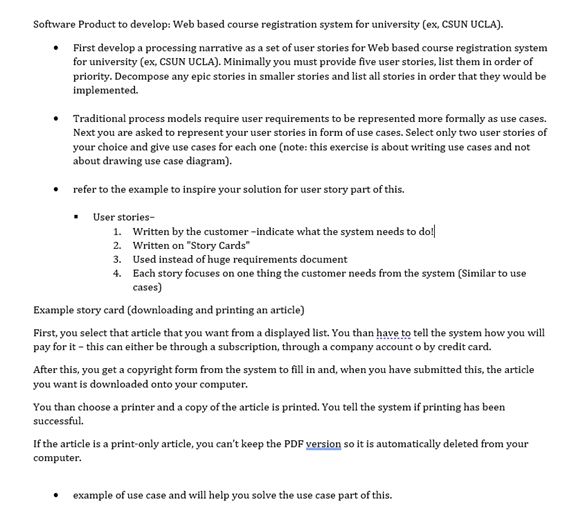
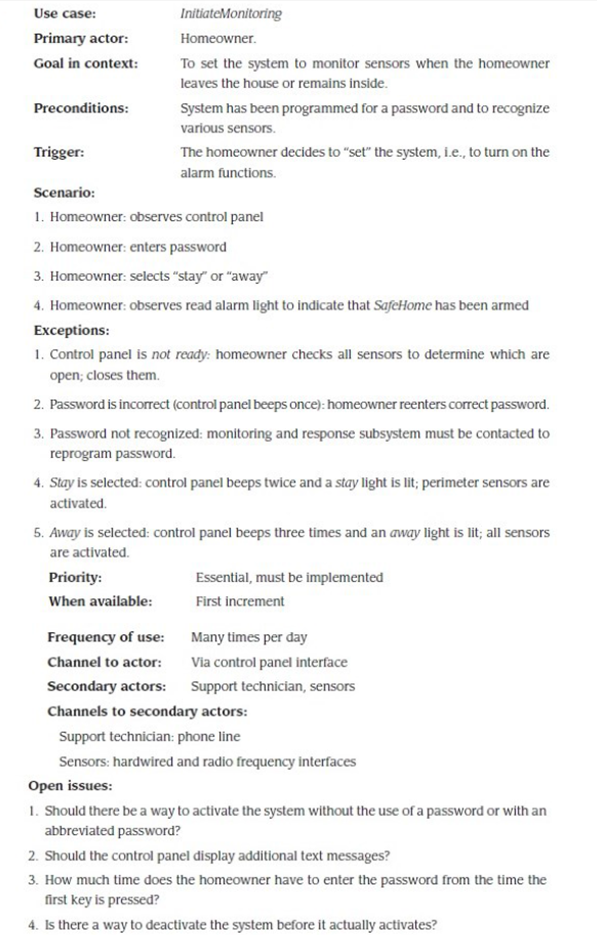
Software Product to develop: Web based course registration system for university (ex, CSUN UCLA). First develop a processing narrative as a set of user stories for Web based course registration system for university (ex, CSUN UCLA). Minimally you must provide five user stories, list them in order of priority. Decompose any epic stories in smaller stories and list all stories in order that they would be implemented. Traditional process models require user requirements to be represented more formally as use cases. Next you are asked to represent your user stories in form of use cases. Select only two user stories of your choice and give use cases for each one (note: this exercise is about writing use cases and not about drawing use case diagram). refer to the example to inspire your solution for user story part of this. User stories- 1. Written by the customer -indicate what the system needs to do! 2. Written on "Story Cards" 3. Used instead of huge requirements document 4. Each story focuses on one thing the customer needs from the system (Similar to use cases) Example story card (downloading and printing an article) First, you select that article that you want from a displayed list. You than have to tell the system how you will pay for it - this can either be through a subscription, through a company account o by credit card. After this, you get a copyright form from the system to fill in and, when you have submitted this, the article you want is downloaded onto your computer. You than choose a printer and a copy of the article is printed. You tell the system if printing has been successful. If the article is a print-only article, you can't keep the PDF version so it is automatically deleted from your computer. example of use case and will help you solve the use case part of this. Use case: InitiateMonitoring Primary actor: Homeowner. Goal in context: To set the system to monitor sensors when the homeowner leaves the house or remains inside. Preconditions: System has been programmed for a password and to recognize various sensors. Trigger: The homeowner decides to "set" the system, i.e., to turn on the alarm functions. Scenario: 1. Homeowner: observes control panel 2. Homeowner: enters password 3. Homeowner: selects "Stay" or "away" 4. Homeowner: observes read alarm light to indicate that SafeHome has been armed Exceptions: 1. Control panel is not ready: homeowner checks all sensors to determine which are open; closes them 2. Password is incorrect (control panel beeps once): homeowner reenters correct password. 3. Password not recognized: monitoring and response subsystem must be contacted to reprogram password. 4. Stay is selected: control panel beeps twice and a stay light is lit; perimeter sensors are activated 5. Away is selected: control panel beeps three times and an away light is lit; all sensors are activated. Priority: Essential, must be implemented When available: First increment Frequency of use: Many times per day Channel to actor: Via control panel interface Secondary actors: Support technician, sensors Channels to secondary actors: Support technician: phone line Sensors: hardwired and radio frequency interfaces Open issues: 1. Should there be a way to activate the system without the use of a password or with an abbreviated password? 2. Should the control panel display additional text messages? 3. How much time does the homeowner have to enter the password from the time the first key is pressed? 4. Is there a way to deactivate the system before it actually activates? Software Product to develop: Web based course registration system for university (ex, CSUN UCLA). First develop a processing narrative as a set of user stories for Web based course registration system for university (ex, CSUN UCLA). Minimally you must provide five user stories, list them in order of priority. Decompose any epic stories in smaller stories and list all stories in order that they would be implemented. Traditional process models require user requirements to be represented more formally as use cases. Next you are asked to represent your user stories in form of use cases. Select only two user stories of your choice and give use cases for each one (note: this exercise is about writing use cases and not about drawing use case diagram). refer to the example to inspire your solution for user story part of this. User stories- 1. Written by the customer -indicate what the system needs to do! 2. Written on "Story Cards" 3. Used instead of huge requirements document 4. Each story focuses on one thing the customer needs from the system (Similar to use cases) Example story card (downloading and printing an article) First, you select that article that you want from a displayed list. You than have to tell the system how you will pay for it - this can either be through a subscription, through a company account o by credit card. After this, you get a copyright form from the system to fill in and, when you have submitted this, the article you want is downloaded onto your computer. You than choose a printer and a copy of the article is printed. You tell the system if printing has been successful. If the article is a print-only article, you can't keep the PDF version so it is automatically deleted from your computer. example of use case and will help you solve the use case part of this. Use case: InitiateMonitoring Primary actor: Homeowner. Goal in context: To set the system to monitor sensors when the homeowner leaves the house or remains inside. Preconditions: System has been programmed for a password and to recognize various sensors. Trigger: The homeowner decides to "set" the system, i.e., to turn on the alarm functions. Scenario: 1. Homeowner: observes control panel 2. Homeowner: enters password 3. Homeowner: selects "Stay" or "away" 4. Homeowner: observes read alarm light to indicate that SafeHome has been armed Exceptions: 1. Control panel is not ready: homeowner checks all sensors to determine which are open; closes them 2. Password is incorrect (control panel beeps once): homeowner reenters correct password. 3. Password not recognized: monitoring and response subsystem must be contacted to reprogram password. 4. Stay is selected: control panel beeps twice and a stay light is lit; perimeter sensors are activated 5. Away is selected: control panel beeps three times and an away light is lit; all sensors are activated. Priority: Essential, must be implemented When available: First increment Frequency of use: Many times per day Channel to actor: Via control panel interface Secondary actors: Support technician, sensors Channels to secondary actors: Support technician: phone line Sensors: hardwired and radio frequency interfaces Open issues: 1. Should there be a way to activate the system without the use of a password or with an abbreviated password? 2. Should the control panel display additional text messages? 3. How much time does the homeowner have to enter the password from the time the first key is pressed? 4. Is there a way to deactivate the system before it actually activates
Step by Step Solution
There are 3 Steps involved in it

Get step-by-step solutions from verified subject matter experts
 Study Help